> ## Documentation Index
> Fetch the complete documentation index at: https://gnero.genetind.com/llms.txt
> Use this file to discover all available pages before exploring further.
# collect
> 长期整理的学习资料、工具、教程和外部资源收藏。
## 目录
* 另外一种页面内链接方法
点这里从头再读一遍
积累平时的代码
## Github/编辑
**名词解释**
解释(代码引用示例之一)
`select * from table where a=3 limit 10;`
> 备注信息:
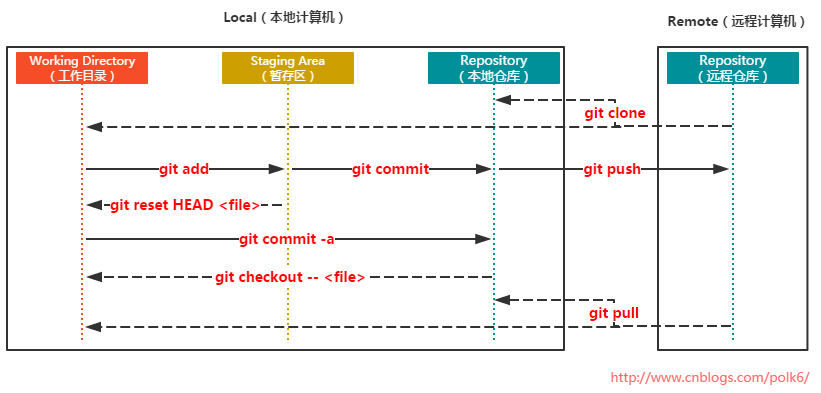
* [Git简易指南](http://www.bootcss.com/p/git-guide/),[图说Git](http://marklodato.github.io/visual-git-guide/index-en.html),[git文件状态和工作区域](https://www.cnblogs.com/polk6/p/git-fileStatus.html)
* 
* 【2018-7-24】[Git交互式在线学习](https://learngitbranching.js.org/),最好的实战教程,图例:

* [github官方markdown指南](https://guides.github.com/features/mastering-markdown/ "英文版")
* [github readme语法简介](http://blog.csdn.net/guodongxiaren/article/details/23690801?utm_source=tuicool\&utm_medium=referral "跟一般markdown语法不同"),【2018-6-10】[github page jeklly主题](https://github.com/Gaohaoyang/gaohaoyang.github.io/blob/master/README-zh-cn.md),【2019-04-29】[Jeklly主题大全](http://jekyllthemes.org/)
* [MarkDown语法笔记(完整版)](http://blog.csdn.net/witnessai1/article/details/52551362)
* [马克飞象markdown语法在线测试](https://maxiang.io/ "可以在线测试MD语言!")
* [Latex在线调试](https://latexbase.com/)
* [Markdown如何插入目录](https://github.com/ekalinin/github-markdown-toc)
- 【2019-03-17】[富文本转markdown在线编辑器](http://www.bejson.com/convert/ueditor2markdown/),[Markdown在线编辑器](https://www.mdeditor.com/)
***流程图***:
(代码引用示例之二)
```bash theme={null}
flow
st=>start: Start:>https://www.zybuluo.com
io=>inputoutput: verification
op=>operation: Your Operation
cond=>condition: Yes or No?
sub=>subroutine: Your Subroutine
e=>end
st->io->op->cond
cond(yes)->e
cond(no)->sub->io
```
***
## macbook配置
* 汇总
| **功能** | **方法** | **备注** |
| -------------------- | :--------------------------------------------------------------------------------------------------------------------------------------------------------------------------------------------------------------------------------------------------------------------------------------------------------------------------------------------------------------------------------------------------------------------------------------------------------------------------------------------------------------------------------------------------------------------------------------------------------------------------------------------------------------------------------------------------------------------------------------------------------------------------------------------------------------------------------------------------------------------------------------------------------------------------------------------------------------------------------------------- | :---------------------------------------------------------------------------------------------------------------------------------------------------------------------------------------------------------------------------- |
| 终端用户名自定义 | 系统偏好设置->共享->编辑电脑名称 | - |
| 画图工具OmniGraffle+Pro | [6下载地址](http://www.onlinedown.net/soft/87746.htm),[注册码](http://blog.csdn.net/x_focus/article/details/41349623);[7下载地址(含许可证)](https://d11.baidupcs.com/file/890a1f15ffddb6f3c3dab4fdadb47912?bkt=p3-000080d1e545b74de7d8e2a7d8017edaf20c\&xcode=ff73db6f0d13a10269722ca0706f4f2d57cb92d68ca6af42837047dfb5e85c39\&fid=1610614513-250528-218454854633625\&time=1494382563\&sign=FDTAXGERLBHS-DCb740ccc5511e5e8fedcff06b081203-HpWzZufk4Ih1Y%2FFYHmSq25HYFyM%3D\&to=d11\&size=93883767\&sta_dx=93883767\&sta_cs=11417\&sta_ft=dmg\&sta_ct=5\&sta_mt=0\&fm2=MH,Yangquan,Netizen-anywhere,,hunan,ct\&newver=1\&newfm=1\&secfm=1\&flow_ver=3\&pkey=000080d1e545b74de7d8e2a7d8017edaf20c\&sl=83034191\&expires=8h\&rt=pr\&r=580566339\&mlogid=3001796489994348567\&vuk=1610614513\&vbdid=502618811\&fin=OmniGraffle+7.2+for+Mac.dmg\&fn=OmniGraffle+7.2+for+Mac.dmg\&rtype=1\&iv=0\&dp-logid=3001796489994348567\&dp-callid=0.1.1\&hps=1\&csl=300\&csign=SlvW2m2iS5Dhs4IYR0kvCbxY%2BwQ%3D\&by=themis) | 兼容viso,功能强大 |
| Mac Office 2016破解 | 操作简单,安装完mac office正式版后,下载破解文件,双击锁,就可以 | [参考地址](http://www.jianshu.com/p/2172835cfb17) |
| Mac下安装Windows | [Mac电脑上用VMware Fusion安装Windows7](http://jingyan.baidu.com/article/54b6b9c0f8830f2d583b47ce.html) | 提前下载vmware+Windows安装包,添加Windows虚拟机后默认无法启动,需要单独指定iso镜像位置,再重启即可 |
| 画图工具OmniGraffle+Pro | [6下载地址](http://www.onlinedown.net/soft/87746.htm),[注册码](http://blog.csdn.net/x_focus/article/details/41349623);[7下载地址(含许可证)](http://bbs.feng.com/forum.php?mod=viewthread\&tid=10739827) | 兼容viso,功能强大(【2017-12-6】注:7.4版才能用许可证,7.5以上不行) |
| 安装pip | sudo easy\_install pip | pip直接安装其他工具 |
| 软件包管理器 | homebrew安装([参考地址](http://www.itbulu.com/macbook-wget-install.html));安装wget:brew install wget | brew安装命令:ruby -e "\$(curl -fsSL [https://raw.githubusercontent.com/Homebrew/install/master/install](https://raw.githubusercontent.com/Homebrew/install/master/install))" |
| 翻墙 | 1.有代理ip的直接设置:网络->高级->代理->勾选网页代理+安全网页代理,输入服务器域名及端口,无需填入账号。2.用[lantern下载](https://github.com/getlantern/forum/issues/833) | 备选方案很多 |
| vim颜色显示 | 1.vim \~/.vimrc,2.添加colorscheme desert;syntax on | vim [sublime颜色主题](http://www.cnblogs.com/fsjohnhuang/p/3911611.html) |
| vim开发环境 | [vim IDE部署](https://github.com/wklken/k-vim) | 其他主题包,\[vim-go开发环境\[([http://blog.csdn.net/chosen0ne/article/details/40782991](http://blog.csdn.net/chosen0ne/article/details/40782991)) |
| shell目录颜色显示 | 开启方法:编辑\~/.bash\_profile,增加:export CLICOLOR=1;export LSCOLORS=exfxaxdxcxegedabagacad | 注:[如何在shell字符串中显示彩色字符?](http://7938217.blog.51cto.com/7928217/1651807/),显示白色:echo -e "\033\[37m white \033\[0m" |
| mac免密码远程登录 | 使用ssh创建rsa公钥密码。基本步骤:\* 1.ssh-keygen生成密钥(ssh-keygen -t rsa) \* 2.复制密钥文件到远程机器(scp \~/.ssh/id\_rsa.pub [wangqiwen@ip.com](mailto:wangqiwen@ip.com):/home/wangqiwen/.ssh) \* 3.登录远程机器,修改文件权限(cd \~/.ssh && cat id\_rsa.pub >> authorized\_keys; chmod 644 authorized\_keys;chmod 700 \~/.ssh/) | 参考地址:[mac无密码登录](http://blog.csdn.net/cdut100/article/details/70277091),[Linux 下 SSH 命令实例指南](https://linux.cn/article-3858-1.html),[菜鸟学Linux命令:ssh命令 远程登录](https://blog.csdn.net/sky786905664/article/details/60580594) |
| ssh会话管理 | [ssh配置文件实现别名快捷登录](http://blog.csdn.net/newjueqi/article/details/47293897),【2018-9-29】[图解ssh及登录原理](https://www.toutiao.com/a6605433008616899076/?tt_from=mobile_qq\&utm_campaign=client_share\×tamp=1538181445\&app=news_article\&utm_source=mobile_qq\&iid=44328463468\&utm_medium=toutiao_android\&group_id=6605433008616899076) | |
| chrome浏览器中右键失灵 | 双指触碰链接时,并未弹出右键菜单,而是“图片另存为” | 解决办法:这是由于chrome浏览器上开启了鼠标手势,造成干扰,关闭或删除插件即可 |
| image not recognized | dmg文件无法安装,原因:文件损坏,dmg权限不允许任意来源的包;换浏览器 | 如何开启任意来源包?sudo spctl --master-disable |
| redis安装 | brew install redis | 使用方法:启动服务,redis-server,连接服务:redis-cli |
| mac mail客户端设置 | 连接163时,需要先去163邮箱开启pop3/imap选项,通过手机验证码设置连接密码;mail终端配置时填入的密码是连接密码(非登录密码!) | wqw3721 |
| 安装虚拟机 | vmware安装,下载地址 | vmware fusion 8激活码:FY75A-06W1M-H85PZ-0XP7T-MZ8E8,ZY7TK-A3D4N-08EUZ-TQN5E-XG2TF,FG1MA-25Y1J-H857P-6MZZE-YZAZ6 |
| Mac下运行Windows软件 | (1)boot camp安装Windows虚拟机(win 10文件过大);(2)安装wine | 步骤:(1)brew cask install xquartz(2)brew install wine |
| java | 官方下载地址:[http://www.oracle.com/technetwork/java/javase/downloads/jdk8-downloads-2133151.html](http://www.oracle.com/technetwork/java/javase/downloads/jdk8-downloads-2133151.html) | 优先使用绿色版(tar.gz,非二进制的rpm)。环境变量配置方法:修改/etc/profile文件,在文件的最下边加入下边的文本:export JAVA\_HOME=/opt/jdk1.7; export CLASSPATH=.:$JAVA_HOME/lib/rt.jar:$JAVA\_HOME/lib/dt.jar:$JAVA_HOME/lib/tools.jar; export PATH=$JAVA\_HOME/bin:\$PATH |
| Web服务 | [Mac OS 启用web服务](http://www.jianshu.com/p/d006a34a343f),[简网教程](http://www.jianshu.com/p/d006a34a343f) | |
| linux 服务器mail | mail command not found | 解决方法:sudo yum install mailx;echo "test" (竖线) mail -s "content" [wangqiwen@p1.com](mailto:wangqiwen@p1.com) |
| linux下安装http服务 | 安装httpd | 1.yum install httpd -y 2.随系统启动:chkconfig httpd on 3.开启Apache:service httpd start |
| terminal下如何开启应用? | 用open命令开启(open .用finder打开当前位置目录;open file自动调用默认程序打开文件;say hello语音说话),可以传参,备注:放到别命中,alias view='open /Applications/Preview\.app'或alias edit='open /Applications/Sublime\ Text.app' | open /Applications/Sublime\ Text.app README.md |
| shell美化 | [Oh My ZSH!](http://ohmyz.sh/) | 安装:sh -c "\$(curl -fsSL [https://raw.github.com/robbyrussell/oh-my-zsh/master/tools/install.sh](https://raw.github.com/robbyrussell/oh-my-zsh/master/tools/install.sh))" |
| 刻盘 | [Etcher](https://etcher.io/)全平台工具 | 操作过程极其简单 |
| 移动硬盘无法写入 | 原因:mac不支持ntfs格式,需要安装特殊软件:[ntfs for mac](http://www.ntfsformac.cn/xiazai.html) | |
| mac显示当前路径 | 命令:defaults write com.apple.finder \_FXShowPosixPathInTitle -bool YES | 顶栏出现路径,还可以点击定位到子目录 |
| mac当前位置打开终端 | 命令:[https://jingyan.baidu.com/article/ce436649281a293773afd3d8.html](https://jingyan.baidu.com/article/ce436649281a293773afd3d8.html) | |
| mac下excel打开csv中文乱码 | 原因是mac底下中文一律utf8编码,而excel文档默认中文是gbk编码,需要单独设置下才行。[http://blog.csdn.net/wqdwin/article/details/76058154](http://blog.csdn.net/wqdwin/article/details/76058154) | 亲测有效 |
| 【2018-1-11】 | [网易mumu模拟器](http://mumu.163.com/) | |
| 【2018-1-11】 | [mac下安装adb,调试Android](https://www.jianshu.com/p/1b3fb1f27b67) | brew cask install android-platform-tools |
| 【2018-6-25】 | [crossover mac版](http://www.pc6.com/mac/111646.html) | mac上运行ie浏览器,[使用步骤](https://jingyan.baidu.com/article/dca1fa6f78ea48f1a5405210.html) |
| 【2018-12-25】 | 复制高亮代码到ppt | 方法:notepad++或sublime text插件SublimeHighlight,[详见](https://www.v2ex.com/t/258518), Plugin commands - Copy Text with Syntax Highlighting |
| 【2019-05-07】 | [pycharm专业版激活](https://blog.csdn.net/u014044812/article/details/86679150) | |
```shell theme={null}
wqw:code wangqiwen$ git clone https://github.com/p1cn/backend.git
Cloning into 'backend'...
Username for 'https://github.com': wqw547243068
Password for 'https://wqw547243068@github.com':
remote: Invalid username or password.
fatal: Authentication failed for 'https://github.com/p1cn/backend.git/'
```
原因:Github没有fork项目代码,或没加所在机器的sshkey(settings->deplot keys)
## python使用mysql方法
### 安装方法
mac下安装MySQL-python
要想使python可以操作mysql,就需要MySQL-python驱动,它是python 操作mysql必不可少的模块。
* [下载地址](https://pypi.python.org/pypi/MySQL-python/)
* 下载MySQL-python-1.2.5.zip 文件之后直接解压。
* 进入MySQL-python-1.2.5目录:
```shell theme={null}
python setup.py install
```
### 连接mysql
shell 代码,shell脚本中调用sql脚本
```shell theme={null}
#mysql初始化-shell
mysql=/usr/local/mysql/bin/mysql
$mysql -uroot -pwqw < init.sql
```
或者shell脚本中直接执行sql
```shell theme={null}
mysql=/usr/local/mysql/bin/mysql
$mysql -uroot -p123456 < pip install git+[https://github.com/dominictarr/JSON.sh#egg=JSON.sh](https://github.com/dominictarr/JSON.sh#egg=JSON.sh)
* 使用:
```shell theme={null}
echo '{"a":2,"b":[3,6,8]}' |JSON.sh
```
详情参考:[https://github.com/dominictarr/JSON.sh](https://github.com/dominictarr/JSON.sh)
## 可视化
### 地图数据可视化
* [地图汇](http://www.dituhui.com/)
* [5min上手写echarts第一个图标](http://echarts.baidu.com/echarts2/doc/start.html),[echarts如何从json文件读数据?](http://bbs.csdn.net/topics/392042291)
* 【2017-7-30】Google开发的数据可视化web工具[Facet Dive](https://pair-code.github.io/facets/),【2018-3-13】可以嵌入jupyter notebook做特征工程可视化分析, 安装方法参考[PAIR-CODE](https://github.com/PAIR-code/facets),[Google AI](https://ai.google/pair),【2018-9-11】[集成到tensorboard工具中:what-if](https://pair-code.github.io/what-if-tool/iris.html)
* 
* \[2018-6-15]数据挖掘软件:[weka](https://www.cs.waikato.ac.nz/ml/weka/)适用于EDA探索性数据分析,[Orange](https://orange.biolab.si/)数据挖掘和机器学习软件
* [北大可视化](http://vis.pku.edu.cn/wiki/start)
* 词云生成[图悦](http://www.picdata.cn/)
* [北大可视化](http://vis.pku.edu.cn/wiki/start)
* \[2018-2-28] OLAP可视化分析工具,[官网](https://www.meteorite.bi/products/saiku),[saiku社区版](https://community.meteorite.bi/),[安装方法](http://www.kanhaige.com/post-5.html),[简介](),[Kylin, Mondrian, Saiku系统的整合](https://tech.youzan.com/kylin-mondrian-saiku/?utm_source=tuicool\&utm_medium=referral),[saiku安装教程](http://blog.csdn.net/longshenlmj/article/details/17359645)
* 
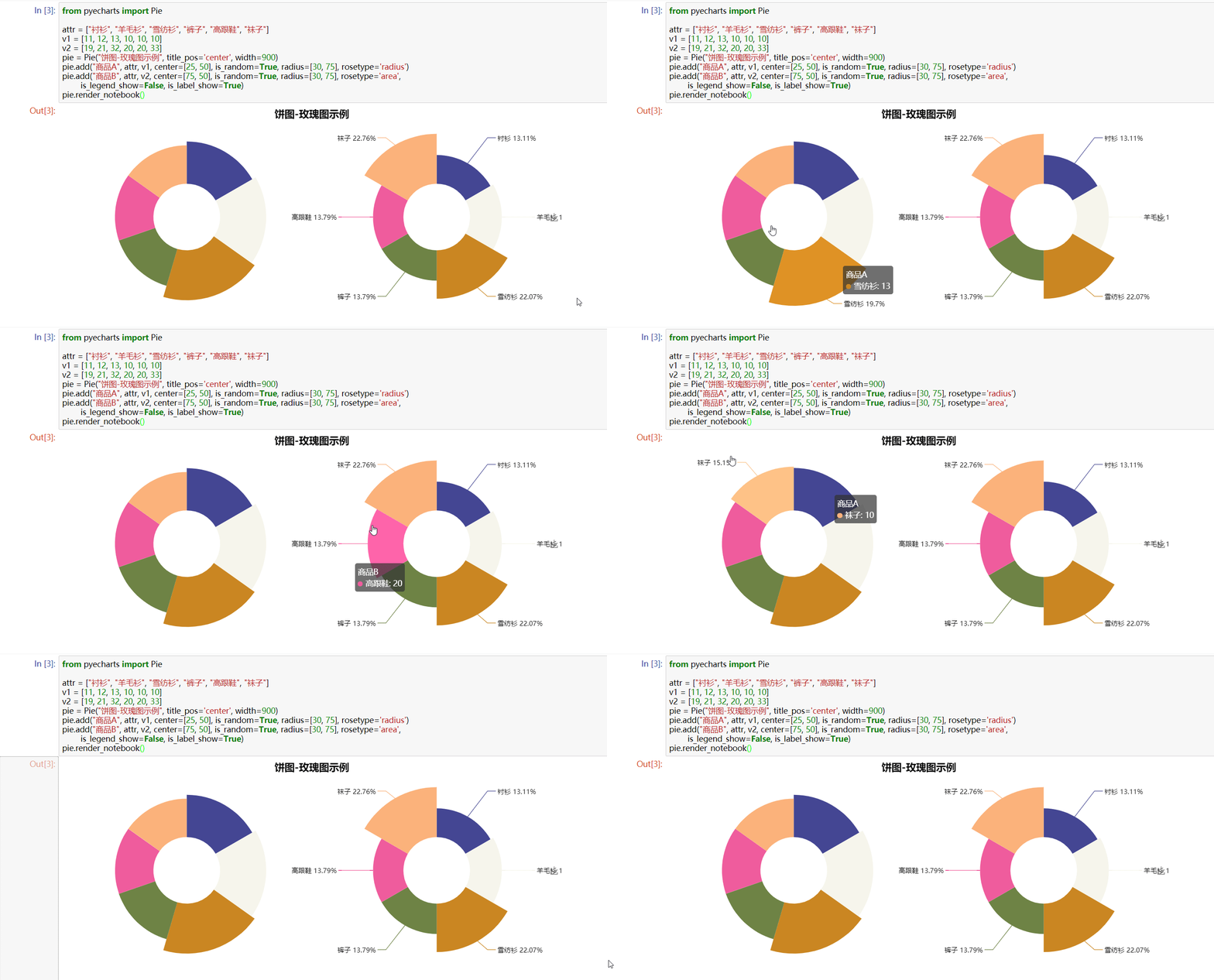
* 【2018-3-5】[python+echarts给你的数据做美颜](https://zhuanlan.zhihu.com/p/24952863),[pycharts](https://github.com/pyecharts/pyecharts)安装,[官方文档](http://pyecharts.org/#/zh-cn/prepare),[jupyter notebook中使用pycharts](https://zhuanlan.zhihu.com/p/28157126),[github代码完整示例](https://github.com/pyecharts/pyecharts-users-cases/blob/master/notebook-users-cases/notebook-user-cases.ipynb),【2019-05-22】[pyechart旧版绘图参数介绍-官网没有](https://gitee.com/sunjiyun26126/pyecharts),效果示例:
* 【2018-9-27】[vue组件demo网站](https://panjiachen.github.io/vue-element-admin/#/dashboard),[Element UI组件库](http://element-cn.eleme.io/#/zh-CN/component/installation)
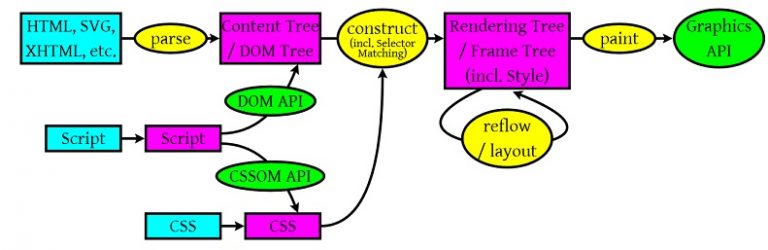
* 【2018-9-27】[从输入 URL 到页面显示都发生了什么?](https://yq.aliyun.com/articles/574896)[英文原版](http://igoro.com/archive/what-really-happens-when-you-navigate-to-a-url/),[浏览器输入URL后发生了什么](https://www.kancloud.cn/zhongxia/fe_interview/214213)

* [深入](http://fex.baidu.com/blog/2014/05/what-happen/),[浏览器工作原理](https://coolshell.cn/articles/9666.html),[浏览器的工作原理:新式网络浏览器幕后揭秘](https://www.html5rocks.com/zh/tutorials/internals/howbrowserswork/)
* 【2018-9-27】[在线简历-动态](https://jijingsong.github.io/my-resume/index.html)
* 【2018-12-17】[python Django快速搭建博客](https://blog.csdn.net/qq_29186489/article/details/78802295)
## 学习资料
[返回目录](#目录)
### 学习技巧
* [@爱可可-爱生活(新浪微博)](http://weibo.com/fly51fly?is_search=0\&visible=0\&is_all=1\&is_tag=0\&profile_ftype=1\&page=2#_rnd1501558283451):
* 互联时代怎么阅读?
* 读书重在结构生长,形成扎实的支撑;
* 碎片阅读重在视野的纳新和扩展,开枝散叶;
* 思考重在提炼和关联,勾画错综的经脉。
* 学习就是如此,由外而内,无广不精,无博不深,但能坚持必有所成。
* 网络阅读的最佳实践,不在“取”,在“舍”,知舍才能知关键,料不在多,有感悟一二足矣。
* 费曼技巧:通过向别人清楚地解说一件事,来确认自己真的弄懂了这件事。参考:[号称终极快速学习法的费曼技巧,究竟是什么样的学习方法?](https://www.zhihu.com/question/20576786)
* 
* 学习金字塔

* 【2018-7-27】什么是博士?[长图](https://pic1.zhimg.com/80/v2-57b8823fbf9213c4661ab132527b9f68_hd.jpg)

### 数学基础
[返回目录](#目录)
* 【2019-06-18】数学基础概率,来自:[深度学习知识大全](https://github.com/isymbo/DeepLearning) 
* 【2018-12-16】[一图解释数学体系-数学深渊](https://www.math.uh.edu/~tomforde/Images/Abstraction.jpg)
* [可微可导可积连续之间的关系](http://blog.csdn.net/huxiaokang1234/article/details/52550999)
* 
* 【2019-04-30】[微积分的本质](https://www.bilibili.com/video/av24325548)
*
* [如何通俗讲解放射变换?](https://www.zhihu.com/question/20666664)
\_ [在线几何作图GeoGebra](https://www.geogebra.org/apps/)(源自 [马同学高等数学](http://www.matongxue.com/madocs/244.html))
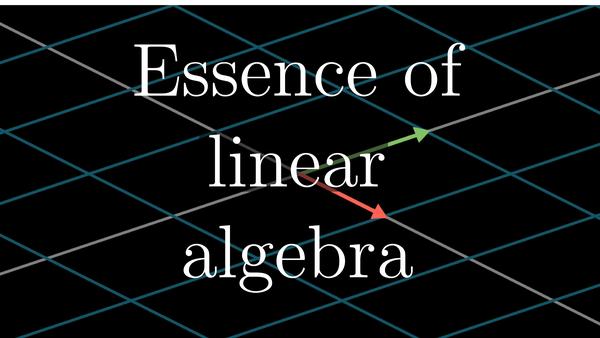
* [3Blue1Brown](https://www.patreon.com/3blue1brown)出品(接受捐助):[线性代数的本质-Essence of Linear Algebra-视频教程](http://www.3blue1brown.com/),[Bilibili上《线性代数本质》双语视频教程](http://www.bilibili.com/video/av6731067/).类似视频还有微积分本质.[制作教学视频的代码](https://github.com/3b1b/manim)
* 
*
*
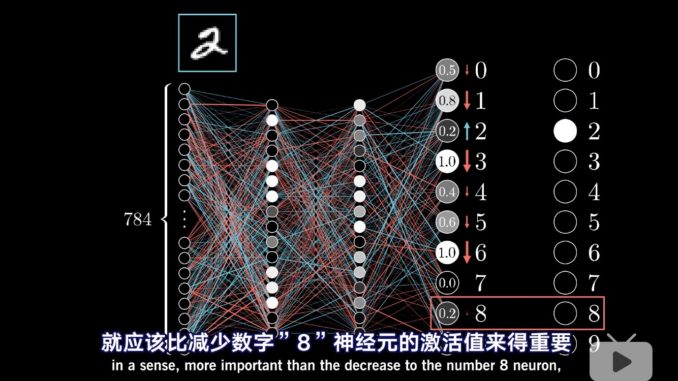
-【2018-9-4】[Google出品:动图解释反向传播](https://google-developers.appspot.com/machine-learning/crash-course/backprop-scroll/)
* 
* [行列式的本质(马同学高等数学)](http://www.matongxue.com/madocs/247.html).《数学拾遗》[英文版百度云地址](https://pan.baidu.com/share/link?shareid=1204761446\&uk=2416092239\&fid=2111748288).
* [矩阵分解(加法偏)](https://mp.weixin.qq.com/s?src=3\×tamp=1498919864\&ver=1\&signature=lwM3ouw-FlaVYwhol06JImHUQz-gJ00kBAYkssdiD3pSLwOS48Mv9ntL97readD8AZrXS2q0D28PegS*LE6Cxp88Hy8RPP9VLGdWA29zARcLVFuwHbJJl8SPtB*dq7njgt7suMGouSV-FP5b9BlFeWtQ8XNSO9aJyrh8mBJNYS8=),[矩阵分解(乘法篇),很不错](https://mp.weixin.qq.com/s?src=3\×tamp=1498919864\&ver=1\&signature=lwM3ouw-FlaVYwhol06JImHUQz-gJ00kBAYkssdiD3q4iNXi-7lf9GzKeq2CvP0yAofBNF7OoCG21M1YDLrrhHHA15K4rrKyP1FFPjQtmNGv0yv5IFeA7LmvuBiea1Xrsa79Gf8c6IT1JiTdra-mU8JNHdj0zp-lYaJUUfp0CHw=)
* [如何通俗的解释放射变换](http://www.matongxue.com/madocs/244.html),[生动讲解矩阵的空间变换](http://blog.csdn.net/a396901990/article/details/44905791):平移、缩放、旋转、对称(xy或原点)、错切、组合。[行列式的本质是什么?---万门大学童哲的解释](https://www.zhihu.com/question/36966326/answer/70687817):行列式就是线性变换的放大率!理解了行列式的物理意义,很多性质你根本就瞬间理解到忘不了!
* 【2018-8-17】[广义线性模型是什么鬼?](https://www.sohu.com/a/228212348_349736)
* 行列式:行列式,记作 det(A),是一个将方阵 A 映射到实数的函数。行列式等于矩阵特 征值的乘积。行列式的绝对值可以用来衡量矩阵参与矩阵乘法后空间扩大或者缩小 了多少。如果行列式是 0,那么空间至少沿着某一维完全收缩了,使其失去了所有的 体积。如果行列式是 1,那么这个转换保持空间体积不变
* 【2017-11-24】遇见数学:[图解线性代数](https://www.toutiao.com/i6490094296459379213/)
* [六大概率分布](http://www.csuldw.com/2016/08/19/2016-08-19-probability-distributions/)
* [最优化算法-避开鞍点](http://www.csuldw.com/2016/07/10/2016-07-10-saddlepoints/)
* 【2018-11-15】数说工作室:[概率论-上帝的赌术](https://mp.weixin.qq.com/s?__biz=MjM5MDEzNDAyNQ==\&mid=200838250\&idx=1\&sn=d0efd4cfa4a79112ebd43009c57c22eb\&scene=19#wechat_redirect),协和八:说人话的统计学,[做统计,多少数据才算够](https://mp.weixin.qq.com/s?__biz=MzAxMDA4NjU3OA==\&mid=207643438\&idx=1\&sn=20fbf90250185008f841fffe28bf4e9b\&scene=1\&srcid=0710wI1mdNbPso36OkPa9LXY#rd)
* [频率学派与贝叶斯学派之争](http://www.cnblogs.com/549294286/archive/2013/04/08/3009073.html):[知乎网友解释](https://www.zhihu.com/question/20587681/answer/21294468),频率学派最先出现,疯狂打压新生的贝叶斯学派,贝叶斯很凄惨,就跟艺术圈的梵高一样,死后的论文才被自己的学生发表,经过拉普拉斯之手发扬光大,目前二派就像华山派的剑宗和气宗。频率学派挺煞笔的,非得做大量实验才能给出结论,比如你今年高考考上北大的概率是多少啊?频率学派就让你考100次,然后用考上的次数除以100。而贝叶斯学派会找几个高考特级教师对你进行一下考前测验和评估,然后让这几个教师给出一个主观的可能性,比如说:你有9成的把握考上北大。
* 这个区别说大也大,说小也小。(1)往大里说,世界观就不同,频率派认为参数是客观存在,不会改变,虽然未知,但却是固定值;贝叶斯派则认为参数是随机值,因为没有观察到,那么和是一个随机数也没有什么区别,因此参数也可以有分布,个人认为这个和量子力学某些观点不谋而合。(2) 往小处说,频率派最常关心的是似然函数,而贝叶斯派最常关心的是后验分布。我们会发现,后验分布其实就是似然函数乘以先验分布再normalize一下使其积分到1。因此两者的很多方法都是相通的。贝叶斯派因为所有的参数都是随机变量,都有分布,因此可以使用一些基于采样的方法(如MCMC)使得我们更容易构建复杂模型。频率派的优点则是没有假设一个先验分布,因此更加客观,也更加无偏,在一些保守的领域(比如制药业、法律)比贝叶斯方法更受到信任。
* 频率 vs 贝叶斯 = P(X;w) vs P(X|w) 或 P(X,w)
* 频率学派认为参数固定,通过无数字实验可以估计出参数值——客观;
* 贝叶斯学派认为参数和数据都是随机的,参数也服从一定的分布,需要借助经验——主观
* 【2018-8-13】[贝叶斯概率模型一览](https://www.toutiao.com/a6585030992715579911/?tt_from=mobile_qq\&utm_campaign=client_share\×tamp=1534170408\&app=news_article\&utm_source=mobile_qq\&iid=39213720304\&utm_medium=toutiao_android\&group_id=6585030992715579911),[贝叶斯概率-精简讲解](https://www.toutiao.com/a6696083742659707400/?tt_from=android_share\&utm_campaign=client_share\×tamp=1559173967\&app=news_article_lite\&utm_medium=toutiao_android\&req_id=20190530075247010023072207214183F\&group_id=6696083742659707400)
* 【2018-8-16】[可视化讲解贝叶斯推断](http://students.brown.edu/seeing-theory/bayesian-inference/index.html#section3)
* 【2018-9-7】深度学习与贝叶斯暑期培训教程[DeepBayes](http://deepbayes.ru/),含ppt、视频,github地址:[Seminars DeepBayes Summer School 2018](https://github.com/bayesgroup/deepbayes-2018),[video视频](https://www.youtube.com/playlist?list=PLe5rNUydzV9Q01vWCP9BV7NhJG3j7mz62),[slides资料](https://drive.google.com/drive/folders/1rJ-HTN3sNTvhJXPoXEEhfGlZWtjNY26C)
* 【2018-11-30】[透彻理解马尔科夫蒙特卡洛](https://www.toutiao.com/a6627436642611233294/?tt_from=mobile_qq\&utm_campaign=client_share\×tamp=1543535821\&app=news_article\&utm_source=mobile_qq\&iid=52365900690\&utm_medium=toutiao_android\&group_id=6627436642611233294),马尔科夫链可视化讲解[Markov Chains](http://setosa.io/ev/markov-chains/)
* 【2018-11-29】[透彻理解最大似然估计](https://www.toutiao.com/a6625581290538140167/?tt_from=mobile_qq\&utm_campaign=client_share\×tamp=1543506091\&app=news_article\&utm_source=mobile_qq\&iid=52365900690\&utm_medium=toutiao_android\&group_id=6625581290538140167)
* [统计学基础知识【脑图笔记】](http://www.cnblogs.com/xiaofeng1234/p/5987845.html)
* 大矩阵相乘:[分布式版本](http://weibo.com/ttarticle/p/show?id=2309404091643656571557),[MapReduce实现矩阵相乘](http://blog.csdn.net/jiangsanfeng1111/article/details/51025744),[Hadoop实现大矩阵相乘之我见](http://www.cnblogs.com/eczhou/p/3340731.html)
* A大B小(内存受限)

* AB都大(内存受限)

* 不受内存限制(最小粒度)

* Colah的[Visual Information Theory](http://colah.github.io/posts/2015-09-Visual-Information/),[中文翻译](http://blog.csdn.net/xtydtc/article/details/52265952)
* 【2017-11-24】遇见数学,[图解普林斯顿微积分系列](https://www.toutiao.com/i6489560900662460942/)

* 【2018-8-16】精品:[可视化交互式讲解概率论](http://students.brown.edu/seeing-theory/cn.html)
* 【2018-9-25】[数学的深渊图](https://wx4.sinaimg.cn/mw690/722cf283ly1fvm3lu933zj20gi2mgtfb.jpg)
* 【2018-9-30】[再谈MCMC方法](http://bindog.github.io/blog/2015/10/15/revisit-mcmc-method/)
* 【2018-11-30】[理科生大战心灵鸡汤](https://www.toutiao.com/a6625814820660707848/?tt_from=mobile_qq\&utm_campaign=client_share\×tamp=1543536458\&app=news_article\&utm_source=mobile_qq\&iid=52365900690\&utm_medium=toutiao_android\&group_id=6625814820660707848),20个数学案例
* 【2019-04-09】可交互数学课本[Mathigon](https://mathigon.org),[github地址](https://github.com/mathigon/textbooks) 
* 【2019-07-09】精品:[傅里叶变换交互式入门](http://www.jezzamon.com/fourier/zh-cn.html?from=groupmessage)
* 【2019-07-15】马同学高等数学:[如何通俗讲解牛顿法](https://matongxue.com/madocs/205.html)
* 切线方程:
$f \left( x _ \{ n + 1 \} \right) - f \left( x _ \{ n \} \right) = f ^ \{ \prime \} \left( x _ \{ n \} \right) \left( x _ \{ n + 1 \} - x _ \{ n \} \right)$
### 计算机基础
* 【2018-5-1】[数据结构总结篇](http://lib.csdn.net/article/datastructure/11369)\_
* 排序算法总结:[视觉感受常见排序算法](http://blog.jobbole.com/11745/)
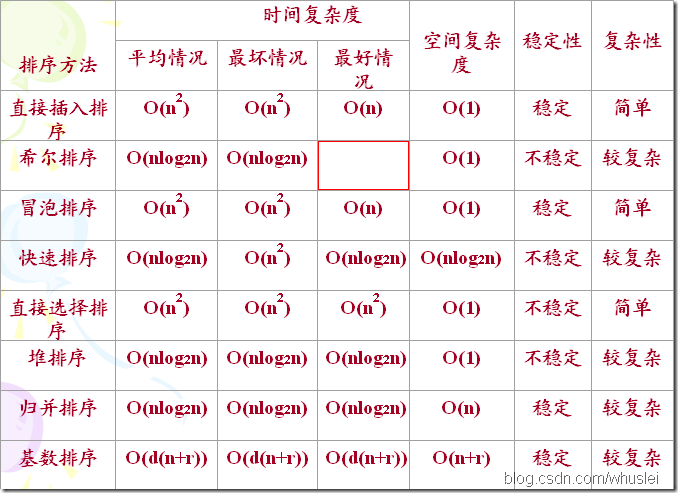
* 【2017-8-1】排序算法可视化对比[Sorting Algorithms Animations](https://www.toptal.com/developers/sorting-algorithms/),[日本程序猿做的排序动画](http://jsrun.it/norahiko/oxIy),[舞动的排序算法【舞蹈视频】](http://v.youku.com/v_show/id_XNTA3NDUwODA4.html?spm=a2h0j.8191423.module_basic_relation.5~5!2~5~5!3~5~5~A)
* 【2018-4-28】算法可视化网站[Visualgo](https://visualgo.net/en),包含动画演示+伪代码,[旧金山大学的数据结构算法可视化](https://www.cs.usfca.edu/~galles/visualization/Algorithms.html)
* 【2019-05-30】基础算法可视化algorithm-visualizer,[GitHub地址](https://github.com/algorithm-visualizer/algorithm-visualizer),[演示地址](https://algorithm-visualizer.org/)
* 【2019-06-18】[算法导论C++实现](https://github.com/huaxz1986/cplusplus-_Implementation_Of_Introduction_to_Algorithms)
* [海量数据处理算法总结【超详解】](http://www.cnblogs.com/ECJTUACM-873284962/p/6910842.html)
* [水库抽样算法精简](http://blog.csdn.net/u012397189/article/details/52181005),空间亚线性算法

* 【2019-07-18】[逆采样(Inverse Sampling)和拒绝采样(Reject Sampling)原理](https://blog.csdn.net/anshuai_aw1/article/details/84840446)
* 
* 【2019-06-06】[程序员小吴](https://www.cxyxiaowu.com/)的[图解Leetcode](https://github.com/MisterBooo/LeetCodeAnimation)
* 【2019-06-10】[LeetCode 代码实现](https://github.com/kamyu104/LeetCode-Solutions)
* 【2019-06-18】代码体系概览,摘自[Leetcode题集](https://github.com/azl397985856/leetcode)
### 分布式计算
* [flume+kafka+hdfs+storm组合](http://www.aboutyun.com/thread-6855-1-1.html)
### 推荐系统
* [项量:关于LDA,pLSA,SVD和Word2vector的一些看法](https://zhuanlan.zhihu.com/p/21377575):
* SVD算法是指在SVD的基础上引入隐式反馈,使用用户的历史浏览数据、用户历史评分数据、电影的历史浏览数据、电影的历史评分数据等作为新的参数
* LSA最初是用在语义检索上,为了解决一词多义和一义多词的问题,将词语(term)中的concept提取出来,建立一个词语和概念的关联关系(t-c relationship),这样一个文档就能表示成为概念的向量。这样输入一段检索词之后,就可以先将检索词转换为概念,再通过概念去匹配文档。在实际实现这个思想时,LSA使用了SVD分解的数学手段.x=T*S*D
* PLSA和LSA基础思想是相同的,都是希望能从term中抽象出概念,但是具体实现的方法不相同。PLSA使用了概率模型,并且使用EM算法来估计P(t|c)和P(c|d)矩阵.LDA是pLSA的generalization:一方面LDA的hyperparameter设为特定值的时候,就specialize成pLSA了
* NMF:一种矩阵分解,要求输入矩阵元素非负,目标和 SVD 一样。
* pLSA:SVD 的一种概率解释方法——要求矩阵元素是非负整数。LDA:pLSA 加上 topics 的 Dirichlet 先验分布后得到的 Bayesian model,数学上更漂亮。为什么是 Dirichlet 先验分布,主要是利用了 Dirichlet 和 multinomial 分布的共轭性,方便计算。

* 【2018-8-2】LDA:无监督,文本主题模型,pLSA的贝叶斯版本。【精】[一文详解主题模型LDA](https://segmentfault.com/a/1190000012215533),[简述LDA主题模型](https://www.cnblogs.com/fengsser/p/5836677.html)
* 
* [从item-base到svd再到rbm,多种Collaborative Filtering(协同过滤算法)从原理到实现](http://blog.csdn.net/dark_scope/article/details/17228643)
* 案例分享:[世纪佳缘推荐系统经验分享](http://www.csdn.net/article/2015-02-15/2823976)
* 《推荐系统实践》[阅读笔记:LFM模型、图模型、slop one和SVD算法](http://www.aiuxian.com/article/p-952427.html)
* 实时推荐系统
* [实时推荐系统的三种方式](http://www.jianshu.com/p/356656ce2901)
* 【2019-04-22】[从FM推演各深度CTR预估模型-含代码](https://mp.weixin.qq.com/s?src=11\×tamp=1555929483\&ver=1562\&signature=Jjiq2apX14IK4UdCU-2Y6tfZnfUd88QpjCBR6*j3QVsA4Tc95frwdKVYN0VijYaajMemNu3tsU0b-dejn4yQdkAb1Gmq5yog2vPsdgs2205Ih9vXa-ZlvyKDeT*gt1A5\&new=1),覆盖CTR预估的前因后果,FM,DeepFM, NFM, DIN, AFM, DCN
### 机器学习
[返回目录](#目录)
#### 特征工程
* 江湖名言:数据和特征决定了机器学习的上限,而模型和算法只是逼近这个上限而已
* [知乎:特征工程到底是什么](https://www.zhihu.com/question/29316149)
* [使用sklearn做特征工程](http://www.cnblogs.com/jasonfreak/p/5448385.html)
* [使用python进行描述性统计](http://www.cnblogs.com/jasonfreak/p/5441512.html)
* [使用sklearn优雅的进行数据挖掘](http://www.cnblogs.com/jasonfreak/p/5448462.html)
* 使用sklearn进行集成学习:[理论](http://www.cnblogs.com/jasonfreak/p/5657196.html),[实践](http://www.cnblogs.com/jasonfreak/p/5720137.html)
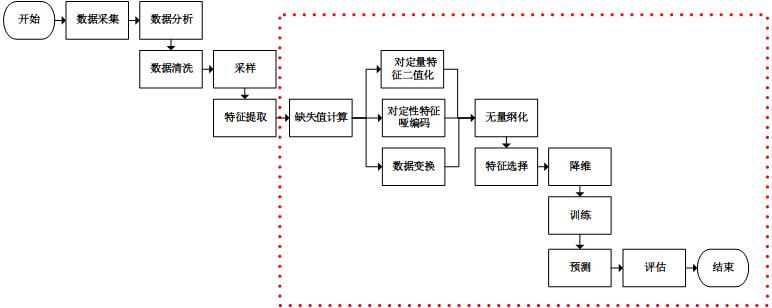
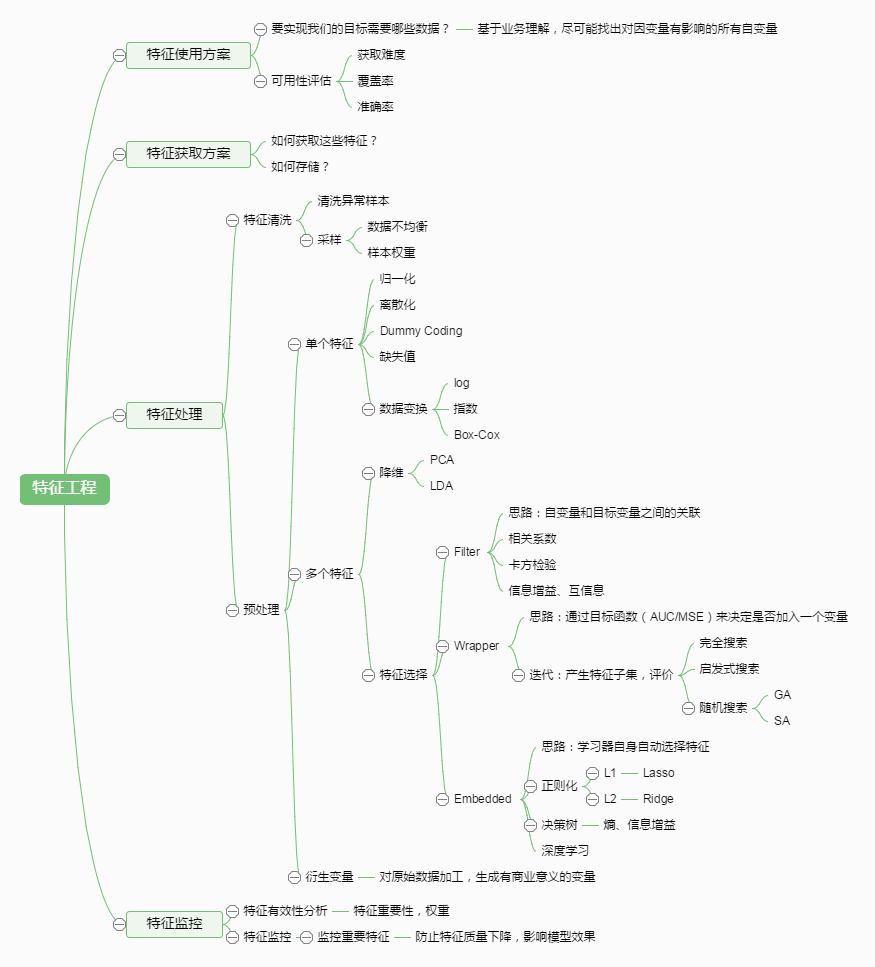
特征工程常用方法:
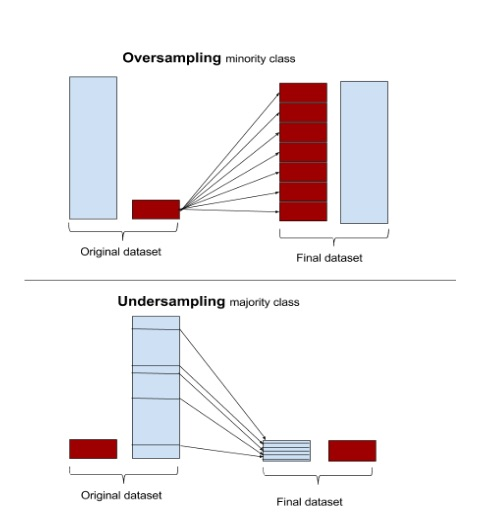
* 不平衡数据集如何处理?研究表明,在某些应用下,1∶35的比例就会使某些分类方法无效,甚至1∶10的比例也会使某些分类方法无效。
* [分类问题中不平衡数据集的解决方案](https://www.52ml.net/16294.html),正负样本玄虚
* 1.过抽样:简单赋值负样本——最常用,容易过拟合,SVM模型里用途不大
* 2.欠抽样:随机减少正样本——造成信息丢失
* 3.算法层面:(1)重构训练集,按错分代价对训练集重构(2)代价敏感函数,大样本高代价,小样本低代价
* 4.特征选择:选取有区分度的特征
* [解决真实世界的问题:如何在不平衡数据集上使用机器学习](https://www.52ml.net/17957.html?utm_source=tuicool\&utm_medium=referral),[非平衡数据机器学习](https://www.cnblogs.com/waring/p/5890214.html),【2019-04-25】[如何处理机器学习中的不平衡类别问题-含代码实现](https://github.com/xitu/gold-miner/blob/master/TODO/how-to-handle-imbalanced-classes-in-machine-learning.md)
* 【2017-12-25】知乎:[机器学习中的测试机和训练集如何划分?](https://www.zhihu.com/question/59683792),与时间强相关的问题需要按照时间划分,否则(大部分ML问题)应该随机抽样,与时间无关(应用了未来函数)。随机划分保证了训练集和测试集的历史场景是类似的,就类似于这些数据都是同一台机器同一时期产生的两类数据集。这样计算出的准确率能最真实的反映模型对这段数据学习的效果
* 【2018-4-8】\[【(Google)机器学习全面入门(96页)】《Jason's Machine Learning 101》by Jason Mayes]
([https://docs.google.com/presentation/d/1kSuQyW5DTnkVaZEjGYCkfOxvzCqGEFzWBy4e9Uedd9k/preview?slide=id.g168a3288f7\_0\_58](https://docs.google.com/presentation/d/1kSuQyW5DTnkVaZEjGYCkfOxvzCqGEFzWBy4e9Uedd9k/preview?slide=id.g168a3288f7_0_58)), ppt展示google机器学习+深度学习中的应用,含视频
* 【2018-4-15】Google机器学习43条军规,[中文版](https://blog.csdn.net/np4rHI455vg29y2/article/details/79341774),[原版pdf](http://martin.zinkevich.org/rules_of_ml/rules_of_ml.pdf)
-【2018-5-4】SAP的梁劲(Jim Liang)整理的[从基础概念到数学公式,这是一份520页的机器学习笔记(图文并茂)](https://mp.weixin.qq.com/s/Pxww9VJY8PKfoZ2vGECqUw),[百度云地址](https://pan.baidu.com/s/1tNXYQNadAsDGfPvuuj7_Tw#list/path=%2F\&parentPath=%2FJim%2FmyPresentation),[Dropbox地址](https://www.dropbox.com/sh/c3l3zrhvbxjsso3/AAD8vI21DW81c7gatikRlv6Fa?dl=0)
* 【2018-5-18】《[Random Forests - What, Why, And How](https://nyhackr.blob.core.windows.net/presentations/Random-Forests-What-Why-and-How_Andy_Liaw.pdf)》by Andy Liaw, 随机森林解析
#### 基本概念
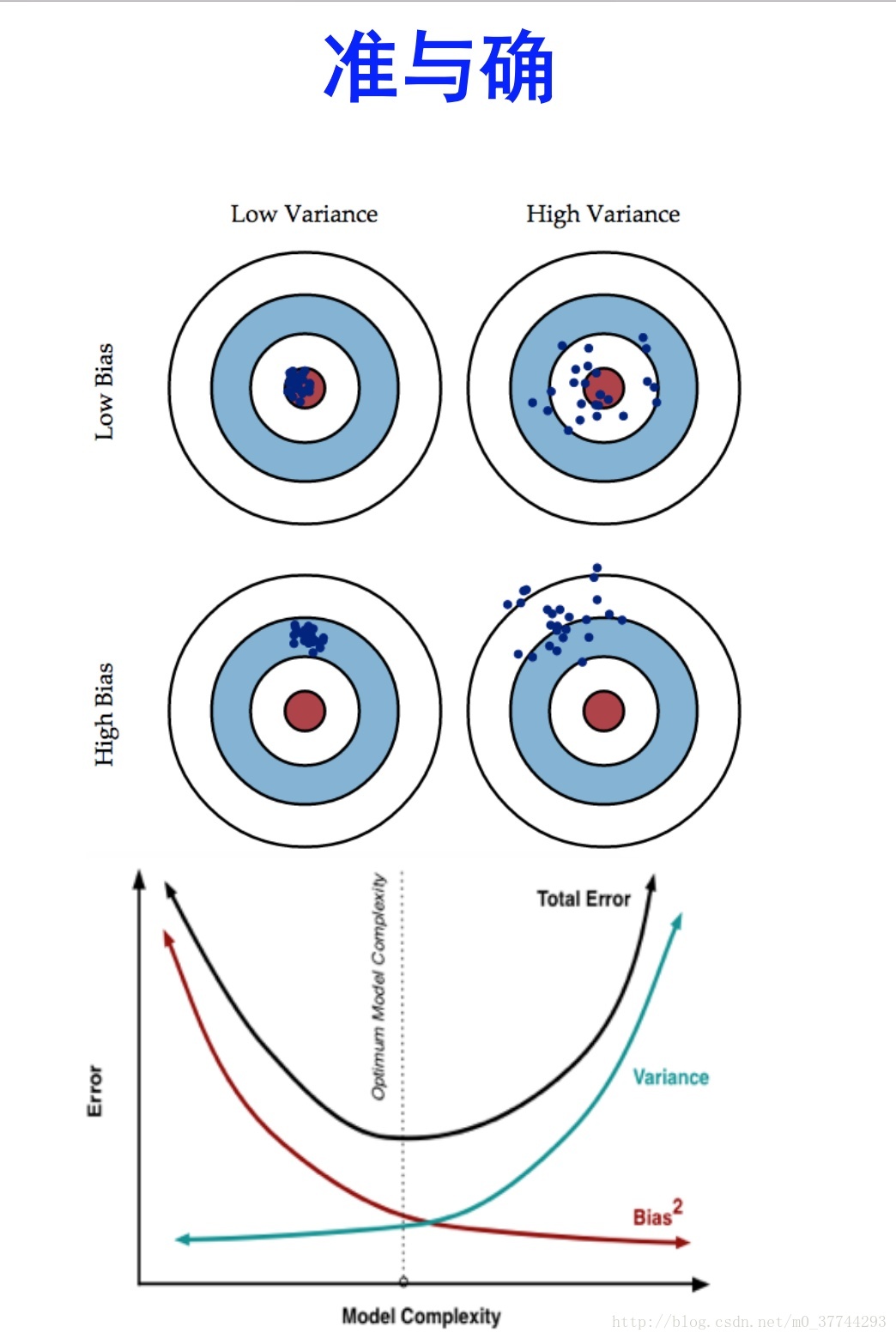
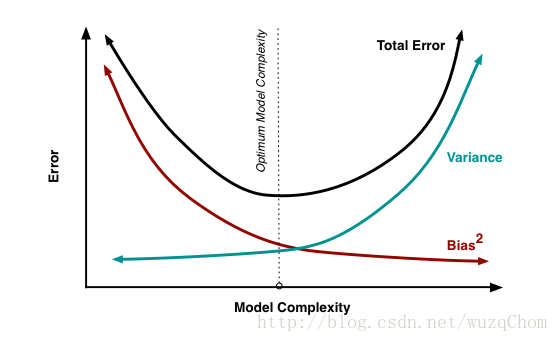
* 【2018-10-25】[偏差(Bias)与方差(Variance)](https://blog.csdn.net/wuzqChom/article/details/75091612), E = B^2 + V + e
,
#### 算法总结
* 微软-ML算法指南:[pdf版下载地址](https://docs.microsoft.com/en-us/azure/machine-learning/machine-learning-algorithm-cheat-sheet)

* 详细讲解[How to choose algorithms for Microsoft Azure Machine Learning](https://docs.microsoft.com/zh-cn/azure/machine-learning/studio/algorithm-choice)
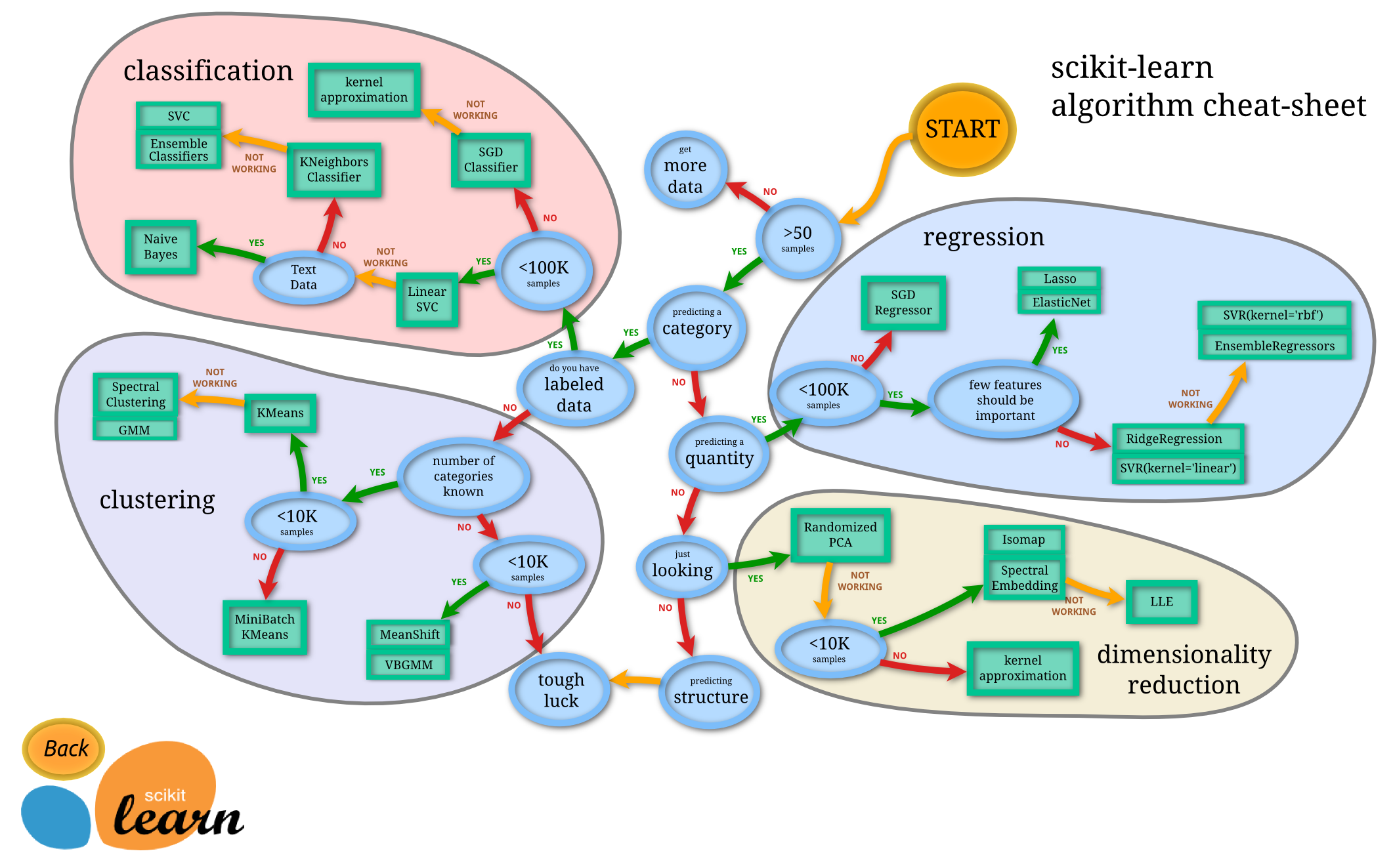
* [scikit-learn官方总结](http://scikit-learn.org/stable/tutorial/machine_learning_map/index.html#),Scikit-learn Cookbook:[英文本](https://www.packtpub.com/big-data-and-business-intelligence/scikit-learn-cookbook),[中文译本](https://www.gitbook.com/book/wizardforcel/sklearn-cookbook/details),[MarkDown格式](http://git.oschina.net/wizardforcel/sklearn-cb/blob/master/SUMMARY.md)。【2018-6-12】scikit-learn中文翻译版,[主页](http://sklearn.apachecn.org/),[scikit-learn网页版](http://sklearn.apachecn.org/cn/0.19.0/index.html),[Github版](https://github.com/apachecn/scikit-learn-doc-zh),[wiki版](http://cwiki.apachecn.org/pages/viewpage.action?pageId=10030181),[视频版](http://i.youku.com/apachecn)。[sklearn库中文版完全手册下载](https://download.csdn.net/download/nndreamer/9823008)
* 【2017-12-20】[Dlib机器学习指南](https://www.cnblogs.com/oloroso/p/6607888.html),方法选择: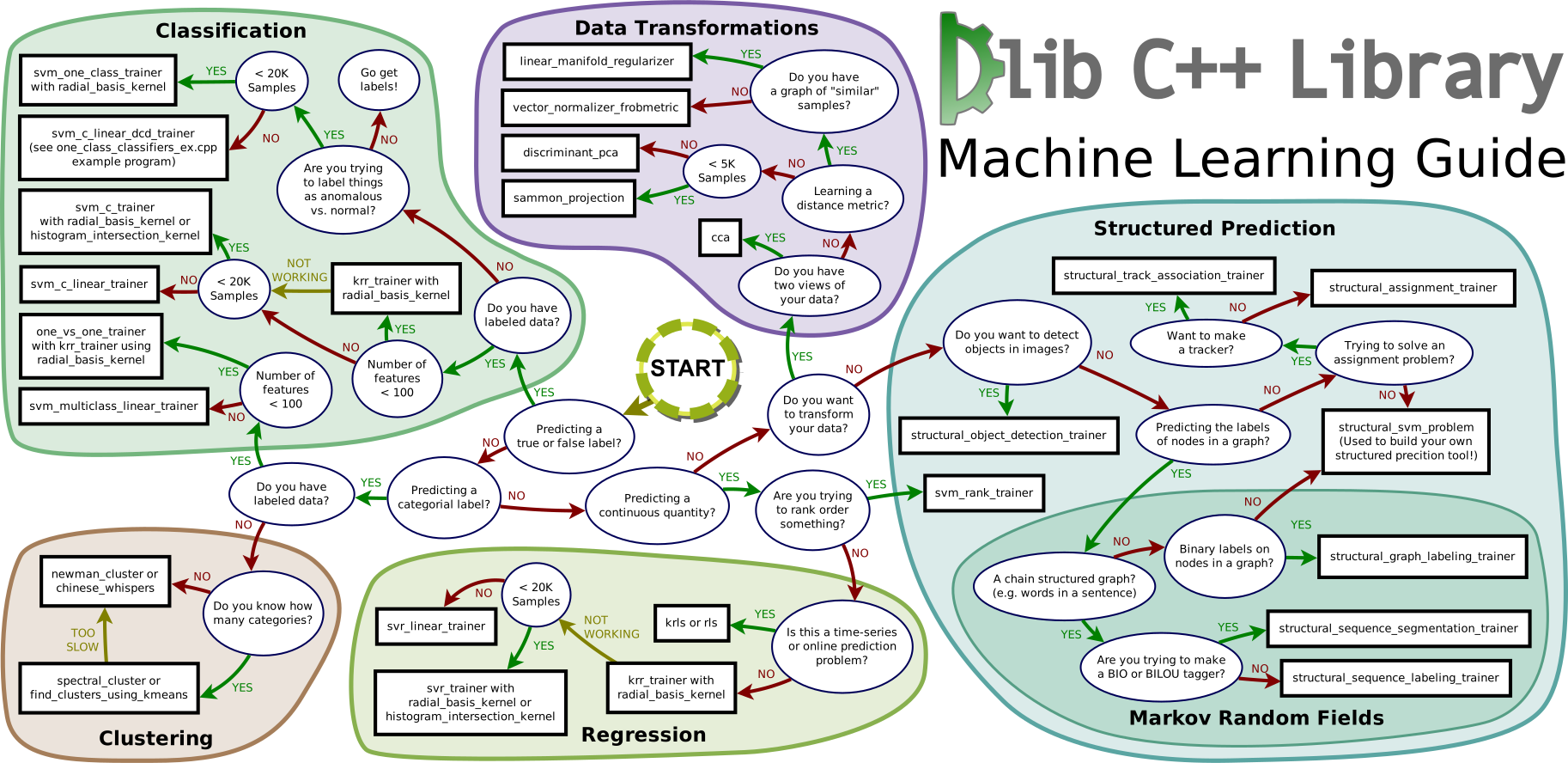,中文版,[dlib中文指南-图](http://images2015.cnblogs.com/blog/693958/201703/693958-20170323225348940-2043166934.png)
* 算法对比
《统计学习方法》总结:【2019-1-23】[Python代码](https://github.com/ExtremeMart/lihang-code)
* 
* [xgboost: 速度快效果好的boosting模型](https://cos.name/2015/03/xgboost/)
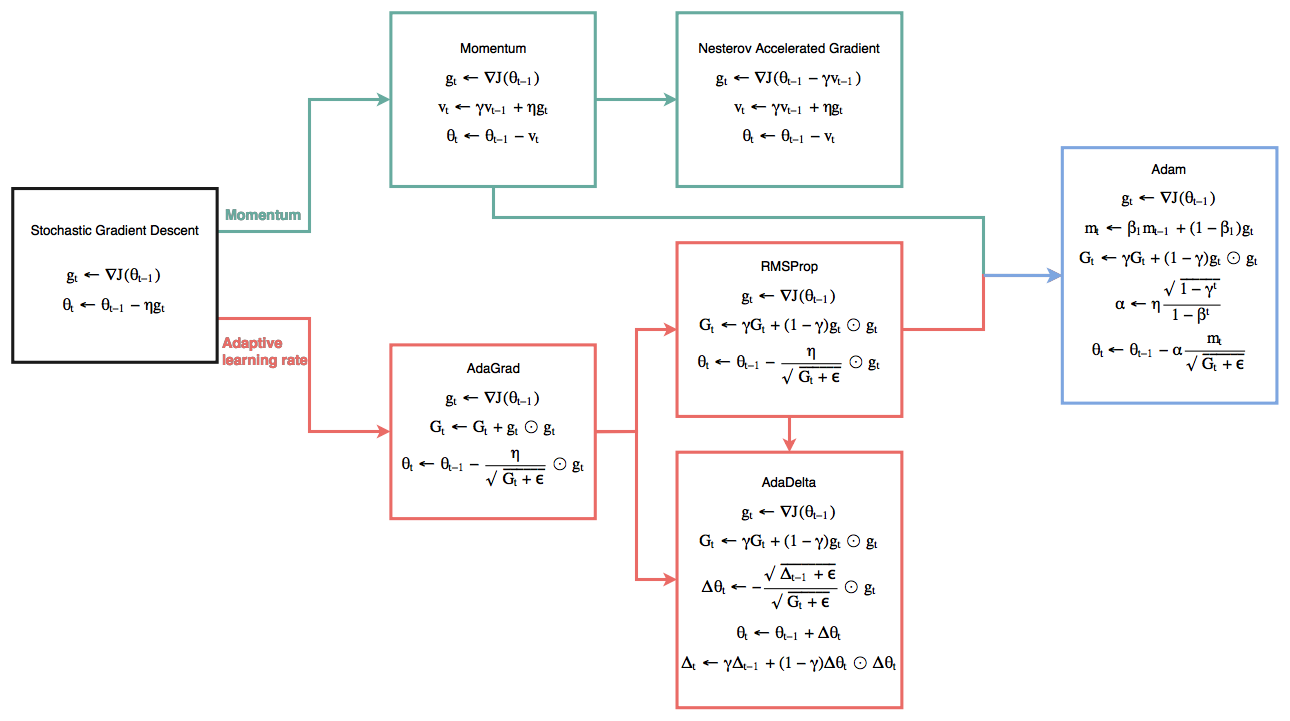
* 最优化:各种优化算法对比
* 
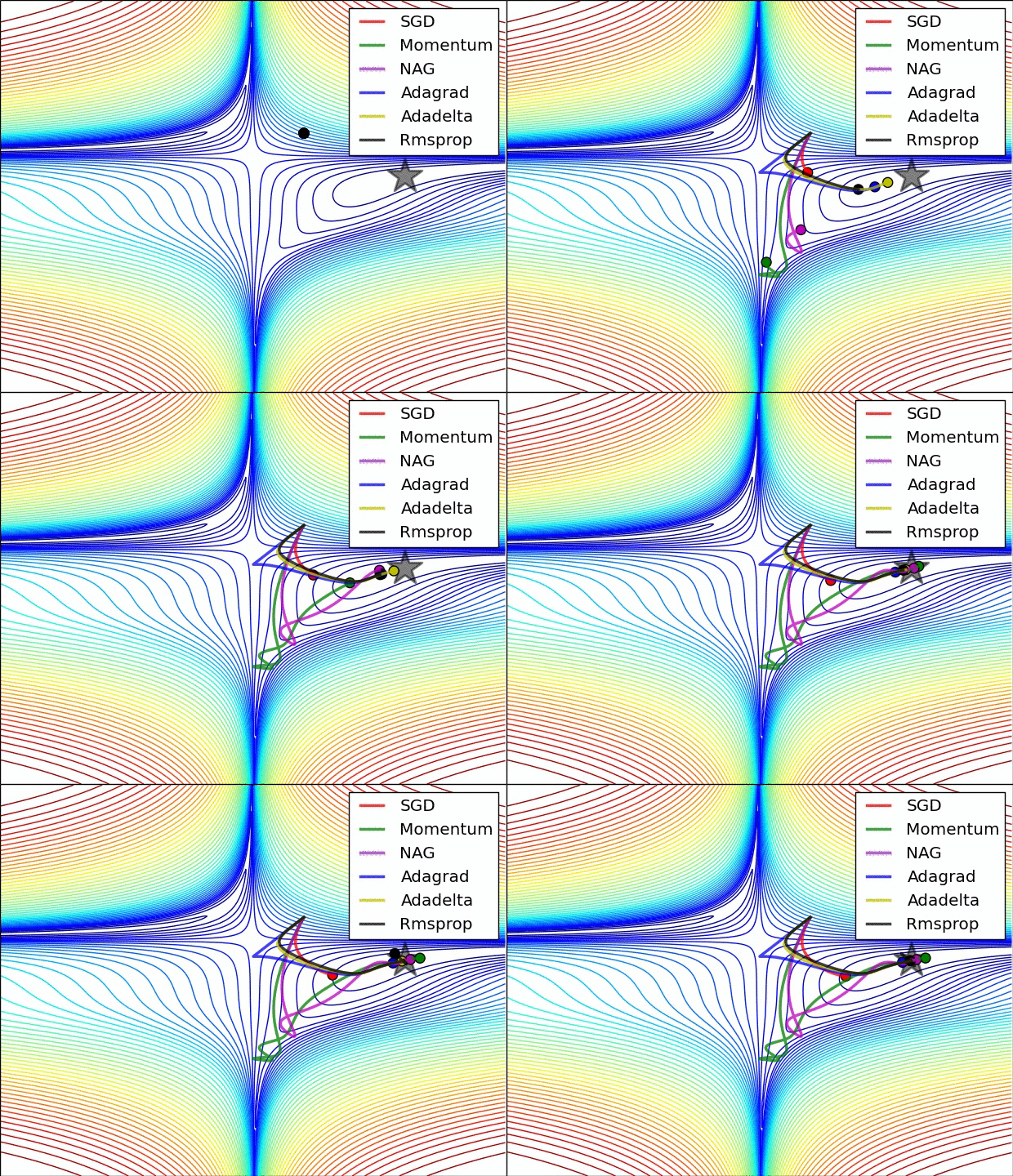
* 最优化:各种优化算法对比
* 
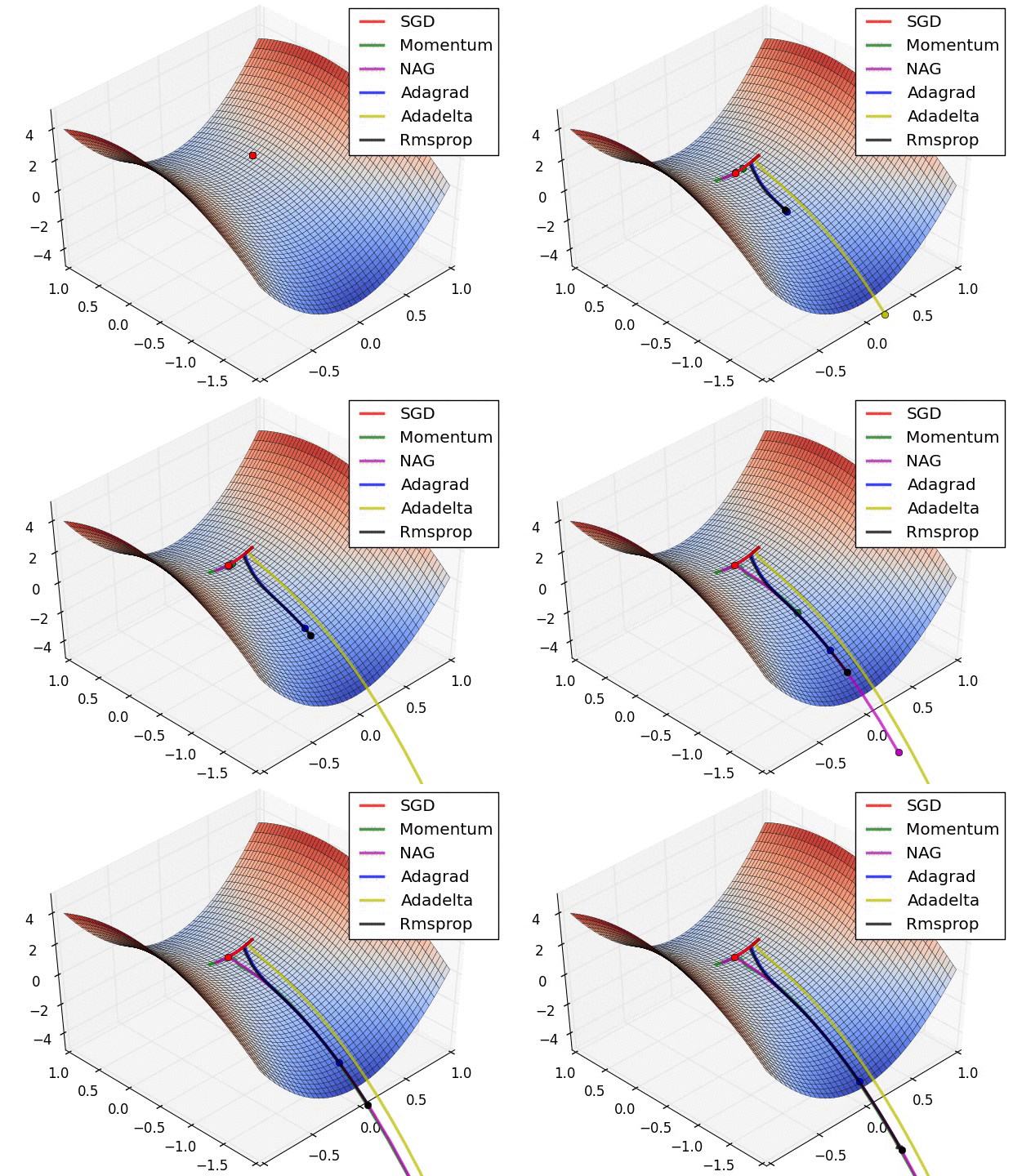
* 【2017-8-30】[SGD comparision](https://blog.slinuxer.com/2016/09/sgd-comparison)
* 
* [SGD,Adagrad,Adadelta,Adam等优化方法总结和比较](http://ycszen.github.io/2016/08/24/SGD%EF%BC%8CAdagrad%EF%BC%8CAdadelta%EF%BC%8CAdam%E7%AD%89%E4%BC%98%E5%8C%96%E6%96%B9%E6%B3%95%E6%80%BB%E7%BB%93%E5%92%8C%E6%AF%94%E8%BE%83/),[An overview of gradient descent optimization algorithms](http://ruder.io/optimizing-gradient-descent/)
* [为什么更偏爱随机梯度下降](https://zhuanlan.zhihu.com/p/28060786)
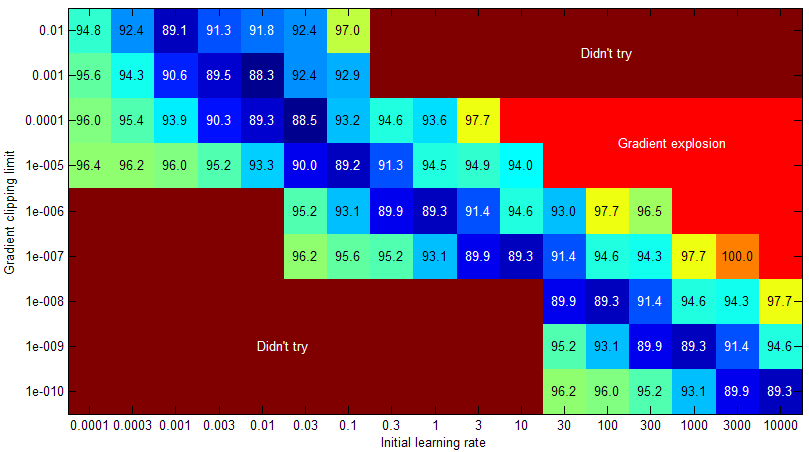
* 【2017-7-31】[10686 一次 CTC-RNN 调参经历](https://zhuanlan.zhihu.com/p/28133530)
* 
* 【2018-3-5】[google 出品的机器学习速成课程](https://developers.google.cn/machine-learning/crash-course/),基于tensorflow
* 谷歌新出的jupyter开发环境,免费试用GPU,试用谷歌账号即可,[google colaboratory](http://g.co/colab),[colaboratory简介](https://colab.research.google.com/notebooks/welcome.ipynb#scrollTo=atsEmPJiubuX),【2019-02-13】Google的colaboratory支持直接从github中导入笔记,地址:[http://colab.research.google.com/github/](http://colab.research.google.com/github/) , 【2018-11-19】[Tensorflow官网中文版](https://tensorflow.google.cn/guide/?hl=zh-cn)
* 【2019-06-19】华校专,[AI算法工程师手册](http://www.huaxiaozhuan.com/),包含各类精简笔记
#### 异常检测
* IsolationForest。欺诈等是一系列的异常孤立点,而IsolationForest则是检测这类孤立点的一个有效算法。无需样本标记、线性时间复杂度。一般情况下要比OneClasSVM等表现要好。尤其是对非高斯分布的样本空间。
* 【2017-7-31】[反欺诈(Fraud Detection)中所用到的机器学习模型有哪些?](https://www.zhihu.com/question/30508773/answer/205831957):
* (1)可视化:相关矩阵+多维尺度变换
* (2)算法模型:时序相关(时间序列分析)、时序无关(无监督学习Isolation Forest、监督学习one-class SVM、统计学密度估计)
* 【2018-9-12】python异常检测工具包[pydor](https://zhuanlan.zhihu.com/p/29868365),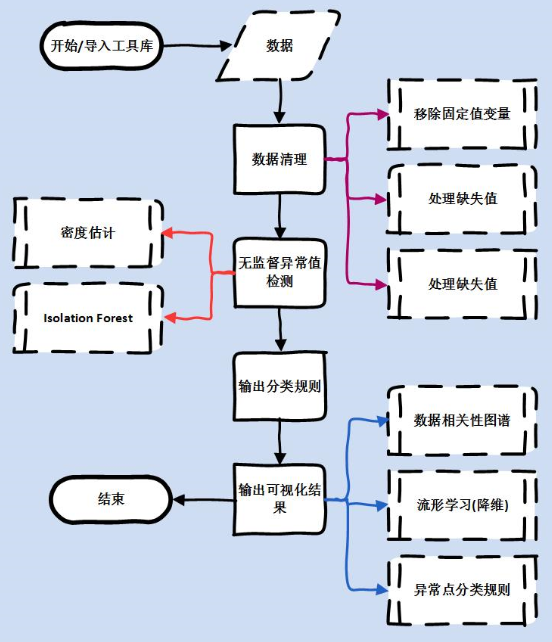
#### 机器学习经验总结
* [Google机器学习经验总结](http://martin.zinkevich.org/rules_of_ml/rules_of_ml.pdf)
* [pluskid总结的SVM系列文章](http://blog.pluskid.org/?page_id=683)(浙大计算机,MIT博士,跟陈天奇和李沐一块做过Mxnet)
* 【2017-8-22】【非常好的web讲解】[可视化机器学习(决策树讲解)](http://www.r2d3.us/%E5%9B%BE%E8%A7%A3%E6%9C%BA%E5%99%A8%E5%AD%A6%E4%B9%A0/)
* 【2017-8-22】剑桥大学的书籍[Introduction to Machine Learning](http://alex.smola.org/drafts/thebook.pdf)
* 【2017-8-22】Machine Learning is Fun!系列教程。[Part 3:Deep Learning and Convolutional Neural Networks](https://medium.com/@ageitgey/machine-learning-is-fun-part-3-deep-learning-and-convolutional-neural-networks-f40359318721),[中文翻译:第三章:图像识别【鸟or飞机】?深度学习与卷积神经网络](https://zhuanlan.zhihu.com/p/24524583)
* 【2017-9-2】维数灾难:精华,[维数诅咒](https://blog.csdn.net/red_stone1/article/details/71692444),原文[The Curse of Dimensionality in classification](http://www.visiondummy.com/2014/04/curse-dimensionality-affect-classification/) [intel机器学习课程](https://software.intel.com/en-us/ai-academy/students/kits/machine-learning-101)
* 【2017-12-9】[Intel AI机器学习课程资料](https://software.intel.com/en-us/ai-academy/students/kits)
* 【2017-12-22】[图解机器学习(含动图)](https://my.oschina.net/taogang/blog/1544709)【2019-04-24】布朗学院出品:[交互式图解人工智能AI](https://okai.brown.edu/zh/index.html)
* 【2017-12-22】[knn原理及代码实现(含kd树)](http://www.hankcs.com/ml/k-nearest-neighbor-method.html),[详解kd树](http://blog.csdn.net/silangquan/article/details/41483689)
* 【2018-3-23】[概率图模型体系:HMM、MEMM、CRF](https://zhuanlan.zhihu.com/p/33397147),精华
* 【2018-7-6】[Bayesian Methods in Machine Learning – Spring 2018](https://www.cse.wustl.edu/~garnett/cse515t/spring_2018/),机器学习中的贝叶斯方法,涉及贝叶斯调参,Radford M. Neal的[Bayesian Methods for Machine Learning](ftp://www.cs.toronto.edu/pub/radford/bayes-tut.pdf)
* 【2018-7-26】[机器学习笔试题精选](https://mp.weixin.qq.com/s?__biz=MzIwOTc2MTUyMg==\&mid=2247484851\&idx=1\&sn=f24ab39d005666005a3ed3bbb00f6987\&chksm=976fa02ea018293813eaf721c7175038f1bb1f90f2b0cb40fa983049281c91fdbafdefdd10c5\&mpshare=1\&scene=23\&srcid=0726j2cGBGr0UkGjgaFMfdFw#rd),原文[45 questions to test a Data Scientist on Regression](https://www.analyticsvidhya.com/blog/2016/12/45-questions-to-test-a-data-scientist-on-regression-skill-test-regression-solution/),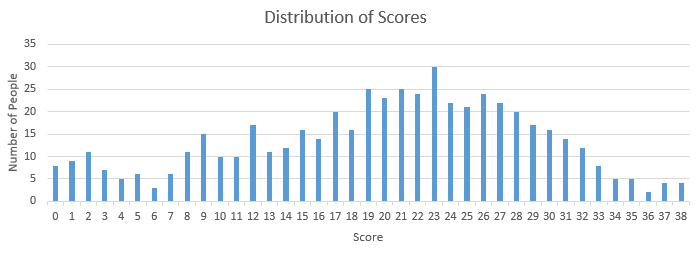
* 【2018-7-28】世界最大外文电子书搜索引擎[B-OK](http://b-ok.org/)
* 【2018-8-16】机器学习在线交互式Demo集锦,“[Interactive Machine Learning, Deep Learning and Statistics websites](http://p.migdal.pl/interactive-machine-learning-list/)”
* 【2018-8-20】[机器学习简易入门教程(结合scikit-learn)](https://github.com/warmheartli/MachineLearningCourse)
* 【2018-8-26】[机器学习笔试精选100题(含详细解答)](https://mp.weixin.qq.com/s?__biz=MzIwOTc2MTUyMg==\&mid=2247485141\&idx=1\&sn=e10e3b177daae4edb3bef68f031c42f3\&chksm=976fa348a0182a5ea11b28f299a9acd0066779c5376b0b8f990d11451b93e758e9ee849f08ee\&mpshare=1\&scene=23\&srcid=0825ETMePKIWOUbBmetSdTUS%23rd)
* 【2018-9-7】8月30日出来的新书:可解释的机器学习[Interpretable Machine Learning](https://christophm.github.io/interpretable-ml-book/),破解黑盒秘密
* 【2018-10-29】[机器学习500问](https://github.com/scutan90/DeepLearning-500-questions)
* 【2018-11-15】优质自媒体:[数说工作室网页版](http://mp.weixin.qq.com/mp/homepage?__biz=MjM5MDEzNDAyNQ==\&hid=1\&sn=36c2ec1ea04c7cc47d2cb073920019a0\&scene=18%23wechat_redirect),[分类战车SVM](https://mp.weixin.qq.com/s?__biz=MjM5MDEzNDAyNQ==\&mid=207467263\&idx=1\&sn=088d5c9adcdc4a716bc90d59510ea96e\&scene=19#wechat_redirect)
* 【2018-11-15】[机器学习十二大经验和准则](https://www.toutiao.com/a6623884585971221000/?iid=50974775731\&app=news_article\&group_id=6623884585971221000\×tamp=1542258210)
#### 集成学习
* 多模型stack方法。参考[房价预测解决方案](https://blog.csdn.net/u011692048/article/details/76583386)
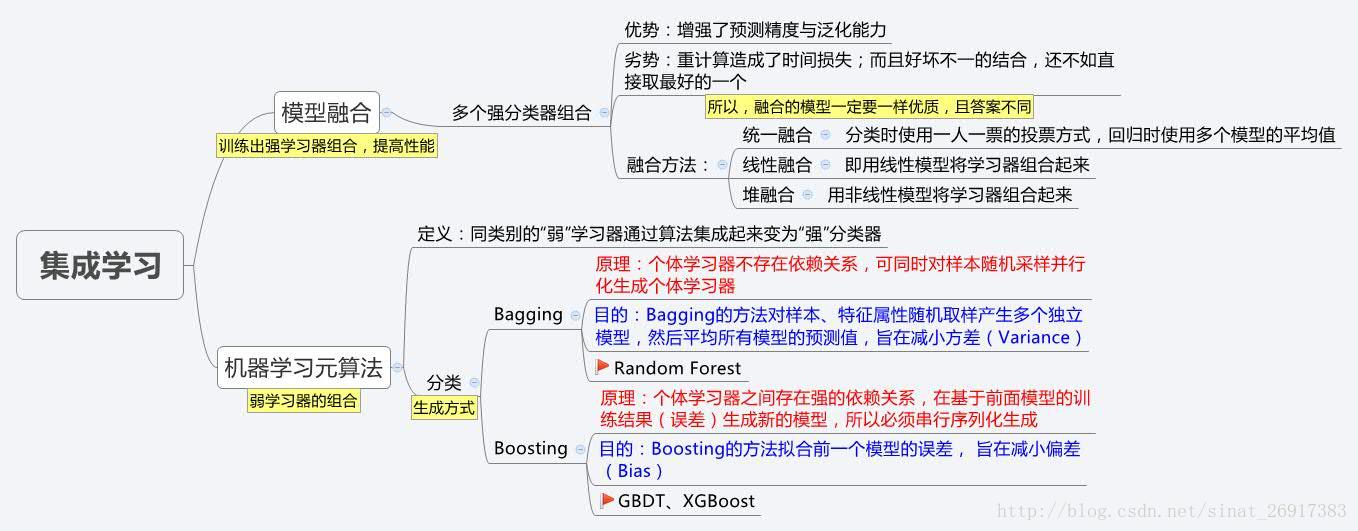
* bagging,boosting,stacking ,[集成学习原理详解](https://blog.csdn.net/qq_36330643/article/details/77621232),[一文读懂集成学习](https://blog.csdn.net/ruiyiin/article/details/77114072),[集成学习Ensemble Learning与树模型、Bagging 和 Boosting、模型融合](https://blog.csdn.net/sinat_26917383/article/details/54667077)
* ,
* ,
* 
* 【2018-9-14】[使用sklearn进行集成学习](http://www.cnblogs.com/jasonfreak/p/5657196.html)
* 【2018-11-27】PRML[官方英文版下载地址](https://www.microsoft.com/en-us/research/people/cmbishop/#!prml-book)
#### 流形学习
* 什么是流形学习?传统的机器学习方法中,数据点和数据点之间的距离和映射函数f都是定义在欧式空间中的,然而在实际情况中,这些数据点可能不是分布在欧式空间中的,因此传统欧式空间的度量难以用于真实世界的非线性数据,从而需要对数据的分布引入新的假设。流形(Manifold)是局部具有欧式空间性质的空间,包括各种纬度的曲线曲面,例如球体、弯曲的平面等。流形是线性子空间的一种非线性推广。参考[流形学习的简单介绍](https://jlunevermore.github.io/2016/06/25/43.%E6%B5%81%E5%BD%A2%E5%AD%A6%E4%B9%A0/)
* 流形学习:本质上,流形学习就是给数据降维的过程。这里假设数据是一个随机样本,采样自一个高维欧氏空间中的流形(manifold),流形学习的任务就是把这个高维流形映射到一个低维(例如2维)的空间里。流形学习可以分为线性算法和非线性算法,前者包括主成分分析(PCA)和线性判别分析(LDA),后者包括等距映射(Isomap),拉普拉斯特征映射(LE)等。流形学习可以用于特征的降维和提取,为后续的基于特征的分析,如聚类和分类,做铺垫,也可以直接应用于数据可视化等。注:摘自[集智百科流形学习(优质,包含代码及案例)](http://wiki.swarma.net/index.php/%E6%B5%81%E5%BD%A2%E5%AD%A6%E4%B9%A0)。
* 拟合线性的流形学习模型:LLE, LTSA, Hessian LLE, 和Modified LLE
* 拟合非线性的流形学习模型:Isomap,MDS和Spectral Embedding
* 效果示意如下:
* [浙大何晓飞的流形学习ppt](http://www.cad.zju.edu.cn/reports/%C1%F7%D0%CE%D1%A7%CF%B0.pdf),讲的很清楚,全面,最佳资料
#### 降维
* 常见的pca属于无监督,【2017-12-28】【精华】[PCA可视化讲解](http://setosa.io/ev/principal-component-analysis/),lda有监督,常用降维方法如下图。

* t-SNE是深度学习大牛Hinton和lvdmaaten(他的弟子?)在2008年提出的,lvdmaaten对t-SNE有个主页介绍:[tsne](http://lvdmaaten.github.io/tsne/),包括论文以及各种编程语言的实现,t-SNE是非线性方法,非常适用于高维数据降维到2维或者3维,进行可视化,具体参考:[t-SNE完整笔记(优质,含Python代码实现)](http://www.datakit.cn/blog/2017/02/05/t_sne_full.html),[t-SNE原理及python实现](http://blog.csdn.net/jyl1999xxxx/article/details/53138975).t-SNE交互体验:[How to Use t-SNE Effectively](https://distill.pub/2016/misread-tsne/);[t-SNE CSV web demo](http://cs.stanford.edu/people/karpathy/tsnejs/csvdemo.html),可以直接输入csv数据,【2019-06-24】[t-SNE 60min简介](https://psubnwell.github.io/2017/12/01/t-sne-a-60-minutes-blitz/),覆盖基础、学术和工程
* 
* \[2018-1-29][从SNE到t-SNE再到LargeVis](https://bindog.github.io/blog/2016/06/04/from-sne-to-tsne-to-largevis/),t-SNE原理最佳资料,深刻讲解
* 其他方法参考[流形学习](http://blog.csdn.net/zhulingchen/article/details/2123129),[MNIST数据集降维可视化效果展示(经典)](http://colah.github.io/posts/2014-10-Visualizing-MNIST/). [Google高维数据交互可视化Web页面](http://projector.tensorflow.org/),(TensorBoard 的一个内置的可视化工具 Embedding Projector,可以上传数据文件)
* ,【2018-1-22】[手写汉字识别](https://zhuanlan.zhihu.com/p/33071173?iam=cc759c5d7c383aa95e7633f06bcf6d82?utm_medium=social\&utm_source=wechat_session)
* 参考:[TensorFlow-7-TensorBoard Embedding可视化](http://blog.csdn.net/aliceyangxi1987/article/details/71079387)
* 【2018-8-16】腾讯技术博客[火光摇曳](http://www.flickering.cn)的文章:[VC维的来龙去脉](http://www.flickering.cn/machine_learning/2015/04/vc%E7%BB%B4%E7%9A%84%E6%9D%A5%E9%BE%99%E5%8E%BB%E8%84%89/)
* 【2019-2-9】[股票预测-随机差分-含代码](https://jtsulliv.github.io/stock-movement/?from=groupmessage)
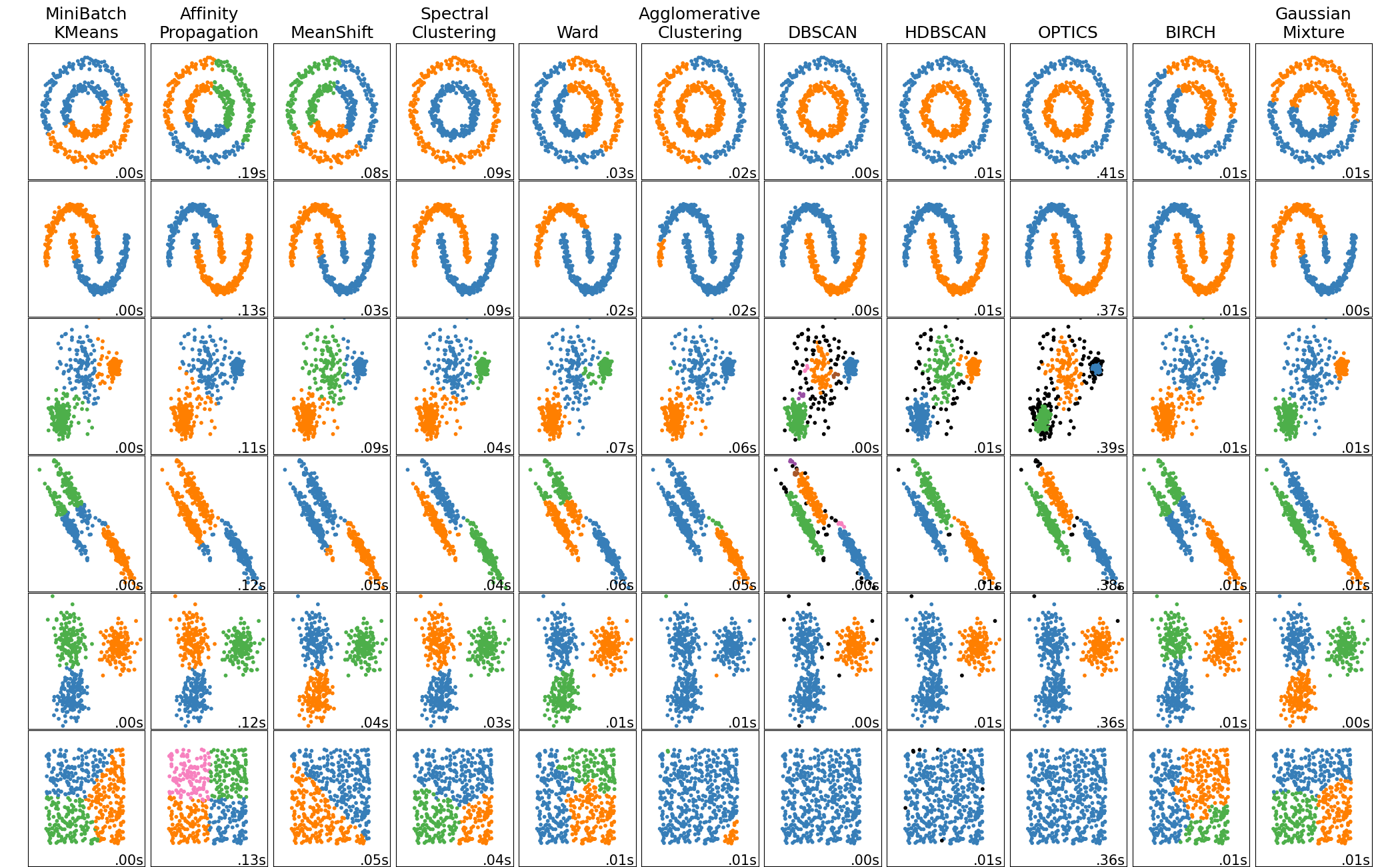
* 【2019-07-04】聚类算法[对比](https://blog.csdn.net/abc200941410128/article/details/78541273),[sklearn可视化对比](https://scikit-learn.org/stable/auto_examples/cluster/plot_cluster_comparison.html#sphx-glr-auto-examples-cluster-plot-cluster-comparison-py)
### 深度学习
[返回目录](#目录)
* 【2019-06-18】[深度学习资料大全](https://github.com/isymbo/DeepLearning)
#### 什么是神经网络
* 【2019-04-30】[what is a Neural Network](https://www.bilibili.com/video/av19828819),Youtube地址]\([https://www.youtube.com/c/3blue1brown?sub\_confirmation=1](https://www.youtube.com/c/3blue1brown?sub_confirmation=1))
*
* 【2019-07-15】神经网络分类面到底什么样?可交互
#### 神经网络发展历史
* [重磅!神经网络浅讲:从神经元到深度学习](http://www.cnblogs.com/subconscious/p/5058741.html),[brief history of neural network-figure](https://raw.githubusercontent.com/qingkaikong/blog/master/38_ANN_part1/figures/figure1_ANN_history.jpg)
* 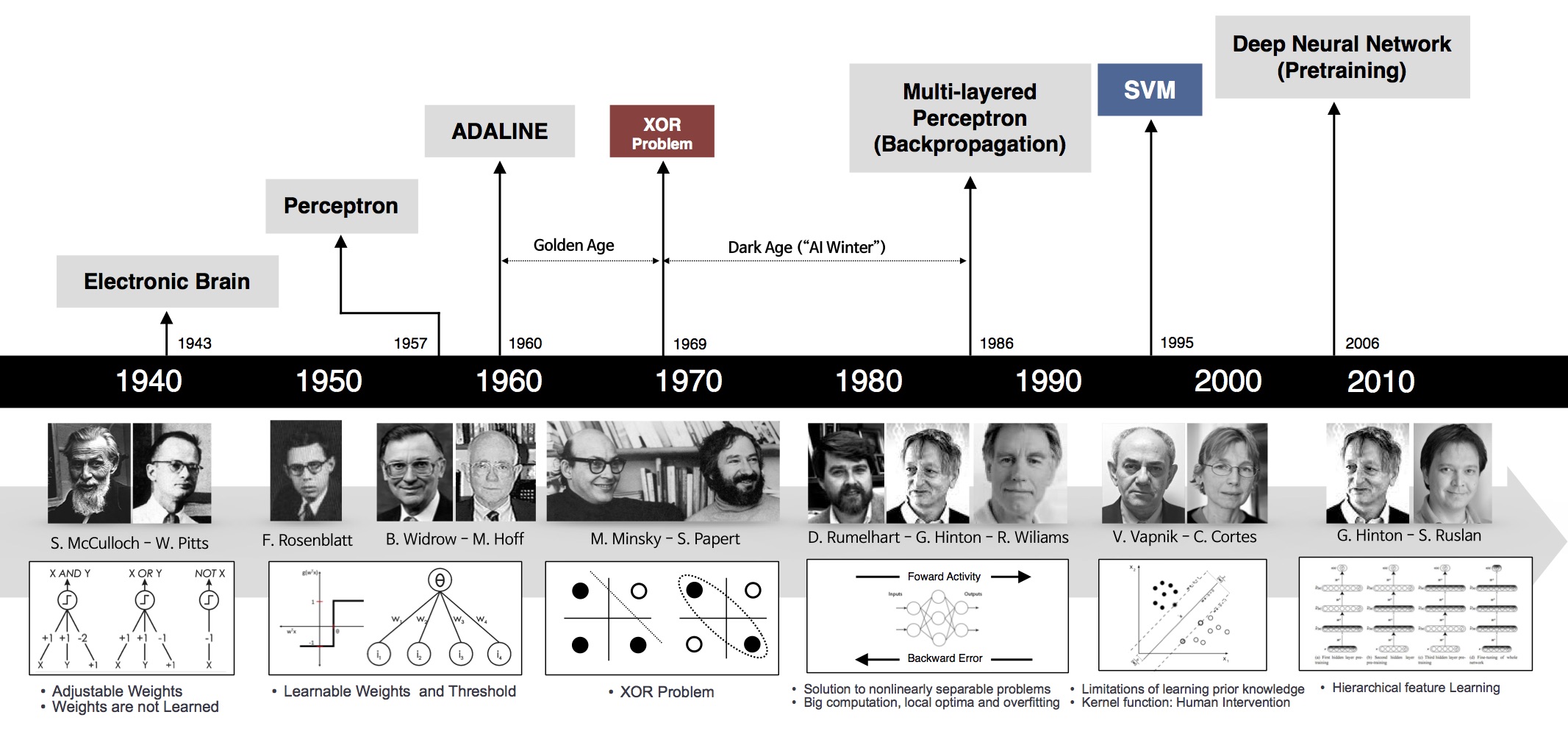
* [图片源自ANN简介](http://qingkaikong.blogspot.com/2016/11/machine-learning-3-artificial-neural.html)
* 【2019-03-21】[漫画人工智能简史](https://mp.weixin.qq.com/s?__biz=MzU4Mjc5NzE3Mw==\&mid=2247483979\&idx=1\&sn=312c458050fda33b095146294cf611ea\&chksm=fdb39051cac41947a9e0ff3a7248bb7aa7de91edcdccb6ed8c2de5b43ae3e9eb71242f6d6e20\&mpshare=1\&scene=23\&srcid=%23rd)
#### 神经网络网络结构变化
* 
当然,光有强大的内在能力,并不一定能成功。一个成功的技术与方法,不仅需要内因的作用,还需要时势与环境的配合。神经网络的发展背后的外在原因可以被总结为:更强的计算性能,更多的数据,以及更好的训练方法。只有满足这些条件时,神经网络的函数拟合能力才能得已体现
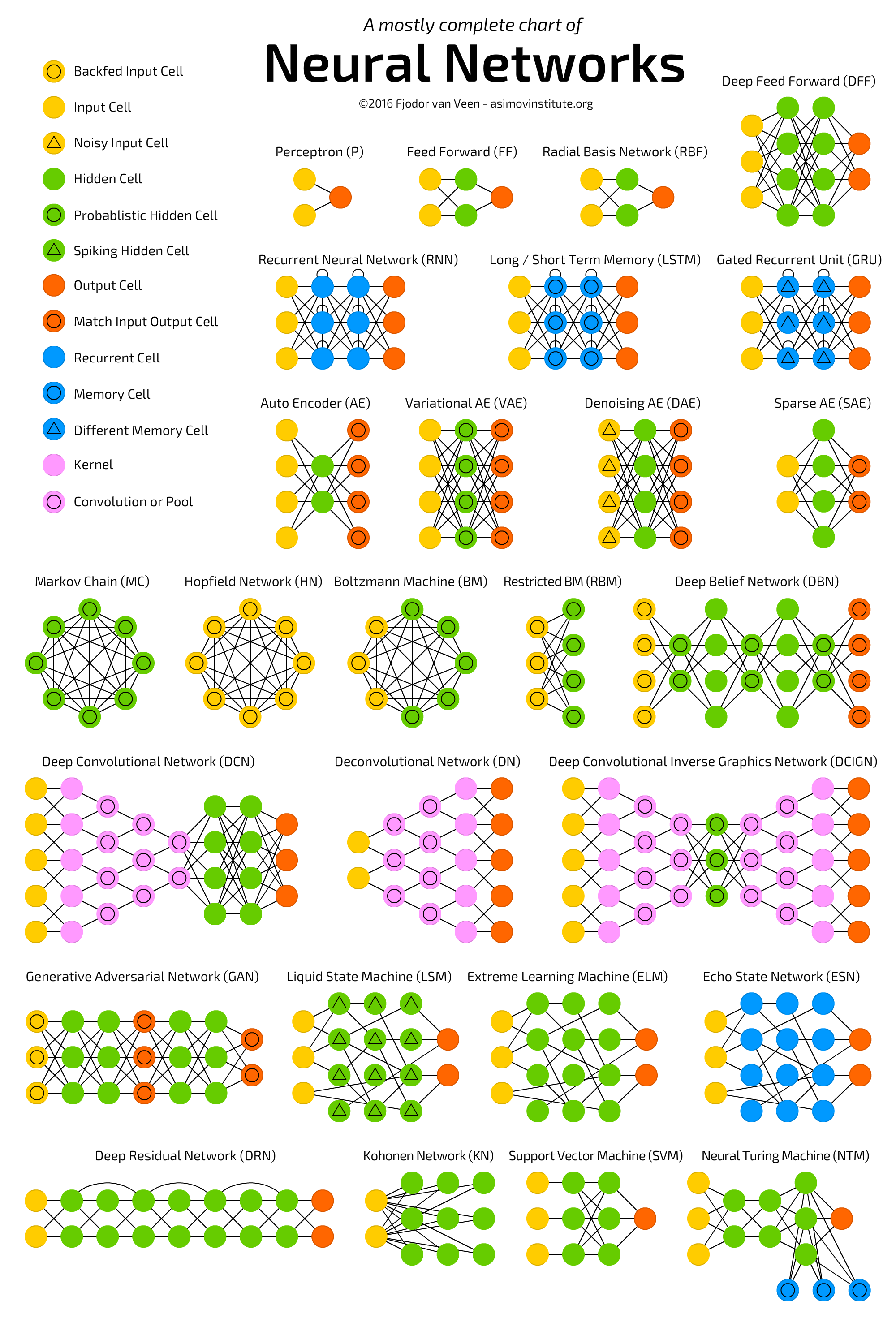
-【2017-8-7】[The mostly complete chart of Neural Networks, explained](https://medium.com/towards-data-science/the-mostly-complete-chart-of-neural-networks-explained-3fb6f2367464),神经网络结构大全
* 
* 
* 【2019-04-30】[神经网络3D仿真视频](https://www.bilibili.com/video/av13942311)
*
* 【2017-12-23】神经网络原理视频(十分直观形象),包含3部分,[直观理解反向传播](https://www.bilibili.com/video/av16577449/)
*
* 【2019-05-07】[神经网络结构可视化](https://www.zhihu.com/question/317106629/answer/630155832?utm_source=qq\&utm_medium=social\&utm_oi=27211553832960)
#### 深度学习大牛
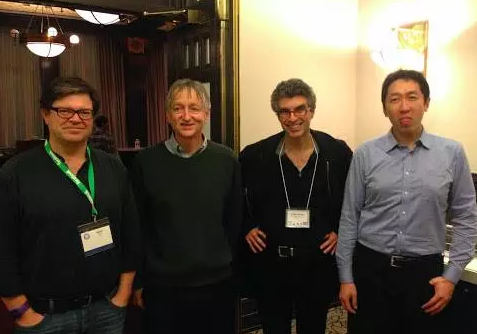
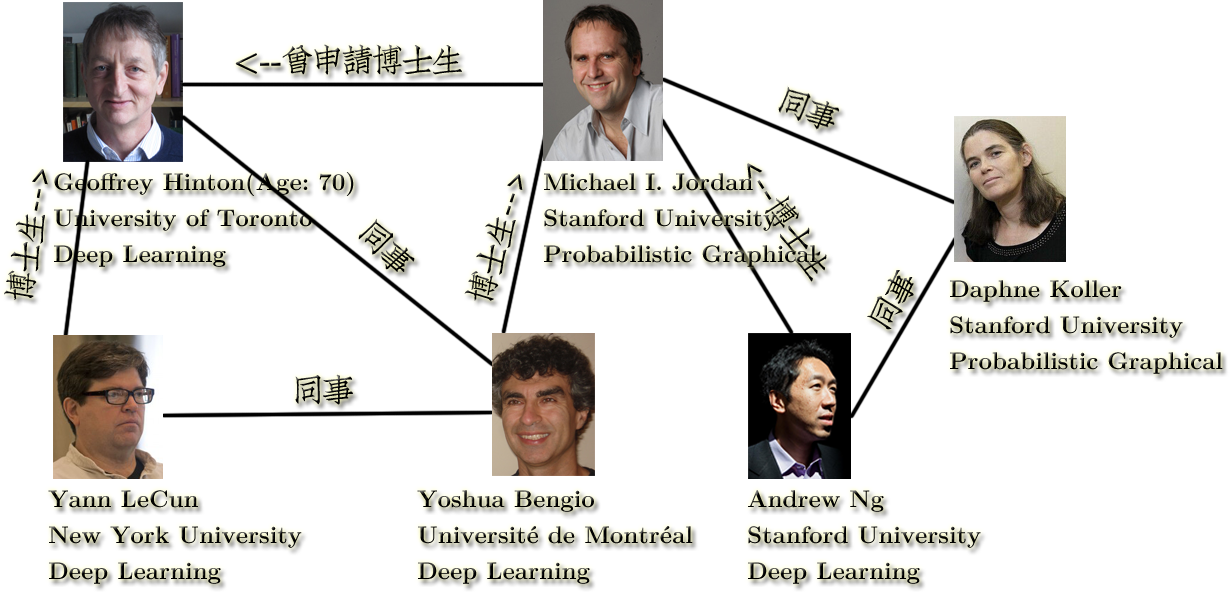
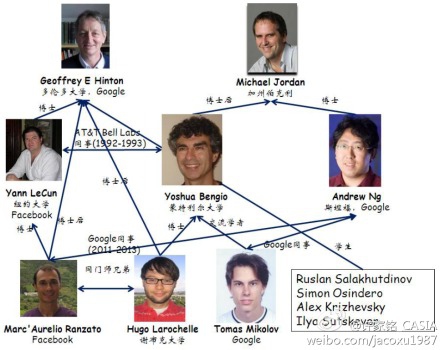
* Geoffrey Hinton :深度学习鼻祖
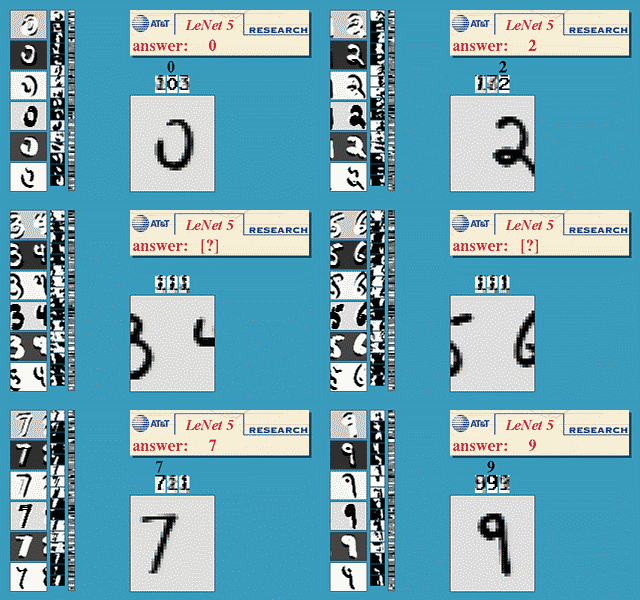
* [Yann Lecun(杨立昆)](http://yann.lecun.com/),CNN发明人,Goeffery Hinton的学生,首创LeNet
* Yoshua Bengio :也是深度学习
* Andrew Ng :Hinton的合作伙伴。coursera公开课,[Andrew Ng: Deep Learning, Self-Taught Learning and Unsupervised Feature Learning](https://www.youtube.com/watch?v=n1ViNeWhC24),[《MACHINE LEARNING YEARNING》翻译](http://blog.csdn.net/nnnnnnnnnnnny/article/details/53524858),【2018-10-24】[中文翻译版github](https://github.com/AcceptedDoge/machine-learning-yearning-cn)
* 深度学习四大天王及其关系
* 
* 
* 
* [Yann Lecun(杨立昆)](http://yann.lecun.com/),CNN发明人,Goeffery Hinton的学生,首创LeNet
* 
* [LeNet-5手写数字识别示意图](http://yann.lecun.com/exdb/lenet/),[CNN手写数字识别实时3D交互,能看到详细的参数(非常直观)](http://scs.ryerson.ca/~aharley/vis/conv/),【2017-8-8】更令人震惊的3D模拟效果(视频)[Neural Network 3D Simulation](https://www.youtube.com/watch?v=3JQ3hYko51Y),[制作方官网提供的解释](https://www.cybercontrols.org/neuralnetworks),实时视频中的CNN各层效果[What convolutional neural networks see](https://www.youtube.com/watch?v=Gu0MkmynWkw),[Deep Visualization Toolbox](https://www.youtube.com/watch?v=AgkfIQ4IGaM),【2018-7-23】[keras.js实现的web端mnist识别Demo](https://transcranial.github.io/keras-js/#/)包含各种pre-trained模型
* 可视化资料:[Google PlayGround神经网络训练在线演示](http://playground.tensorflow.org/#activation=tanh\&batchSize=10\&dataset=circle\®Dataset=reg-plane\&learningRate=0.03\®ularizationRate=0\&noise=0\&networkShape=4,2\&seed=0.45786\&showTestData=false\&discretize=false\&percTrainData=50\&x=true\&y=true\&xTimesY=false\&xSquared=false\&ySquared=false\&cosX=false\&sinX=false\&cosY=false\&sinY=false\&collectStats=false\&problem=classification\&initZero=false\&hideText=false)
* 【2017-12-28】汉化版,[好玩的神经网络](http://playground.tensorflowjiaocheng.com/),来自[Tensorflow教程网](http://www.tensorflowjiaocheng.com/). [ConvNetJS两层神经网络实时训练和可视化(可定制网络结构,看隐层空间,作者是Andrej Karpathy)](http://cs.stanford.edu/people/karpathy/convnetjs//demo/classify2d.html),[Andrej Karpathy的其他Demo主页](http://cs.stanford.edu/people/karpathy/convnetjs/)
* 【2018-11-30】3D模型可视化框架:[TensorSpace:超酷炫3D神经网络可视化框架](https://www.toutiao.com/a6623592564396130820/?tt_from=mobile_qq\&utm_campaign=client_share\×tamp=1543537103\&app=news_article\&utm_source=mobile_qq\&iid=52365900690\&utm_medium=toutiao_android\&group_id=6623592564396130820),
* 
* 【2019-03-19】[TensorEditor](https://www.tensoreditor.com/dashboard):[ 一个小白都能快速玩转的神经网络搭建工具](https://zhuanlan.zhihu.com/p/37596328?utm_source=qq\&utm_medium=social\&utm_oi=27211553832960)
* 神经网络可视化-[LaTeX](https://github.com/HarisIqbal88/PlotNeuralNet),【2018-3-21】[2分钟论文 | 用 谷歌「AI可解释性」 看懂机器学习](https://www.toutiao.com/a6534574654458167815/?tt_from=mobile_qq\&utm_campaign=client_share\×tamp=1521592137\&app=news_article\&utm_source=mobile_qq\&iid=28217844450\&utm_medium=toutiao_android),[Building Blocks of AI Interpretability | Two Minute Papers #234](https://www.youtube.com/watch?v=pVgC-7QTr40),可视化展示Web地址[The Building Blocks of Interpretability](https://distill.pub/2018/building-blocks/)
* 资料:[Deep Learning(ppt)](http://www.cs.nyu.edu/~yann/talks/lecun-20090720-vlpr-01.pdf),[Manifold](http://www.cs.nyu.edu/~yann/talks/lecun-20080905-mlss-manifold.pdf)
* [Google AI实验室](https://aiexperiments.withgoogle.com/),包含多种AI Demo(手写预测,[卷积网络可视化](https://aiexperiments.withgoogle.com/what-neural-nets-see),[高维数据可视化](http://projector.tensorflow.org/),autodraw,quickdraw,[摄像头物品识别](https://aiexperiments.withgoogle.com/giorgio-cam/view/),声音合成,[实物翻译](https://oxism.com/thing-translator/),手势控制)。
* 【2017-12-26】[AI人工智能不断前进,看神经网络如何玩超级玛丽(视频)](https://www.yidianzixun.com/article/V_01NRsCrl?title_sn/0\&s=9\&appid=xiaomi\&ver=4.5.4.0\&utk=a8pzx7na)
-【2017-11-24】[卷积核效果在线实验](https://graphics.stanford.edu/courses/cs178/applets/convolution.html)
* 【2017-9-8】[Data Science and Robots](http://brohrer.github.io/blog.html),[Brandon Rohrer](http://brohrer.github.io/index.html).[How Deep Neural Networks Work](https://www.youtube.com/watch?v=ILsA4nyG7I0\&feature=share),[ppt](https://docs.google.com/presentation/d/1AAEFCgC0Ja7QEl3-wmuvIizbvaE-aQRksc7-W8LR2GY/edit#slide=id.g1cc8f6e4e5_0_303)
* \[2017-9-13]Lighthouse:smart camera,video: [the future of home](https://youtu.be/erZBQ8nv_M0)
* 【2017-10-11】[吴恩达眼中的深度学习七雄](https://mp.weixin.qq.com/s?__biz=MzA5NzkxMzg1Nw==\&mid=2653163378\&idx=1\&sn=1d7728cdad982c0cc595036bcbe8fbd7\&chksm=8b49321cbc3ebb0ac0ba0daf9f65f44fc86a26a019c7bf4ce9627cbd42d98b90c24787caaa40\&mpshare=1\&scene=23\&srcid=1009kT4PvNGcTlOHrcm9cgm9#rd)
* 【2017-12-22】[李沐:博士这五年](https://zhuanlan.zhihu.com/p/25099638),[动手学深度学习](http://zh.gluon.ai/),[GPU购买指南](http://zh.gluon.ai/chapter_preface/buy-gpu.html),【2018-10-16】[博士五年之后五年的总结](https://www.toutiao.com/a6612838983925760525/?tt_from=mobile_qq\&utm_campaign=client_share\×tamp=1539694038\&app=news_article\&utm_source=mobile_qq\&iid=46429957479\&utm_medium=toutiao_android\&group_id=6612838983925760525)
* 【2018-7-22】王飞跃教授[IJCAI申办记录](http://blog.sciencenet.cn/blog-2374-246126.html)
* 【2017-8-30】[45个问题测出你的深度学习基本功](https://jizhi.im/blog/post/45_questions_deep_learning),[45 Questions to test a data scientist on basics of Deep Learning (along with solution)](https://www.analyticsvidhya.com/blog/2017/01/must-know-questions-deep-learning/),深度学习笔试题,神经网络笔试题
* 【2018-11-20】一图概括深度学习核心知识点,如下:
* 【2019-06-18】清华顾险峰(丘成桐学生)的[深度学习的几何观点](https://zhuanlan.zhihu.com/p/38014719)
#### 深度学习书籍
几本有名的书籍:
-【2017-8-5】**Neural Network and Deep Learning(神经网络与深度学习)**
* [Michael Nielsen](http://michaelnielsen.org/),这本书通俗易懂,由浅入深,细致讲解了神经网络,[英文版(官网)](http://neuralnetworksanddeeplearning.com/index.html),[配套Code](https://github.com/mnielsen/neural-networks-and-deep-learning),[中文版CSDN下载地址](http://download.csdn.net/download/pb09210/9556832),书籍开源,作者求捐助5美元,[GitBook中文翻译地址](https://www.gitbook.com/book/tigerneil/neural-networks-and-deep-learning-zh/details)
-【2017-12-13】Deep learning(AI圣经)。
* (1)[Deep Learning中文版](https://exacity.github.io/deeplearningbook-chinese/),[英文版](http://www.deeplearningbook.org/front_matter.pdf),[官方slides地址](http://www.deeplearningbook.org/lecture_slides.html),[github中文读书笔记](https://github.com/exacity/simplified-deeplearning),[Deep Learning presented by Ian Goodfellow现场版(youtube)](https://www.youtube.com/watch?v=vi7lACKOUao).无法翻墙?看[bilibili版本](https://www.bilibili.com/video/av15558220?spm_id_from=333.338.__bofqi.11)
* (2)[雷锋网读书会历次分享集合:Deep Learning解读合辑](http://www.mooc.ai/bbs/blog/423/show),更完整的集合[AI研习社公开课年度盘点](http://www.mooc.ai/bbs/blog/2474/show)
* (3)[清华读书会分享笔记(pdf)](https://pan.baidu.com/s/1pKCiBO3#list/path=%2F),【2019-05-09】[配套代码](https://github.com/dalmia/Deep-Learning-Book-Chapter-Summaries)
| **时间** | **类型** | **名称** | **备注** |
| -------------------------------------------- | ------------------------------------------------------------------------------------------------------------------------------------------------------------------------------------------------------------------------------------------------------------------------------------------------------------------------------------------------------------------------------------------------------------------------------------------------------------------------ | ----------------------------------------------------------------------------------------------------------------------------------------------------------------------------------------------- | --------------------------------------------------------------------------------------------- |
| Andrew NG | cs229:Andrew NG斯坦福机器学习[网易公开课](http://open.163.com/special/opencourse/machinelearning.html) | 中文字幕 | |
| 台大[林轩田](https://www.csie.ntu.edu.tw/~htlin/) | [Machine Learning Foundations官方ppt](https://www.csie.ntu.edu.tw/~htlin/course/mlfound17fall/),[Machine Learning Techniques官方ppt](https://www.csie.ntu.edu.tw/~htlin/course/mltech18spring/),[机器学习基石bilibili地址](https://www.bilibili.com/video/av4294020/),[机器学习技法bilibili视频地址](https://www.bilibili.com/video/av12469267/),[机器学习基石百度云链接](https://pan.baidu.com/s/13GjUE9b9TMT0UfMINncRoA) 密码:30p0,[机器学习技法百度云链接](https://pan.baidu.com/s/1WWbEjBWZ6PG7-NtzScCNig),密码:nh16 | 【2018-8-16】AI有道,红色石头[精心整理-林轩田机器学习资源汇总](https://blog.csdn.net/red_stone1/article/details/80517672),[Learning from data下载地址](https://download.csdn.net/download/shiyih/9671865) | |
| Hinton | 机器学习和神经网络,[网易云课堂](https://study.163.com/course/introduction.htm?courseId=1003842018) | | |
| chris manning | [斯坦福2017季CS224n深度学习自然语言处理课程](https://www.bilibili.com/video/av13383754/?from=search\&seid=11933326047978202113) | | |
| 李宏毅 | [李宏毅Machine Learning (2017,秋,台湾大学) ](https://www.bilibili.com/video/av15889450/?from=search\&seid=16362427614856778742) | | |
| 牛津 | 深度学习NLP(牛津大学 2017)(英文字幕)[bilibili地址](https://www.bilibili.com/video/av9817911/) | | |
| andrew ng | deeplearning.ai,神经网络和深度学习,[bilibili地址](https://www.bilibili.com/video/av15235628/),[bilibili汉化系列](https://www.bilibili.com/video/av47213492),黄海广博士写的学习笔记,源自[AI初学者--(机器学习爱好者)](http://www.ai-start.com/),[2014斯坦福机器学习](http://www.ai-start.com/ml2014/),【2018-9-13】[Super VIP Cheatsheet: Machine Learning](https://github.com/afshinea/stanford-cs-229-machine-learning),[深度学习](http://www.ai-start.com/dl2017/) | deeplearning.ai | |
| andrew ng | [《MACHINE LEARNING YEARNING》翻译](https://blog.csdn.net/nnnnnnnnnnnny/article/details/53524858), | 2018-4-23 | |
| Ian good fellow | 《深度学习》读书会分享视频集,[bilibili地址](https://www.bilibili.com/video/av15558220/#page=14) | | |
| 普林斯顿 | [普林斯顿-算法](https://www.bilibili.com/video/av9995456/) | | |
| 吴恩达 | [DeepLearning.ai学习笔记彩绘版](https://pan.baidu.com/s/1DtYg3TyplXQOVZ-YmplJaw),百度云地址 | 很好的资料,作者TessFerrandez的[信息图地址](https://www.slideshare.net/TessFerrandez/notes-from-coursera-deep-learning-courses-by-andrew-ng),相关[github地址](https://github.com/mbadry1/DeepLearning.ai-Summary) | |
| google | [Google AI 教学系列片 《Cloud AI Adventures》](https://zhuanlan.zhihu.com/p/33996430) | | |
| 机器学习概念图示 | 来自Chris Albon博士,[英文原版](https://machinelearningflashcards.com/)需要12\$,中文版[百度网盘地址](https://pan.baidu.com/s/1hsTPt7A)(密码:hje1)由大数据文摘提供 | 参考资料:[300张小抄表搞定机器学习知识点](http://www.sohu.com/a/217940688_464065) | |
| 语音识别实践 | [解析深度学习:语音识别实践,pdf](https://download.csdn.net/download/qq_32716885/10389257) | [备份pdf链接](https://download.csdn.net/download/whl19841123/10395542) | |
| 集成学习 | 周志华:集成学习方法,Ensemble methods Foundations and Algorithms | 下载地址:[人大经管论坛](http://bbs.pinggu.org/thread-6058652-1-1.html),[腾讯微云](https://share.weiyun.com/5s0yLXI),fee8kn | [CNCC 2016 周志华 57 张 PPT 揭开机器学习本质](https://www.leiphone.com/news/201610/rZ9EHIpeSwBv2Tvq.html) |
| Judea Pearl | The book of why,[电子版](http://b-ok.org/book/3594400/3a1356) | | |
| 邓力、刘洋 | 【2018-11-9】[Deep Learning in Natural Language Processing](https://www.jiqizhixin.com/articles/2018-11-07-12) | | |
| | Artificial Intelligence: A Modern Approach | | |
| | Convex Optimization | | |
| | Deep Learning Fundamentals: An Introduction for Beginners | | |
| | Optimization in Operations Research | | |
| | Artificial Intelligence: A Modern Approach | 参考[AI算法8本书](https://blog.csdn.net/b0Q8cpra539haFS7/article/details/81713899) | |
| 复旦[邱锡鹏](https://xpqiu.github.io/)教授 | 【2019-04-09】[神经网络与深度学习-pdf](https://nndl.github.io/) | | |
| 伯克利 | 【2019-04-28】Spring 2019 Full Stack Deep Learning Bootcamp,[伯克利-全栈深度学习课程](https://fullstackdeeplearning.com/march2019) | 覆盖面很广,很有价值 | |

#### 大神博客
* [Andrej Karpathy博客](http://karpathy.github.io/neuralnets/),[Colah's Blog](http://colah.github.io/),[Neural Networks, Manifolds, and Topology](http://colah.github.io/posts/2014-03-NN-Manifolds-Topology/),[Understanding LSTM Networks](http://colah.github.io/posts/2015-08-Understanding-LSTMs/),[印度人总结的cnn笔记](https://deepnotes.io/implementing-cnn)
* [如何简单有趣的讲解神经网络(优质)](https://www.zhihu.com/question/22553761),[什么是人工神经网络(数学模拟过程清晰)](https://mp.weixin.qq.com/s?__biz=MzIyNDA1NjA1NQ==\&mid=2651003012\&idx=1\&sn=323f7ebd22520d8cb08f35fa35d4e89a\&chksm=f3e37f1cc494f60aabe5fd38235e6779769a6031d8128adfb912fc5f4c34c33e23c369d7a827\&mpshare=1\&scene=23\&srcid=0630lUih5zoLdXoKDEZtXLBT#rd)
* [一文读懂深度学习](http://www.36dsj.com/archives/20382),[深度学习:像人脑一样深层次思考](http://blog.csdn.net/yinlili2010/article/details/47760389)
* Deep Learning(深度学习)学习笔记整理[第一部分](http://blog.csdn.net/zouxy09/article/details/8775360/)|[第二部分](http://blog.csdn.net/zouxy09/article/details/8775488)|[第三部分](http://blog.csdn.net/zouxy09/article/details/8775518)|[第四部分](http://blog.csdn.net/zouxy09/article/details/8775524)|[第五部分](http://blog.csdn.net/zouxy09/article/details/8777094)|[第六部分](http://blog.csdn.net/zouxy09/article/details/8781396)|[第七部分](http://blog.csdn.net/zouxy09/article/details/8781543)|[第八部分](http://blog.csdn.net/zouxy09/article/details/8782018)
* [深度学习为何要深?](https://zhuanlan.zhihu.com/p/22888385),[超智能体gitbook](https://www.gitbook.com/book/yjango/superorganism/details),[台大李宏毅:一天搞懂深度学习](http://v.youku.com/v_show/id_XMTY5NDUzNjIxNg==.html?from=s1.8-1-1.2\&spm=0.0.0.0.LZsB12%EF%BC%8C%E4%B8%80%E5%A4%A9%E6%90%9E%E6%87%82%E6%B7%B1%E5%BA%A6%E5%AD%B8%E7%BF%92--%E5%AD%B8%E7%BF%92%E5%BF%83%E5%BE%97),[CNN原理3D交互演示-MNIST](http://scs.ryerson.ca/~aharley/vis/conv/),[CMU备份地址](http://www.cs.cmu.edu/~aharley/vis/conv/)
-【2017-8-6】Andrew NG, 优质ppt [Machine Learning and AI via brain simulations](https://forum.stanford.edu/events/2011/2011slides/plenary/2011plenaryNg.pdf)
* 【TensorFlow】:[Gentlest Introduction to Tensorflow-日本人Khor SoonHin](https://www.youtube.com/watch?v=dYhrCUFN0eM\&feature=youtu.be),中文翻译版:小白也能懂的TensorFlow介绍[上](https://baijiahao.baidu.com/po/feed/share?wfr=spider\&for=pc\&context=%7B%22sourceFrom%22%3A%22bjh%22%2C%22nid%22%3A%22news_3418700520043930080%22%7D),[下](https://www.jiqizhixin.com/articles/67507027-b7e2-4597-b510-2e060d64e1a3);[CS 20SI: Tensorflow for Deep Learning Research](https://web.stanford.edu/class/cs20si/syllabus.html),[TensorBoard使用方法](http://www.jianshu.com/p/076a3e794312),[introduction-to-tensorflow(PPT)](https://ep2017.europython.eu/media/conference/slides/introduction-to-tensorflow.pdf)
* 【2018-1-5】[没有博士学位,照样玩转TensorFlow深度学习](https://zhuanlan.zhihu.com/p/25010476?utm_source=qq\&utm_medium=social)
* 作者斯坦福学生[Chin Huyen](https://huyenchip.com/), [Yann LeCun连发三弹:人人都懂的深度学习基本原理(附视频)](https://www.leiphone.com/news/201612/Sjkmer9Kto5ILxFk.html?viewType=weixin),【2019-04-28】Deep Learning Zero to All, Tensorflow教程[Youtube视频](https://www.youtube.com/user/hunkims),[Github代码](https://github.com/hunkim/DeepLearningZeroToAll)
* 【2019-05-11】[香港科技大学教授Sung Kim的pytorch速成课](https://mp.weixin.qq.com/s?__biz=MzA3MzI4MjgzMw==\&mid=2650731685\&idx=1\&sn=9b8cfdf380ff9c8c91b45ebe7452f4ee\&chksm=871b30dbb06cb9cd199412e72d7740970e82c7c61057473871287706a4239f3661eafbfd1630\&scene=21#wechat_redirect),[Github代码](https://github.com/hunkim/PyTorchZeroToAll),[PPT](http://bit.ly/PyTorchZeroAll),[youtube视频](https://www.youtube.com/watch?v=SKq-pmkekTk\&pbjreload=10).[全面解读PyTorch内部机制](https://mp.weixin.qq.com/s?__biz=MzA3MzI4MjgzMw==\&mid=2650763179\&idx=1\&sn=c41e016ef58f4b4079bb70fbe05081f4\&chksm=871aabd5b06d22c38550e6bdf2c645be073537d65e4a686c0345ca70f71ab68d8ff86f5ae35d\&mpshare=1\&scene=23\&srcid=#rd)
* [上海复旦大学吴立德教授的《深度学习课程》](http://list.youku.com/albumlist/show?id=21508721\&ascending=1\&page=1),[张俊林:深度学习在搜索推荐领域的应用](http://blog.csdn.net/malefactor/article/details/52040228#0-tsina-1-63822-397232819ff9a47a7b7e80a40613cfe1)
* [深度学习](http://my.tv.sohu.com/pl/9161916/84849655.shtml),[从神经元到深度学习](http://www.36dsj.com/archives/39775),神经网络与深度学习:[英文网址](http://neuralnetworksanddeeplearning.com/),[中文版下载地址](http://download.csdn.net/detail/pb09210/9556832)
* 【2017-8-1】[反向传播神经网络极简入门](http://www.hankcs.com/ml/back-propagation-neural-network.html)(含python代码实现)。Colah的[Calculus on Computational Graphs: Backpropagation](http://colah.github.io/posts/2015-08-Backprop/).
* 1974年有个Harvard博士生Paul Werbos首次提出了backprop,不过没人理他。1986年,Rumelhart和Hinton一起重新发现了backprop,并且有效训练了一些浅层网络,一下子开始有了名气。那个时候的backprop从现在看来并不是个很清晰的概念,把梯度和更新一块打包了。([知乎達聞西](https://www.zhihu.com/question/27239198/answer/43560763))。论文:Rumelhart D E, Hinton G E, Williams R J. Learning representations by back-propagating errors\[M]. MIT Press, Cambridge, MA, USA, 1988.
* BP算法解释(多图):[Principles of training multi-layer neural network using backpropagation](http://galaxy.agh.edu.pl/~vlsi/AI/backp_t_en/backprop.html)。[BP算法推导](http://blog.csdn.net/sheng_ai/article/details/19931347),[A Gentle Introduction to Artificial Neural Networks](https://theclevermachine.wordpress.com/tag/backpropagation/),[一文弄懂神经网络中的反向传播法——BackPropagation](http://www.cnblogs.com/charlotte77/p/5629865.html),[如何直观地解释 back propagation 算法?](https://www.zhihu.com/question/27239198?rf=24827633)
* [寒小阳:深度学习视频](http://my.tv.sohu.com/pl/9161916/84849655.shtml)
* 【2017-8-22】非常好的机器学习/深度学习系列教程:[Machine Learning is Fun](https://medium.com/@ageitgey),作者[Adam Geitgey](https://twitter.com/ageitgey),[知乎专栏中文翻译(来自混沌巡洋舰)](https://zhuanlan.zhihu.com/c_29122335),系列:
* [第一章:最简入门指南](https://zhuanlan.zhihu.com/p/24450104)
* [第二章:用机器学习制作超级马里奥关卡](https://zhuanlan.zhihu.com/p/24344720)
* [第三章:图像识别,鸟还是飞机?深度学习与卷积网络](https://zhuanlan.zhihu.com/p/24524583)
* [第四章:用深度学习识别人脸](https://zhuanlan.zhihu.com/p/24567586)
* [第五章:谷歌翻译背后的黑科技:神经网络和端到端学习](https://zhuanlan.zhihu.com/p/24590838),[Machine Learning is Fun Part 5: Language Translation with Deep Learning and the Magic of Sequences](https://medium.com/@ageitgey/machine-learning-is-fun-part-5-language-translation-with-deep-learning-and-the-magic-of-sequences-2ace0acca0aa)
* [第六章:如何用深度学习进行语音识别?](https://zhuanlan.zhihu.com/p/24703268),[Machine Learning is Fun Part 6: How to do Speech Recognition with Deep Learning](https://medium.com/@ageitgey/machine-learning-is-fun-part-6-how-to-do-speech-recognition-with-deep-learning-28293c162f7a)
* [第七章:未翻译](),[Machine Learning is Fun Part 7: Abusing Generative Adversarial Networks to Make 8-bit Pixel Art](https://medium.com/@ageitgey/abusing-generative-adversarial-networks-to-make-8-bit-pixel-art-e45d9b96cee7)
* [第八章:未翻译](),[Machine Learning is Fun Part 8: How to Intentionally Trick Neural Networks](https://medium.com/@ageitgey/machine-learning-is-fun-part-8-how-to-intentionally-trick-neural-networks-b55da32b7196)
* \[2017-8-23]MRSA KaiMing He[Tutorial: Deep Learning for Objects and Scenes](https://www.youtube.com/watch?v=jHv37mKAhV4)
* \[2017-8-23][Machine Learning Mindmap / Cheatsheet](https://github.com/dformoso/machine-learning-mindmap),[sklearn](https://github.com/dformoso/sklearn-classification),[Data Science, Classification Analysis Jupyter notebook](https://github.com/dformoso/sklearn-classification/blob/master/Data%20Science%20Workbook%20-%20Census%20Income%20Dataset.ipynb)
* 【2017-10-10】[26种神经网络激活函数可视化](https://www.jiqizhixin.com/articles/2017-10-10-3),[Visualising Activation Functions in Neural Networks](https://dashee87.github.io/data%20science/deep%20learning/visualising-activation-functions-in-neural-networks/)(可交互)
* 【2017-12-14】Google deepmind [深度学习实践和发展趋势](https://pan.baidu.com/s/1mhWGSpq)
* 【2018-4-10】[Google AI面试题](https://medium.com/acing-ai/google-ai-interview-questions-acing-the-ai-interview-1791ad7dc3ae)
* 【2018-4-13】[Tensorflow中国社区](https://www.tensorflowers.cn/)
* 【2018-7-12】[为什么神经网络非凸?](https://www.zhihu.com/question/265516791)
* 【2018-8-3】ICML2018教程:深度学习的理论理解[《ICML 2018 Tutorial-Toward theoretical understanding of deep learning》](http://unsupervised.cs.princeton.edu/deeplearningtutorial.html)
* 【2018-11-12】张俊林,公众号布卡洛林区,文章质量很高,[深度学习枕边书](https://blog.csdn.net/malefactor/article/details/82051716),[深度学习中的注意力机制](https://blog.csdn.net/malefactor/article/details/78767781)
* 【2019-07-08】[国立台湾大学机器智能与理解实验室MiuLab](https://www.csie.ntu.edu.tw/~miulab/),包含对话机器人的各种研究及[Github代码](https://github.com/MiuLab),Machince Intelligence & Understanding Laboratory,National Taiwan University
#### 案例及Demo
* 【2019-04-12】[知乎专题:AI达到什么程度](https://www.zhihu.com/question/46563853)
* [ClarifAI图像视频物体识别](https://www.clarifai.com/demo)
* 【2017-8-31】[Toranto Deep Learning Demos](http://deeplearning.cs.toronto.edu/i2t),涉及图像分类+图像标注,服务性能有限,响应不及时
* [Deeplearn.js](https://pair-code.github.io/deeplearnjs/#getting-started)
* [你们天天嚷嚷神经网络, 可是知道一开始的赫布律么?](http://v.youku.com/v_show/id_XMjg5ODUzMTEyMA==.html)
* [MIT Scene Recognition Demo](http://places.csail.mit.edu/demo.html)
* [DeepDream Demo](https://deepdreamgenerator.com/)
* [20个令人惊叹的深度学习应用(欢迎补充):Demo+Paper+Code](https://zhuanlan.zhihu.com/p/26392608)
* \[2017-9-20][ClarifAI在线Demo(目标检测、人脸识别、色情识别、场景识别等)](https://clarifai.com/demo#)
* 【2018-2-25】[在线demo:黑白图片着色](http://demos.algorithmia.com/colorize-photos/)
* 【2018-5-13】[TensorFlow.js浏览器里的实时人体姿态估计](https://github.com/tensorflow/tfjs-models/tree/master/posenet/demos),【2019-05-06】[tensorflow.js web demo大全-github部署](https://zaidalyafeai.github.io/)
-【2019-04-11】[Tensorflow发布实时任务分隔模型](https://www.toutiao.com/a6658462631025705480/?tt_from=mobile_qq\&utm_campaign=client_share\×tamp=1554985015\&app=news_article\&utm_source=mobile_qq\&utm_medium=toutiao_android\&req_id=201904112016540100230730289583E63\&group_id=6658462631025705480),[Demo地址](https://storage.googleapis.com/tfjs-models/demos/body-pix/index.html)
* 【2018-5-13】[Kaggle Kernal免费GPU试用案例](https://www.kaggle.com/dansbecker/running-kaggle-kernels-with-a-gpu/code)
* 【2018-5-26】[无需深度学习框架,如何从零开始用Python构建神经网络](https://zhuanlan.zhihu.com/p/37340090)
* 【2018-8-11】手把手:在Colab里把TPU用起来[HowTo Start Using TPUs From GoogleColab in Few Simple Steps](https://blog.kovalevskyi.com/howto-start-using-tpus-from-google-colab-in-few-simple-steps-fff0fd2cb361)
* 【2018-9-11】[Tensorflow分布式实现(含简介概要+代码+图示)](https://blog.csdn.net/hjimce/article/details/61197190)
* 【2018-9-19】AI,ML标注平台Demo [Prodigy](https://prodi.gy/demo?view_id=ner)
* 【2018-10-4】AI学习曲线,源自[算法工程师的危机](https://mp.weixin.qq.com/s?__biz=MzAwNTMxMzg1MA==\&mid=2654072143\&idx=2\&sn=52f33d0dabc2bfc18c375cf897a3313d\&chksm=80dbc91ab7ac400cd84d89b5170679cc7e4eff0cc72bf97f2f509b025f8a81a48a170c67cbab\&mpshare=1\&scene=23\&srcid=1003P5hrlO3msksRVxmztOlq%23rd)
* 【2018-12-16】[AI领域state-of-art技术汇总](https://www.stateoftheart.ai/),【2019-03-13】各领域效果最佳论文及代码[Browse state-of-the-art](https://paperswithcode.com/sota)
* 【2019-03-20】[Tensorflow解决ranking问题](https://github.com/tensorflow/ranking)
#### CNN
* [ImageNet 缔造者:如何让冰冷的机器读懂照片背后的故事?](http://www.ifanr.com/648667), [TED视频](https://www.ted.com/talks/fei_fei_li_how_we_re_teaching_computers_to_understand_pictures?language=zh-cn#t-40455),[网易公开课](http://open.163.com/movie/2015/3/Q/R/MAKN9A24M_MAKN9QAQR.html)
* [CS231n Convolutional Neural Networks for Visual Recognition](http://cs231n.github.io/neural-networks-3/),[Youtube视频地址](https://www.youtube.com/playlist?list=PLkt2uSq6rBVctENoVBg1TpCC7OQi31AlC),[Andrej Karpathy Youtube主页](https://www.youtube.com/channel/UCPk8m_r6fkUSYmvgCBwq-sw),[CS231n官方笔记授权翻译总集篇发布](https://zhuanlan.zhihu.com/p/21930884?utm_medium=social\&utm_source=wechat_session\&from=groupmessage)
### NLP自然语言处理\&RNN
[返回目录](#目录)
* 【2017-8-1】[NLP十分钟入门](http://www.cnblogs.com/baiboy/p/learnnlp.html),【2018-7-23】[NLP哪里跑: 什么是自然语言处理](http://www.zmonster.me/2018/06/25/nlp-thinking-2.html)优质入门文章, 【2018-8-3】追踪NLP最新技术进展的两个好地方
[NLP-progress](http://nlpprogress.com/),[decaNLP](http://decanlp.com/)
* [斯坦福CoreNLP在线Demo演示](http://nlp.stanford.edu:8080/corenlp/process)(含分词WS、POS词性标注、NER命名实体识别、语法树等等),[斯坦福NLP相关软件](https://nlp.stanford.edu/software/), 斯坦福深度学习与自然语言处理课程[CS224d: Deep Learning for Natural Language Processing学习笔记(我爱自然语言处理)](http://www.52nlp.cn/%E6%96%AF%E5%9D%A6%E7%A6%8F%E5%A4%A7%E5%AD%A6%E6%B7%B1%E5%BA%A6%E5%AD%A6%E4%B9%A0%E4%B8%8E%E8%87%AA%E7%84%B6%E8%AF%AD%E8%A8%80%E5%A4%84%E7%90%86%E7%AC%AC%E4%B8%80%E8%AE%B2%E5%BC%95%E8%A8%80)

* [国内外自然语言处理(NLP)研究组大全](http://blog.csdn.net/wangxinginnlp/article/details/44890553)
* 【2017-12-22】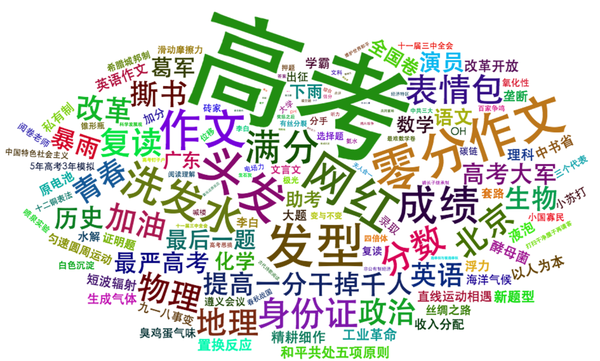。
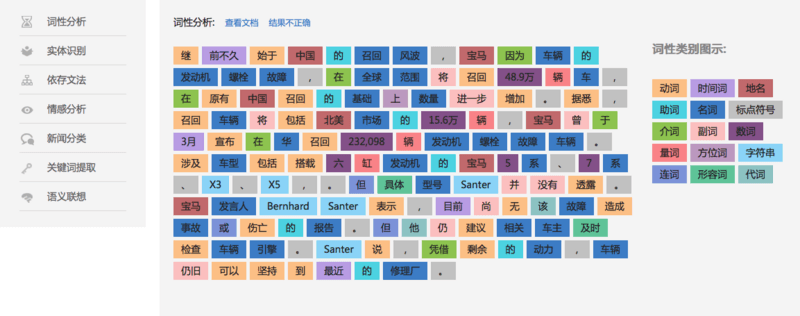
* [Boson NLP波森自然语言处理Web演示](http://bosonnlp.com/demo)
* 
* 【2017-12-21】 深度学习为什么在NLP管用?[Deep Learning, NLP, and Representations](https://colah.github.io/posts/2014-07-NLP-RNNs-Representations/),[深度学习、自然语言处理和表征方法](http://blog.jobbole.com/77709/). [Deep Learning in NLP (一)词向量和语言模型](http://licstar.net/archives/328#comment-1636).如何生成好的词向量?[《How to Generate a Good Word Embedding?》导读](http://licstar.net/archives/620),[](),,[论文地址](http://arxiv.org/abs/1507.05523),[实验代码地址](https://github.com/licstar/compare)
* 【2018-4-15】[机器翻译简史](https://zhuanlan.zhihu.com/p/34612952)
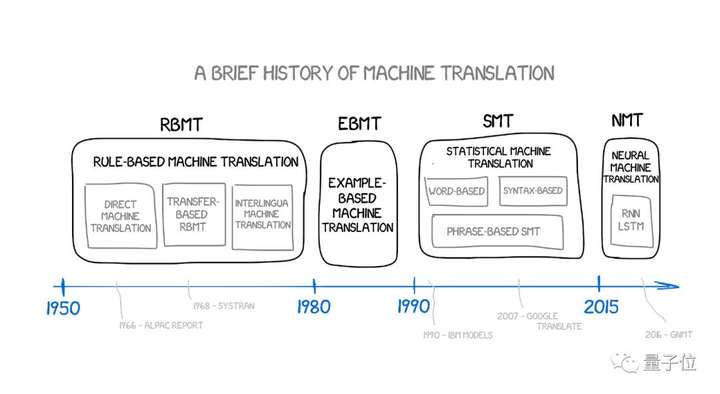
* 【2018-4-16】谷歌发布的自然语言理解(NLU)体验,[Semantic Experiences](https://research.google.com/semanticexperiences/),Talk to Books + Semantris
* 【2018-4-19】[11款分词工具大比拼](https://segmentfault.com/a/1190000003971257),[jieba分词15min入门与进阶](https://blog.csdn.net/fontthrone/article/details/72782499),jieba [Github地址](https://github.com/fxsjy/jieba)
* 【2018-5-13】[100+ Chinese Word Vectors 上百种预训练中文词向量](https://github.com/Embedding/Chinese-Word-Vectors)
* 【2018-7-21】牛津大学DeepNLP 2017课程[Deep Learning for Natural Language Processing: 2016-2017](http://www.cs.ox.ac.uk/teaching/courses/2016-2017/dl/),[github](https://github.com/oxford-cs-deepnlp-2017/lectures),[网易云课堂](https://study.163.com/course/introduction/1004336028.htm)
* What's next for NLP\&AI? 来自[Richard的twitter](https://twitter.com/RichardSocher/status/1021917140801052672/photo/1),工具包[decanlp](http://decanlp.com/)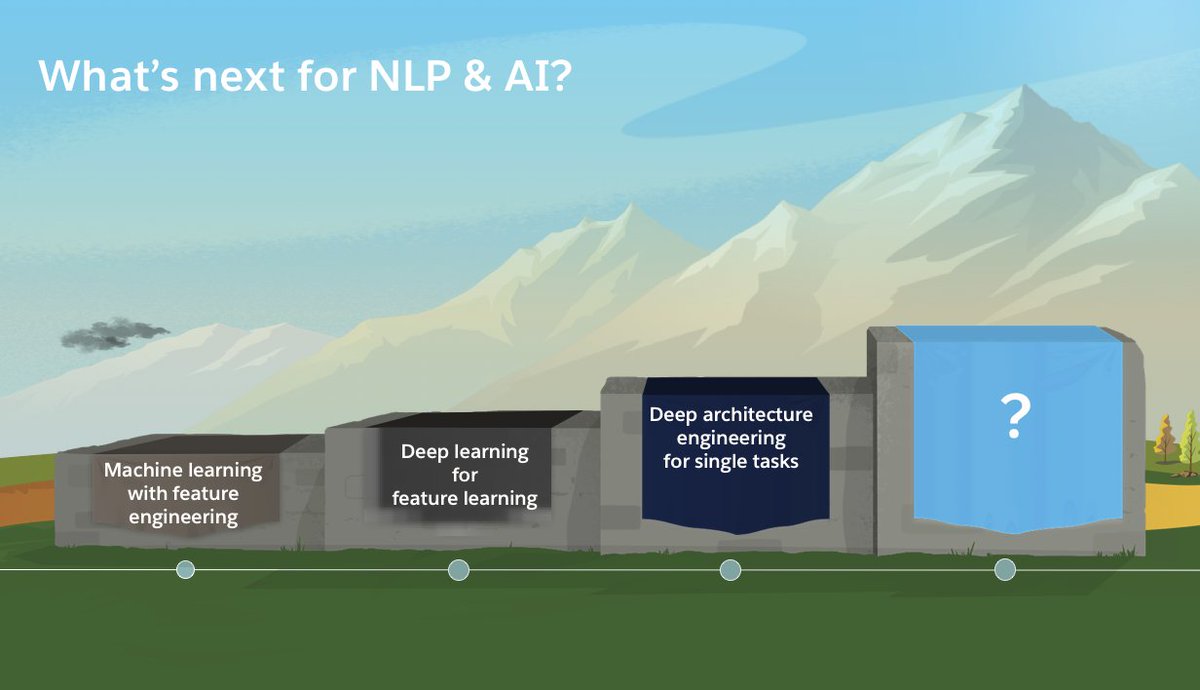
* 【2018-7-27】[https://medium.com/@ageitgey/natural-language-processing-is-fun-9a0bff37854e](https://medium.com/@ageitgey/natural-language-processing-is-fun-9a0bff37854e)
* 【2018-8-12】刘知远:语义表示学习[20180726\_语义表示学习\_CIPS暑期学校,ppt](http://nlp.csai.tsinghua.edu.cn/~lzy/talks/representation_learning_cips2018.pdf),[知识指导的自然语言处理](http://nlp.csai.tsinghua.edu.cn/~lzy/talks/knowledge_guided_nlp_2018.pdf)
* 【2019-04-08】[图解word2vec](https://mp.weixin.qq.com/s?__biz=MjM5MTQzNzU2NA==\&mid=2651669277\&idx=2\&sn=bc8f0590f9e340c1f1359982726c5a30\&chksm=bd4c648e8a3bed9817f30c5a512e79fe0cc6fbc58544f97c857c30b120e76508fef37cae49bc\&mpshare=1\&scene=25\&srcid=\&key=e26fe09897582c588a4204d6def3089e4ab9c01cf936a1af6c9d3139caa4632c05fa652b9d9f23f1aa33adaffbd5ff7221e60d2fbca99135d41f57e62101a4296f5137fbaf1ccc1e241eaf97a8b9862d\&ascene=1\&uin=Mjc1MTA5Njg0NA%3D%3D\&devicetype=Windows+10\&version=62060739\&lang=zh_CN\&pass_ticket=Uo3CAhHVpIfTBeoRpBZVWKyd7w6acyVkb3zIHTeUUXqq6ekJqLCLUwAH38YA5aOm#wechat_redirect),通俗讲解词嵌入方法的来龙去脉(源自大数据文摘),原文:[The Illustrated Word2vec](https://jalammar.github.io/illustrated-word2vec/)
* 【2019-6-2】免费书籍AutoML-[Auto Machine Learning](https://link.springer.com/book/10.1007/978-3-030-05318-5#toc),[A Beginner's Guide to Automated Machine Learning & AI](https://skymind.ai/wiki/automl-automated-machine-learning-ai)
* 【2019-07-02】[清华九歌诗词自动生成系统-含代码](https://mp.weixin.qq.com/s?__biz=MjM5ODkzMzMwMQ==\&mid=2650410297\&idx=1\&sn=cda7099455083fbd412d0fdcb41acbea\&chksm=becd8b6389ba02753810e8d2741010d1ac9f11277b5a53c08fccff63f16409babbd39999b5f5\&mpshare=1\&scene=23\&srcid=%23rd)
#### RNN
* 循环神经网络RNN:[BiLSTM iMDB影评分类可视化Demo](https://transcranial.github.io/keras-js/#/imdb-bidirectional-lstm)
* 【2018-5-2】[可视化LSTM网络:探索「记忆」的形成](https://www.toutiao.com/a6539111834589331976/?tt_from=mobile_qq\&utm_campaign=client_share\×tamp=1525255789\&app=news_article\&utm_source=mobile_qq\&iid=29957305093\&utm_medium=toutiao_android)。【2018-5-8】[对LSTM中M(Memory)的再思考](https://zhuanlan.zhihu.com/p/28263453?utm_source=wechat_session\&utm_medium=social),[YJango的循环神经网络——实现LSTM](https://zhuanlan.zhihu.com/p/25518711)
* [ImageNet 缔造者:如何让冰冷的机器读懂照片背后的故事?](http://www.ifanr.com/648667), [TED视频](https://www.ted.com/talks/fei_fei_li_how_we_re_teaching_computers_to_understand_pictures?language=zh-cn#t-40455),[网易公开课](http://open.163.com/movie/2015/3/Q/R/MAKN9A24M_MAKN9QAQR.html)
* \[2017-8-17][CS224n: Natural Language Processing with Deep Learning](http://web.stanford.edu/class/cs224n/)
* [Neural Nets for Generating Music](https://medium.com/artists-and-machine-intelligence/neural-nets-for-generating-music-f46dffac21c0)
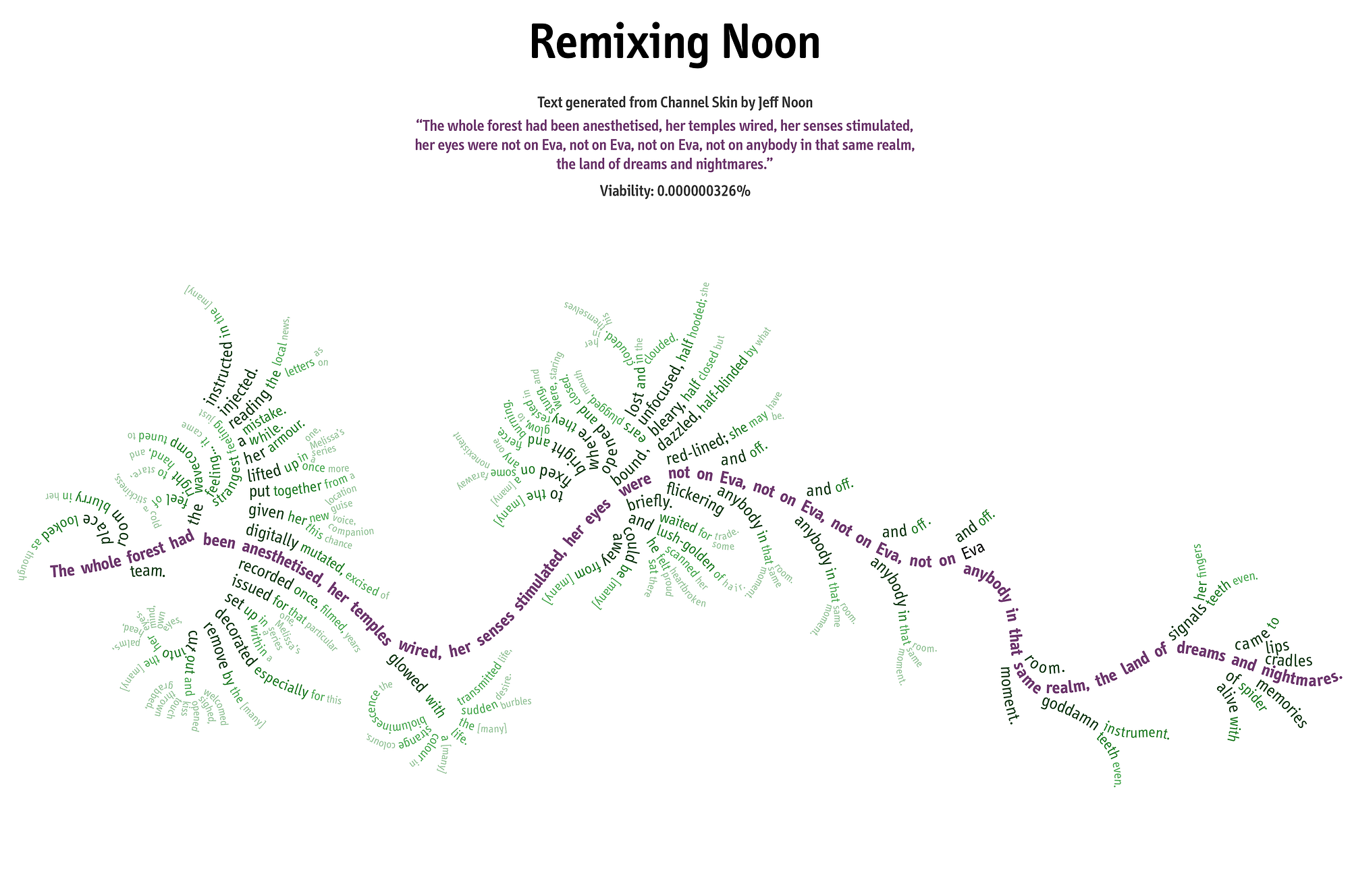
* Word2Vec教程:通俗易懂,Part-1,[Skip-Gram模型](http://blog.csdn.net/layumi1993/article/details/72866235),[原文:word2vec tutorial the skip-gram model](http://mccormickml.com/2016/04/19/word2vec-tutorial-the-skip-gram-model/);Part-2,[Negative Sampling](http://blog.csdn.net/Layumi1993/article/details/72868399),[原文](http://mccormickml.com/2017/01/11/word2vec-tutorial-part-2-negative-sampling/)
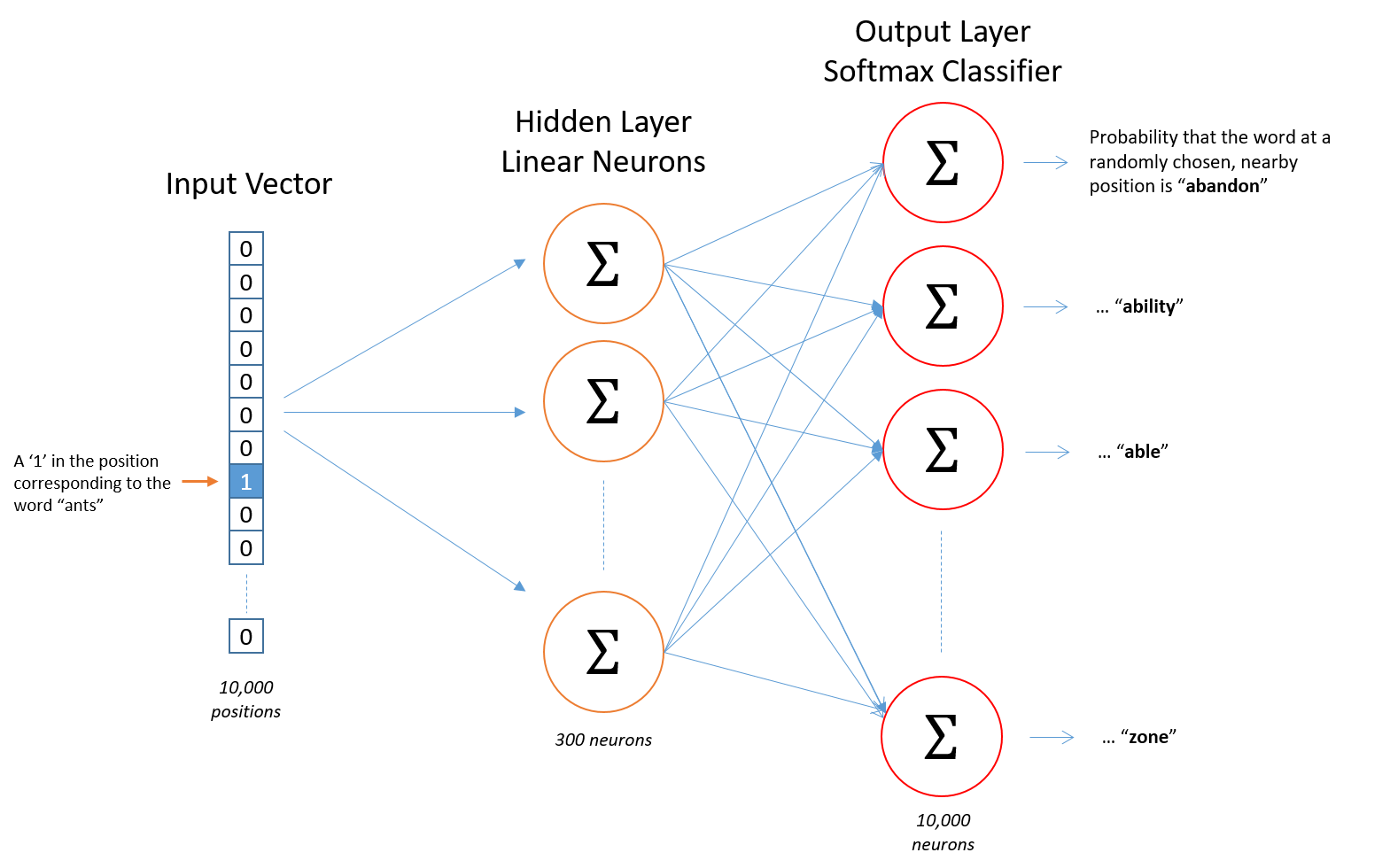
* [The amazing power of word vectors](https://blog.acolyer.org/2016/04/21/the-amazing-power-of-word-vectors/?blogsub=confirming#subscribe-blog)
* 【2017-12-29】[Embedding Projector](http://projector.tensorflow.org/). 
* 【2017-12-11】CMU,[Neural Network for NLP](http://phontron.com/class/nn4nlp2017/schedule.html)
* 【2017-12-12】NLP牛人
* 斯坦福[李纪为](https://web.stanford.edu/~jiweil/)
* [李纪为:用于对话生成的深度强化学习](https://baijia.baidu.com/s?old_id=545627)
* [让机器像人一样交流:斯坦福李纪为博士毕业论文](https://www.jiqizhixin.com/articles/2017-11-14)
* 【2018-1-15】[李纪为创立的香侬科技获红杉千万投资](http://www.sohu.com/a/216713639_114778),金融搜索分析工具
* 香港理工[李嫣然](http://yanran.li/about/)
* 【2018-4-2】Google Brain开发者,[蔡善清](http://scai.io/#about), [Github主页](https://github.com/caisq), 2005进入清华,2012年MIT博士毕业, tensorflow debugger主要开发者(以后会集成到tensorboard中),Eager动态计算图开发者
* 【2018-4-27】[完全图解RNN、RNN变体、Seq2Seq、Attention机制](https://zhuanlan.zhihu.com/p/28054589),将各自的关系讲的清清楚楚。【2018-5-12】神经网络机器翻译模型可视化(注意力Seq2seq模型机制)[《Visualizing A Neural Machine Translation Model (Mechanics of Seq2seq Models With Attention)》](https://jalammar.github.io/visualizing-neural-machine-translation-mechanics-of-seq2seq-models-with-attention/).
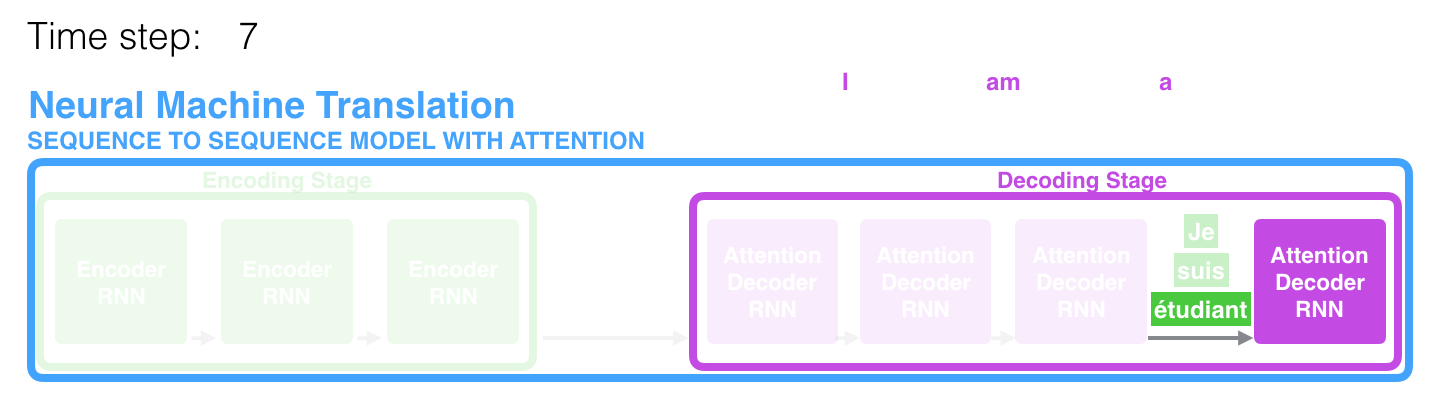,【2019-04-15】[【NLP】Attention Model(注意力模型)学习总结](https://www.cnblogs.com/guoyaohua/p/9429924.html)【2018-7-1】[图解机器翻译transforms实现](https://jalammar.github.io/illustrated-transformer/),原文[The Illustrated Transformer](https://jalammar.github.io/illustrated-transformer/),非常好的讲解资料!Jay Alammar的其它文章:[The Illustrated Word2vec](https://jalammar.github.io/illustrated-word2vec/),[The Illustrated BERT, ELMo, and co. How NLP Cracked Transfer Learning](https://jalammar.github.io/illustrated-bert/),[The Illustrated Transformer](https://jalammar.github.io/illustrated-transformer/)
* 【2018-5-1】机器阅读理解google QANet的[Tensorflow实现](https://github.com/NLPLearn/QANet)
* 【2018-5-18】[解密谷歌 Gmail 新功能:结合 BoW 模型和 RNN-LM,帮助用户快速写邮件](https://www.jiqizhixin.com/articles/051705)
* 【2018-7-23】[Keras.js实现的web版情感分析](https://transcranial.github.io/keras-js/#/imdb-bidirectional-lstm)
* 【2018-7-25】Google文本分类,[官方解读](https://developers.google.com/machine-learning/guides/text-classification/?linkId=54683504)

* 【2018-7-25】Google AutoML Natural Language [官方体验地址](https://cloud.google.com/natural-language/),涉及PoS,NER,情感分析,翻译,tts和asr,相关文章:[Empowering businesses and developers to do more with AI](https://www.blog.google/products/google-cloud/empowering-businesses-and-developers-to-do-more-with-ai/)。
* 【2018-9-7】谷歌大脑出品:注意力与增广RNN,[Attention and Augmented Recurrent Neural Networks](https://distill.pub/2016/augmented-rnns/),
* 【2018-11-12】张俊林的[从Word Embedding到Bert模型—自然语言处理中的预训练技术发展史](https://pan.baidu.com/s/1o4SBdsx6dY4W4bnuBmU38Q?errno=0\&errmsg=Auth%20Login%20Sucess&\&bduss=\&ssnerror=0\&traceid=)
### 语音
* 【2018-5-13】[音频样本浏览器](https://www.sononym.net/),支持音频分析、相似搜索、智能分类等
* 【Google Duplex:通过电话进行自然对话以执行“真实世界”任务】[《Google Duplex: An AI System for Accomplishing Real World Tasks Over the Phone | Google AI Blog》](https://ai.googleblog.com/2018/05/duplex-ai-system-for-natural-conversation.html)
#### 对抗生成学习
VAE和GAN,[VAE和GAN](https://pic4.zhimg.com/v2-380cde71a2f6ece28b46038ea2455a97_b.png)
* \[2017-7-28]AI专家的忏悔[Confession of a so-called AI expert](https://huyenchip.com/2017/07/28/confession.html?from=timeline)
* 【2017-7-30】Google的AI产品:[QuickDraw](https://quickdraw.withgoogle.com),类似你画我猜,只是用机器来猜。【2019-05-06】[如何利用TensorFlow.js部署简单的AI版「你画我猜」](https://www.jiqizhixin.com/articles/072202)
* [Facebook AI实验室最新的实时GAN图片展示](http://soumith.ch/eyescream/)
* 集智俱乐部李嫣然:[《深入浅出GAN-原理与应用》学习笔记](https://zhuanlan.zhihu.com/p/27663439),[厉害了,我的GAN](https://zhuanlan.zhihu.com/p/27663139)
* 【2018-9-11】[GAN工作原理演示Demo](https://poloclub.github.io/ganlab/), [GAN Lab详解](https://www.toutiao.com/a6599505914636534280/?tt_from=mobile_qq\&utm_campaign=client_share\×tamp=1536578339\&app=news_article\&utm_source=mobile_qq\&iid=43288484319\&utm_medium=toutiao_android\&group_id=6599505914636534280)
* 【2019-05-17】[GAN 毕业手册:从零到一构建自己的 GAN 模型](https://www.toutiao.com/a6691803487333777927/?tt_from=android_share\&utm_campaign=client_share\×tamp=1558069203\&app=news_article_lite\&utm_medium=toutiao_android\&req_id=201905171300020100220560468667020\&group_id=6691803487333777927),用 MNIST 数据集训练网络,用 Comet.ml 对实验数据和参数进行分析,并生成手写数字
### 强化学习
[返回目录](#目录)
* 强化学习、监督学习和无监督学习对比:
* [一文了解强化学习](http://geek.csdn.net/news/detail/201928)
* 【2017-7-31】[David Silver 强化学习公开课中文讲解](https://zhuanlan.zhihu.com/reinforce)
* 【2017-8-21】[Q-learning算法简明教程](http://blog.csdn.net/itplus/article/details/9361915),[英文原文](http://mnemstudio.org/path-finding-q-learning-tutorial.htm)
* 【2017-8-29】AK的博客[Deep Reinforcement Learning: Pong from Pixels](http://karpathy.github.io/2016/05/31/rl/)
* 【2017-12-19】强化学习领军人物Richard Sutton的经典教材[《强化学习》第二版](http://incompleteideas.net/book/the-book-2nd.html)。
* 【2017-12-21】[强化学习视频教程分享(从入门到精通)](https://mp.weixin.qq.com/s?__biz=MzIxNDgzNDg3NQ==\&mid=2247484036\&idx=1\&sn=4f7abdaec180d425f84c133bed53335d\&chksm=97a0c950a0d740467ee23bc8adb1aa081d8047d1ee8ba8ad60487a04c0f90383d480253448a4\&scene=21#wechat_redirect)
* 【2017-12-21】【视频】[深度强化学习介绍 (John Schulman, OpenAI)](http://www.365yg.com/item/6463040754213192206/)
* 【2018-5-1】[强化学习用于比特币自动交易](https://github.com/samre12/deep-trading-agent)
* 【2018-7-1】[Hands-On Reinforcement Learning With Python](https://github.com/sudharsan13296/Hands-On-Reinforcement-Learning-With-Python#)
* 【2018-7-29】[深度学习炒股](https://www.wukong.com/question/6561262297682018573/),含github代码
* 【2018-11-11】[OpenAI深度强化学习课程教程](https://mp.weixin.qq.com/s?__biz=MzIwOTc2MTUyMg==\&mid=2247485877\&idx=1\&sn=9fbd75c0dc4b72faa3810e685a3d74a8\&chksm=976fac28a018253e445cdf55846d58a4c47ffae528cd9d1528dc58cd3b279231f77b9c2c0b2f\&mpshare=1\&scene=23\&srcid=1110PlfHRdZcDEqvG8Wi3iSn#rd)
* 【2018-11-27】[UCL Reinforecement learning 视频地址](http://www0.cs.ucl.ac.uk/staff/d.silver/web/Teaching.html)
* 【2019-1-15】[A Free course in Deep Reinforcement Learning from beginner to expert.](https://simoninithomas.github.io/Deep_reinforcement_learning_Course/)
### 迁移学习
* 【2017-9-3】中科院计算所[迁移学习pdf](http://jd92.wang/assets/files/l08_tl_zh.pdf)
* 【2017-9-3】集智俱乐部,迁移学习资料汇总[github](https://zhuanlan.zhihu.com/p/28792291)[知乎](https://github.com/wantingallin/transferlearning)
* 【2018-5-1】【主动学习:优化!=改进】[《Active Learning: Optimization != Improvement》](https://lighttag.io/blog/active-learning-optimization-is-not-imporvement/) by LightTag。注:主动学习是指监督学习中,用较少的训练样本来获得性能较好的分类器
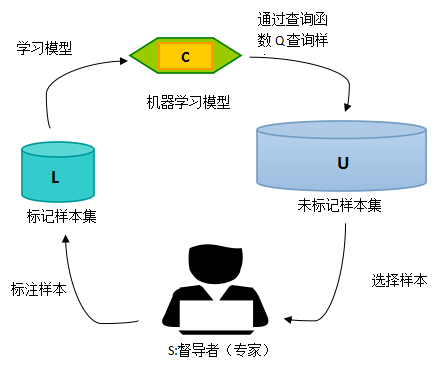
* 【2018-5-12】【无需博士学位的TensorFlow深度强化学习教程】《TensorFlow and deep reinforcement learning, without a PhD (Google I/O '18) - YouTube》by Martin Gorner. [Youtube地址](http://t.cn/R3bErsa), [Bilibili地址](https://www.bilibili.com/video/av23286922/)
* 【2018-8-16】《Transfer Learning in NLP | Feedly Blog》by Peter Martigny[迁移学习在NLP中的应用](https://blog.feedly.com/transfer-learning-in-nlp/)
* 【2019-04-18】[Multi-Task Learning代码示例](https://jg8610.github.io/Multi-Task/)
### 知识图谱
* [精益知识图谱方法论](http://blog.memect.cn/?p=2005),文因互联鲍捷组件的[北京知识图谱学习班](https://github.com/memect/kg-beijing),[知识管理和语义搜索的哲学思考](http://blog.memect.cn/?p=3022),更多资料参考[将门创业历届活动嘉宾视频及ppt](https://mp.weixin.qq.com/s?__biz=MzAxMzc2NDAxOQ==\&mid=502876225\&idx=1\&sn=25894a894cc2c58214ddde13e0a8ef93\&chksm=03907c9d34e7f58b57b068d0e7e74ac3db935a131cc7955478b58a98b9bc5c2b239c8ee03129\&mpshare=1\&scene=23\&srcid=1201jRGgplUzlGGggjBesJuI#rd), [八一八聊天机器人](https://zhuanlan.zhihu.com/p/25190575),[聊天机器人终极设计指南](http://www.woshipm.com/pd/441725.html),[一文看懂聊天机器人的所有猫腻](http://www.eeworld.com.cn/qrs/article_2016081529734.html),【2018-5-8】[自己动手做聊天机器人](https://github.com/warmheartli/ChatBotCourse),【2019-07-04】[零基础系列教程-如何开发微信聊天机器人并集成深度人工智能应用](https://github.com/telescopeuser/workshop_blog)
* 【2017-12-22】李文哲[知识图谱的应用](https://zhuanlan.zhihu.com/liwenzhe/20394260) 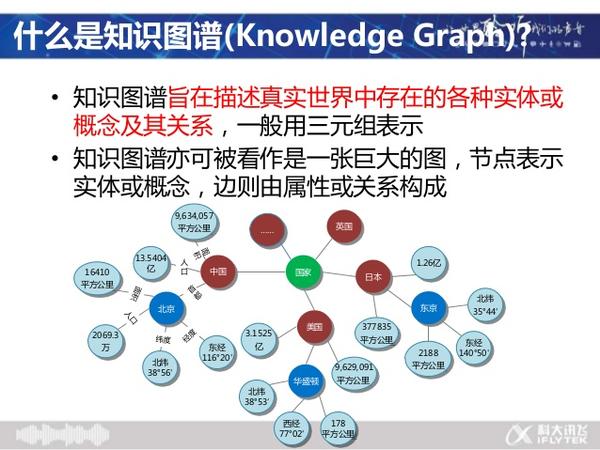
* 【2018-4-9】[十分钟上手图数据库](https://www.jianshu.com/p/97c6752e928b)
* 【2018-4-17】狗尾草CTO王昊奋[When KB meets Chatbots](http://blog.openkg.cn/%E7%8E%8B%E6%98%8A%E5%A5%8B-when-kg-meets-chatbots/),知识图谱[Zhishi.me](http://zhishi.me/),开放的知识图谱社区[OpenKG.cn](http://blog.openkg.cn/page/2/)
* 【2019-03-09】[前员工揭内幕: 10年了,为何谷歌还搞不定知识图谱?](https://mp.weixin.qq.com/s?__biz=MzA3Njc3NDY2MA==\&mid=2657869352\&idx=1\&sn=c4a7ad436475d261c8f28b5abb56ec63\&chksm=84c35243b3b4db550e12c797a2b6a351ced74d5496ef94f54f70a69120bd927d1d75f64cdffc\&scene=21#wechat_redirect)
### 数据挖掘
[返回目录](#目录)
* [谁说菜鸟不会数据分析【脑图笔记】](http://www.cnblogs.com/xiaofeng1234/p/5997018.html?from=timeline)
* [SQL必知必会【脑图笔记】](http://www.cnblogs.com/xiaofeng1234/p/6024479.html)
* SQL各种join区别:
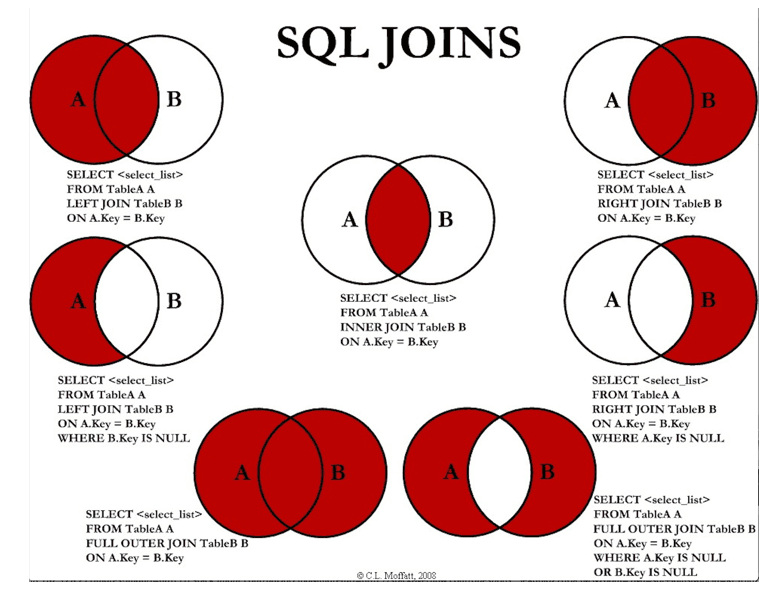
* 经验总结:[以什么姿势进入DataMining会少走弯路?](http://weibo.com/ttarticle/p/show?id=2309403973170330790744)
* [大嘴巴漫谈数据挖掘](http://download.csdn.net/detail/laoge/9386026)(易向军),图解各种基础知识和算法概念——五星推荐
* [分分钟带你杀入Kaggle Top 1%](https://zhuanlan.zhihu.com/p/27424282),[Kaggle求生:亚马逊热带雨林篇](https://zhuanlan.zhihu.com/p/28084438)
* \[2017-8-30][Kaggle 首战拿银总结 | 入门指导 (长文、干货)](https://jizhi.im/blog/post/kaggle_silver)
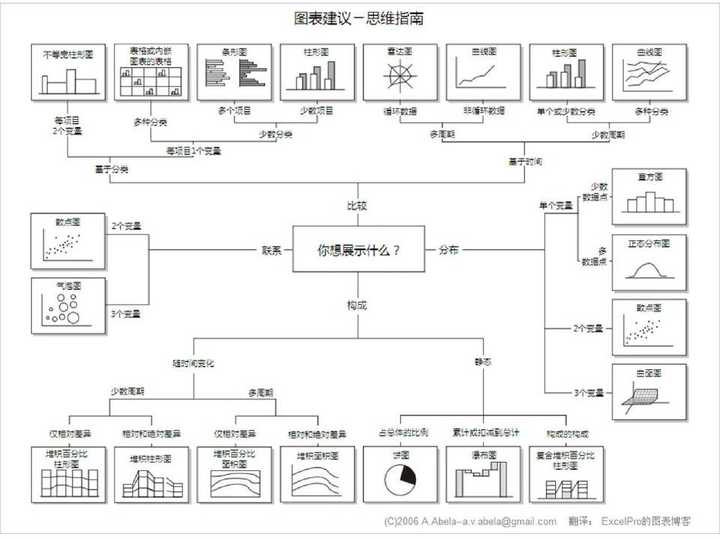
* 【2017-12-13】知乎[如何快速成为分析师](https://www.zhihu.com/question/29265587),图表建议-思维指南
* 
* 【2017-12-14】知乎[数据分析&数据挖掘书籍推荐](https://www.zhihu.com/question/20757000)
* 【2018-5-2】[你费那么大劲做的数据分析,有用吗](https://zhuanlan.zhihu.com/p/21378331),左耳朵耗子-陈皓的[数据的游戏:冰与火](https://coolshell.cn/articles/10192.html),博主的视频简介,[二叉树视频](https://time.geekbang.org/column/intro/48?code=GGVOKz%2FyFTRtOnWIHYr%2FvFsgL3ON7Xqwkdz2f7yTqD4%3D\&utm_source=weibo\&utm_medium=geektime\&utm_campaign=79-rise\&utm_content=0613)
### 人脸识别
* 权威书籍[Handbook of Face Recognition](https://cours.etsmtl.ca/sys828/REFS/Intro/Hanbook%20of%20Face%20Recognition.pdf)
* [Modern Face Recognition with Deep Learning](https://medium.com/@ageitgey/machine-learning-is-fun-part-4-modern-face-recognition-with-deep-learning-c3cffc121d78)

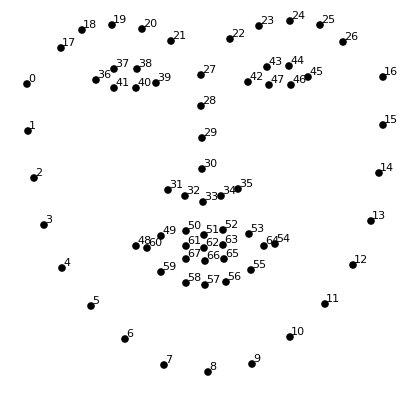
* Face Point
* 
* Face Compare
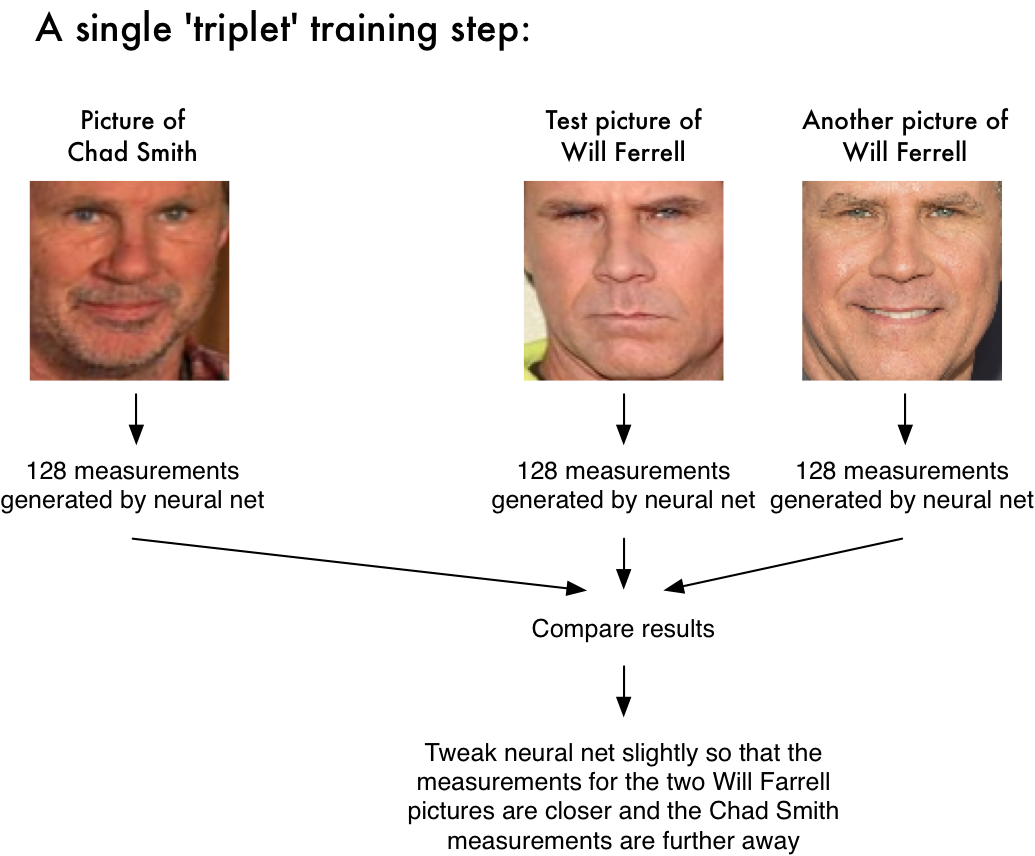
* \[2017-9-20][CMU OpenPose姿势识别](https://github.com/hxl1990/openpose)
* 
* \[2017-9-21]自拍照三维重建[3D Face Reconstruction from a Single Image](http://www.cs.nott.ac.uk/~psxasj/3dme/index.php)
* :no_upscale\(\)/cdn.vox-cdn.com/uploads/chorus_image/image/56734861/3d_mark_take_2.0.gif)
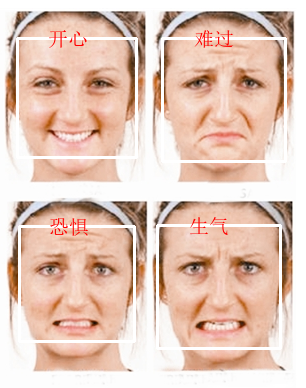
* 【2018-2-25】[人脸识别:含年龄性别表情人种](https://www.haystack.ai/)
* 【2018-7-15】[人脸识别入门大全faceai](https://github.com/vipstone/faceai):含情绪、性别识别,表情替换等
* 
* 
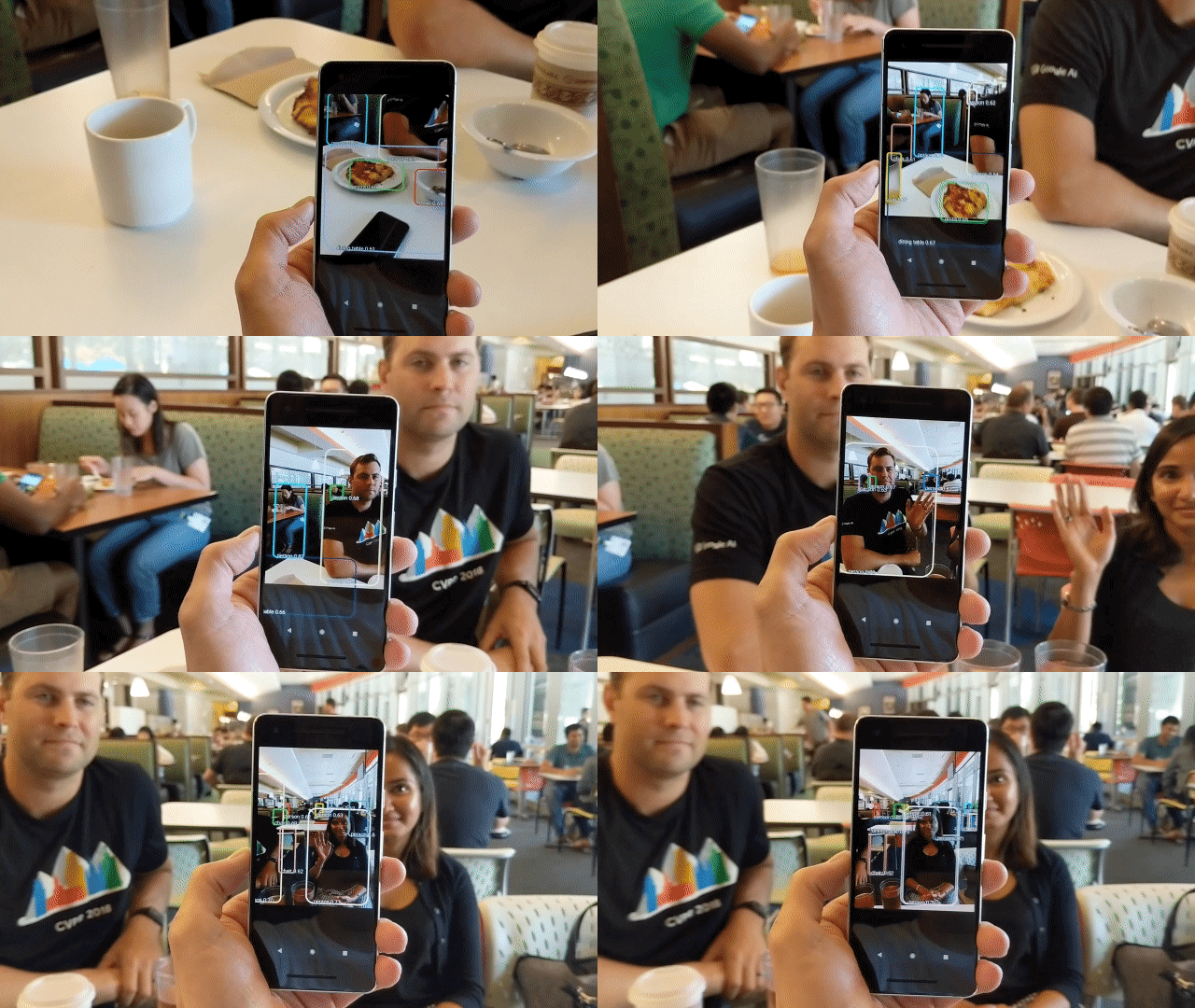
* 【2018-7-15】基于tensorflow的实时目标检测
* 
* 2018中国AI战事全景图
## IT资讯
[返回目录](#目录)
* 查公司信息:[天眼查](http://www.tianyancha.com/),[IT桔子](https://www.itjuzi.com/)
* [互联网黑名单](https://github.com/shengxinjing/programmer-job-blacklist)
* 股权信息:[股权周刊](https://zhuanlan.zhihu.com/guquanzhoukan)(各种股权纠纷案例,作者[邓永权](https://www.zhihu.com/people/guquanzhoukan/answers))。[【干货】创业公司融资时如何分配股权?融资后一般怎么稀释?](http://bbs.pinggu.org/thread-4526409-1-1.html)
* [程序员跳槽全攻略-读书笔记](http://www.cnblogs.com/coderland/p/5903051.html)
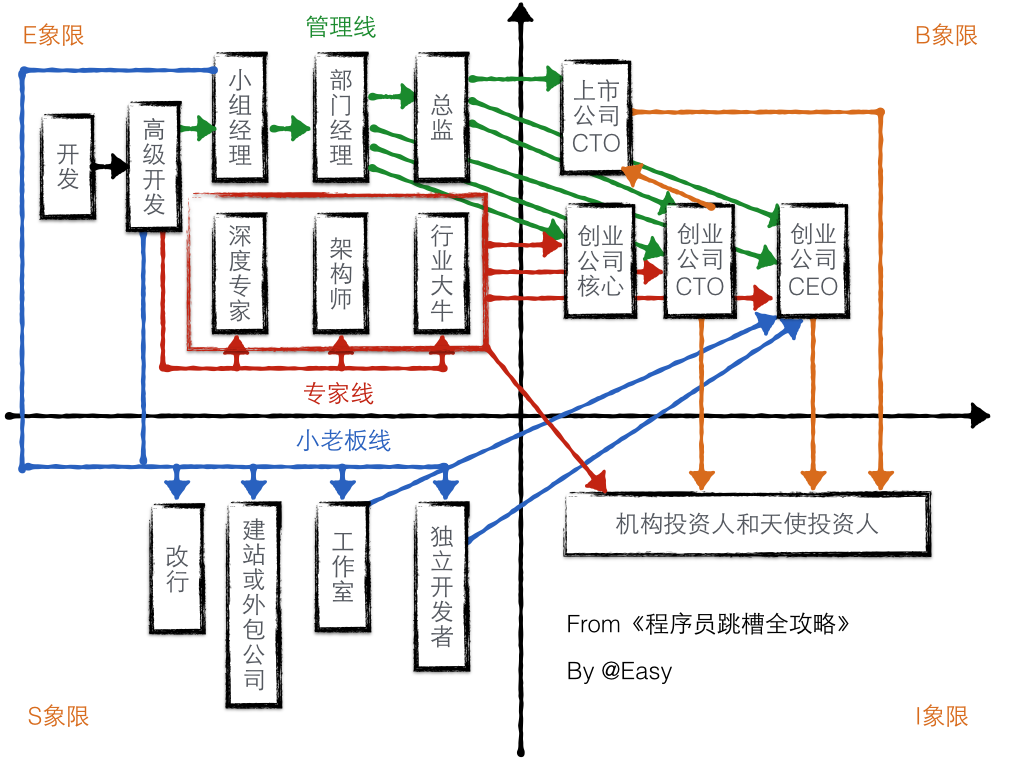
* 【2018-1-7】程序员职业生涯蓝图。(原图链接已失效,保留条目说明)
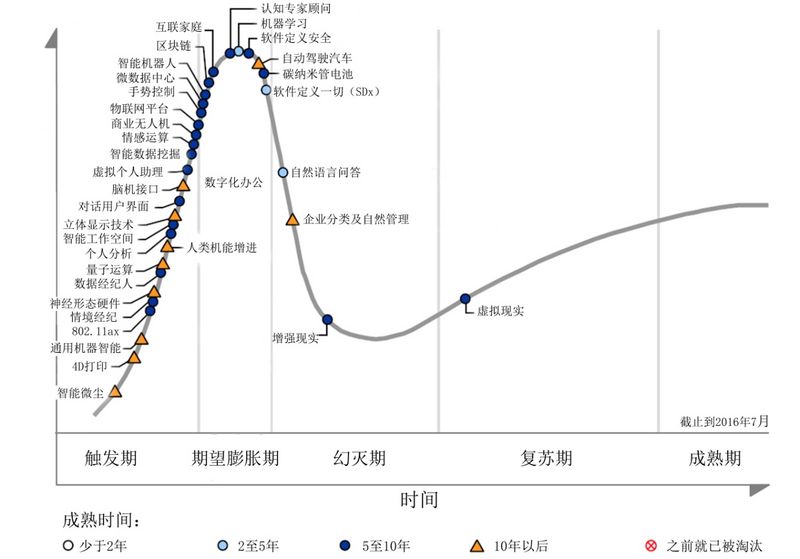
* Gartner:技术成熟度曲线.[Gartner2016 年度新兴技术成熟度曲线解读:3 大趋势、16 个新技术](http://www.cniteyes.com/archives/26460)
* [互联网大佬的出生地图鉴](http://www.toutiao.com/a6442203091621314818/?tt_from=mobile_qq\&utm_campaign=client_share\&app=news_article_lite\&utm_source=mobile_qq\&iid=12181093832\&utm_medium=toutiao_android)
* [SixSence](https://www.ted.com/talks/pattie_maes_demos_the_sixth_sense?language=zh-cn#t-492870),[The thrilling potential of SixthSense technology](https://www.youtube.com/watch?v=YrtANPtnhyg),[Pranav Mistry](http://www.pranavmistry.com/projects/sixthsense/#VIDEOS)
* 
* IT橘子[人工智能全产业链图谱](https://www.itjuzi.com/ai)
* 【2018-1-8】36Kr,[互联网中的少数派-女性开发者(视频)](https://www.ixigua.com/a6481129329202823693/?utm_medium=feed_steam\&utm_source=toutiao#mid=3757989448),全世界1850w程序员,中国占10%,主人翁司晓静、刘旸(iOS开发,天气旋律闹钟weather tunes)、创业公司castbox CEO王小雨(北大心理学系自学转Android开发,fruit boom杰作,Google)。
* 【2018-1-16】舒适区、恐慌区,参考知乎[不断跳出自己的「心理舒适区」真的能够让人们取得更大的成就吗?](https://www.zhihu.com/question/26111474)
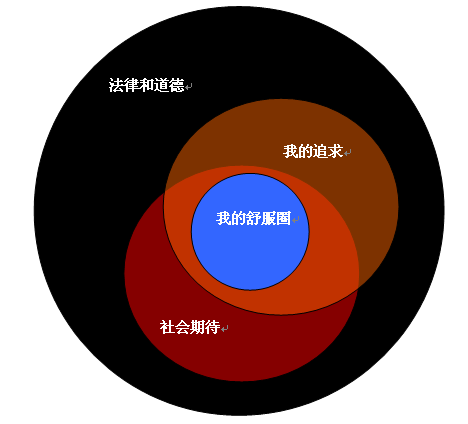
如何成为一个很厉害的人?

* 【2018-11-24】邓宁-克鲁格心理效应,又称达克效应 
* 【2018-5-2】[技术人员的发展之路](https://coolshell.cn/articles/17583.html)
* 【2018-9-28】[阿里技术参考图册](https://zhuanlan.zhihu.com/p/35819123?utm_source=wechat_timeline\&utm_medium=social\&utm_oi=26687341330432\&from=timeline)[算法篇](http://techforum-img.cn-hangzhou.oss-pub.aliyun-inc.com/1523848064814/AliTech101_Algorithms.pdf),[研发篇](http://techforum-img.cn-hangzhou.oss-pub.aliyun-inc.com/1523962960197/AliTech101_RD.pdf)
* 【2018-2-25】[纪实:中国人工智能之路](http://list.youku.com/show/id_zefbfbd2b2f7befbfbdef.html?spm=a2h0j.8191423.module_basic_title.5~A!2),[人工智能真的来了](http://list.youku.com/show/id_zefbfbd2b2f7befbfbdef.html?spm=a2h0j.8191423.module_basic_title.5~A!2)
* 【2019-06-03】人类唯一的出路:变成人工智能系列, 全部看完会开心很久,精品原文:waitbutwhy出品,[Neuralink and the Brain’s Magical Future](https://waitbutwhy.com/2017/04/neuralink.html)
* 第一章:[人类巨灵](http://t.cn/RubPLhR)(约7000字)简述人类语言、智能和人类巨灵的崛起
* 第二章:[大脑](http://t.cn/R3XxgqR) (约8000字)简述大脑结构,为了解脑机接口提供基础知识
* 第三章:[脑机接口](http://t.cn/R3Xxgqn)(约12000字)讲述脑机接口的基本原理和目前的技术水平
* 第四章:[挑战](http://t.cn/RuV44co)(约8000字)讲述目前脑机接口跨越到全脑接口所要面临的挑战
* 第五章:[魔法纪元](http://t.cn/R3Xxgq8)(约13000字)全脑接口实现后未来的人类会是怎样
* 第六章:大融合(约10000字)人类唯一的出路:变成人工智能
* 【2018-4-25】[阿布量化](https://github.com/bbfamily/abu?from=groupmessage\&isappinstalled=0)
* 【2018-8-9】How Google works? [pdf下载](https://download.csdn.net/download/leee77/8149425),[知乎评价](https://www.zhihu.com/question/30360173),[英文版](https://download.csdn.net/download/baby6046/9386857)
* 【2019-03-11】[互联网一些事儿](http://www.yixieshi.com/),包含最新各行业调查报告
## 工具
[返回目录](#目录)
* 视频下载工具:[流媒体下载的10种方法](http://www.jianshu.com/p/e7d2c3a624f6)
* [硕鼠](http://www.flvcd.com/)(可以下载流视频,可按专辑下载),[硕鼠Mac版下载地址](http://www.pc6.com/mac/118056.html)(官网地址有问题)
* [维棠](http://www.vidown.cn/)
* YouTube视频下载:(更多方法参考知乎帖子:[如何下载youtube视频](https://www.zhihu.com/question/51714507?sort=created))
* (1)每个视频域名稍作修改即可(youtube.com->kissyoutube.com),[SaveMedia](https://savemedia.com/)提供,在线下载+系列视频自动推荐
* (2) python代码下载,pip3 install you-get,you-get '[https://www.youtube.com/watch?v=jNQXAC9IVRw](https://www.youtube.com/watch?v=jNQXAC9IVRw)', 支持的视频网站范围广. 【2018-9-20】视频下载工具[annie](https://github.com/iawia002/annie),覆盖几乎所有视频网站
* (3) [clipconverter](http://www.clipconverter.cc/)
* 【2019-04-24】安装annie,可批量下载,windows下:[scoop](https://scoop.sh/) install annie,步骤:Set-ExecutionPolicy RemoteSigned -scope CurrentUser; iex (new-object net.webclient).downloadstring('[https://get.scoop.sh](https://get.scoop.sh)')
* 【2018-6-21】webrtc [peer to peer文件传输工具](https://reep.io/), 基于浏览器,直接选中本地文件,生成下载链接,速度400kb,示例:[mathematica下载](https://reep.io/d/9vsymkgm3e),【2019-05-16】[mathematica快速入门](https://zhuanlan.zhihu.com/p/47896722)
* 【2019-06-08】突破百度网盘限速工具[Pandownload](http://pandownload.com/)
* 【2018-12-9】录屏制作成gif工具[GifCam](https://www.iplaysoft.com/gifcam.html),[在线OCR工具](https://zhcn.109876543210.com/),如提取图片里的excel表格,【2018-12-16】[在线LaTeX编辑器overleaf](https://www.overleaf.com/),[数学公式截图转LaTeX](https://mathpix.com/),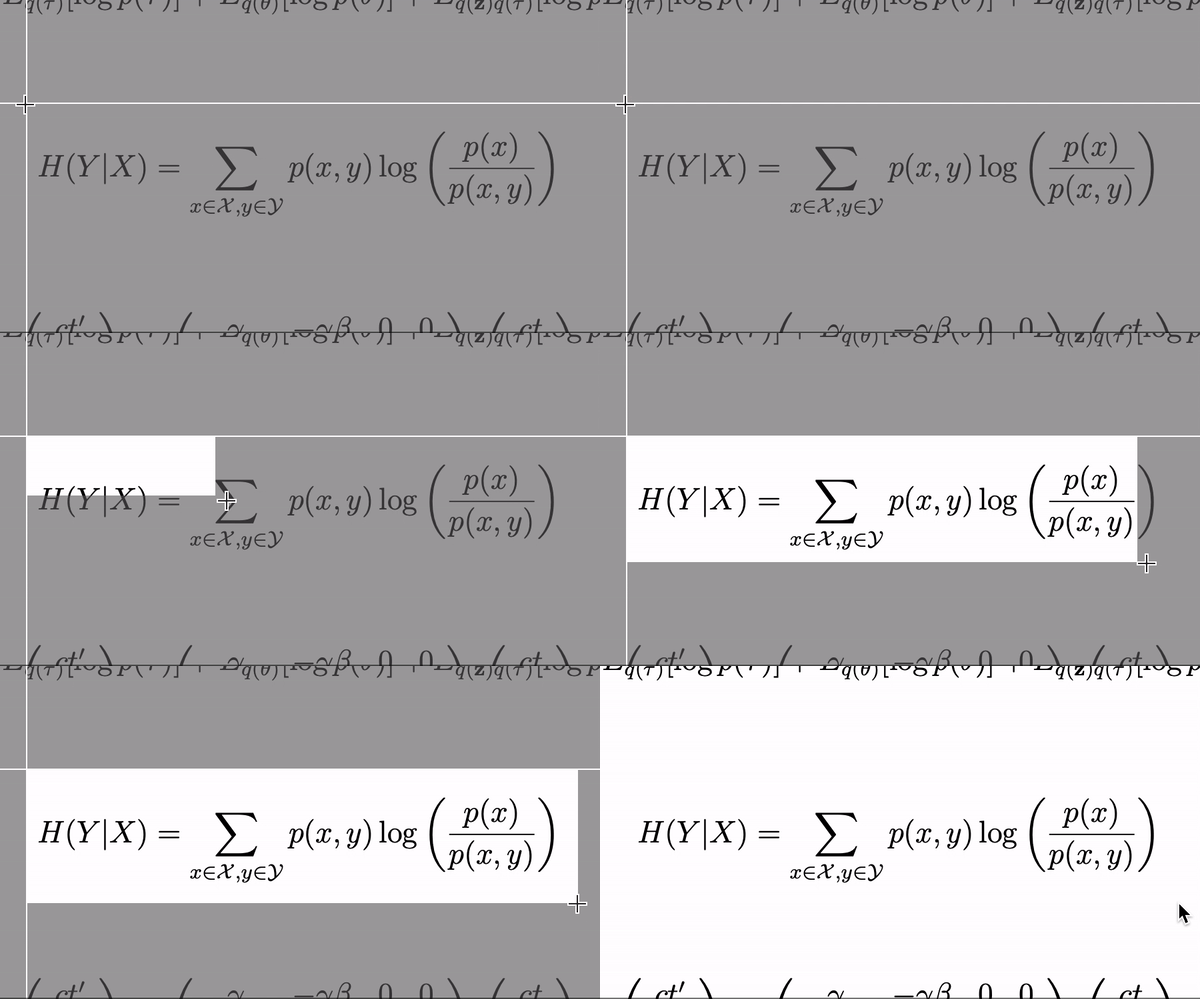
* [lantern下载](https://github.com/getlantern/forum/issues/833),[蓝灯无限制版](https://github.com/JuncoJet/unlimited-landeng-for-win)
* 在线代码着色(高亮):[国外:含语言类型自动识别(优)](http://markup.su/highlighter/),[国内:在线代码着色器(需要自己勾选)](http://tool.oschina.net/highlight),[实时英文拼写检测](https://app.grammarly.com/),[插件下载地址](https://chrome.google.com/webstore/detail/grammarly-for-chrome/kbfnbcaeplbcioakkpcpgfkobkghlhen?hl=en),【2018-10-11】[pycorrector](https://github.com/shibing624/pycorrector) - 中文错别字纠正工具。音似、形似错字(或变体字)纠正,可用于中文拼音、笔画输入法的错误纠正,[Demo地址](http://www.borntowin.cn/nlp/corrector.html),`sudo pip install jieba kenlm pypinyin pycorrector`
* 【2019-07-18】编辑器学习曲线:
* 
* [如何使用VIM搭建IDE?](http://harttle.com/2015/11/04/vim-ide.html),[vim键盘图大全](http://www.cnblogs.com/yu-lang/p/5413279.html),[所见即所得,像IDE一样使用vim](https://github.com/yangyangwithgnu/use_vim_as_ide),
* 
* [台湾人总结的vim命令图解(pdf打印版)](http://img.my.csdn.net/uploads/201211/24/1353759337_6781.png)
* 【2017-12-14】[awk思维导图](http://s1.51cto.com/wyfs02/M01/7D/18/wKiom1bf0R6wMA_sABZGEQxE4yg982.png),[sed思维导图](http://scc.qibebt.cas.cn/docs/linux/script/sed%CB%BC%CE%AC%B5%BC%CD%BC.jpg),[更多linux工具总结](http://scc.qibebt.cas.cn/docs/doc-main.php?dir=linux)
* [python下的二维码生成与解析](http://peihao.space/2016/01/30/QR/),【2019-04-29】二维码识别原理
* 【2018-9-9】[哪些相见恨晚的python库](https://www.cnblogs.com/jinjiangongzuoshi/p/6596268.html)
* 【2018-2-17】[用PYTHON玩微信(非常详细)](http://www.cnblogs.com/jiaoyu121/p/6944398.html),通过微信网页版抓包的开源工具[itchat](https://github.com/littlecodersh/itchat),可以分析微信数据,可视化(echart+wordcount),聊天机器人,接入图灵机器人,[示例](https://itchat.readthedocs.io/zh/latest/tutorial/tutorial0/),【2018-7-15】[接入微软小冰,把公众号升级为人工智能公众号的攻略](https://www.jianshu.com/p/1e3c11435123),支持文章回复,其它:[Python实现微信自动回复机器人](http://blog.csdn.net/weixin_40127725/article/details/78185193),[python实现微信接口(itchat)](https://segmentfault.com/a/1190000009420701)资料全面
* 【2018-4-4】微信小程序开发,[官方小程序简易教程](https://developers.weixin.qq.com/miniprogram/dev/quickstart/basic/file.html),[微信小程序开发资源汇总](http://xn--vuqv9g32iftcfqq6am2a581eowevx8ayg8b/)
* 【2017-12-17】[如何用github搭建个人博客](https://cczeng.github.io/2017/05/03/git/%E6%88%91%E6%98%AF%E5%A6%82%E4%BD%95%E5%88%A9%E7%94%A8Github-Pages%E6%90%AD%E5%BB%BA%E8%B5%B7%E6%88%91%E7%9A%84%E5%8D%9A%E5%AE%A2%E2%80%94%E2%80%94%E7%BB%86%E6%95%B0%E4%B8%80%E8%B7%AF%E7%9A%84%E5%9D%91/),【2018-2-19】[微信公众号如何接入图灵机器人](http://blog.csdn.net/jueyi1127/article/details/48291025),【2019-02-23】中文语音对话-悟空机器人[wukong-robot](https://wukong.hahack.com/#/install)
* 【2018-2-16】[1997年世界黑客编程大赛冠军作品](http://blog.sina.com.cn/s/blog_882361720101d730.html),[视频地址](http://v.youku.com/v_show/id_XMTY5NTI2NzY2OA==.html),汇编语言生成3D动画
* 【2018-3-31】文件转换,①[pdf转换器](http://www.pdfdo.com/pdf-to-word.aspx),②[迅捷pdf转换器](http://app.xunjiepdf.com/),pdf到各种文件格式的转换,③[国外的pdf converter](https://www.freepdfconvert.com/)
* 【2018-4-2】[Heavens Above](http://www.heavens-above.com/), 查看天体运行,如特斯拉实时位置,天宫一号降落过程
* 【2018-5-1】[《后端架构师技术图谱》](https://github.com/xingshaocheng/architect-awesome/blob/master/README.md#innodb)
* 【2018-8-9】[正向代理+反向代理总结](https://www.cnblogs.com/Anker/p/6056540.html)
* 
* 【2018-5-20】[Linux,一生只为寻找欢笑](https://www.oschina.net/news/72562/linus-smell)[知乎帖子](https://zhuanlan.zhihu.com/p/19796979),Linus Torvalds名言:Talk is cheap,show me the code!翻译:①正经版:代码胜于雄辩②俗版:屁话少说,放码过来③文艺版:纸上得来终觉浅,觉知此事需躬行④红色版:空谈误国,实干兴⑤邦隐晦版:北沙滩,亮马桥
* 【2018-12-6】[漫画图解linux内核](http://www.techug.com/post/carton-inside-the-linux-kernel.html),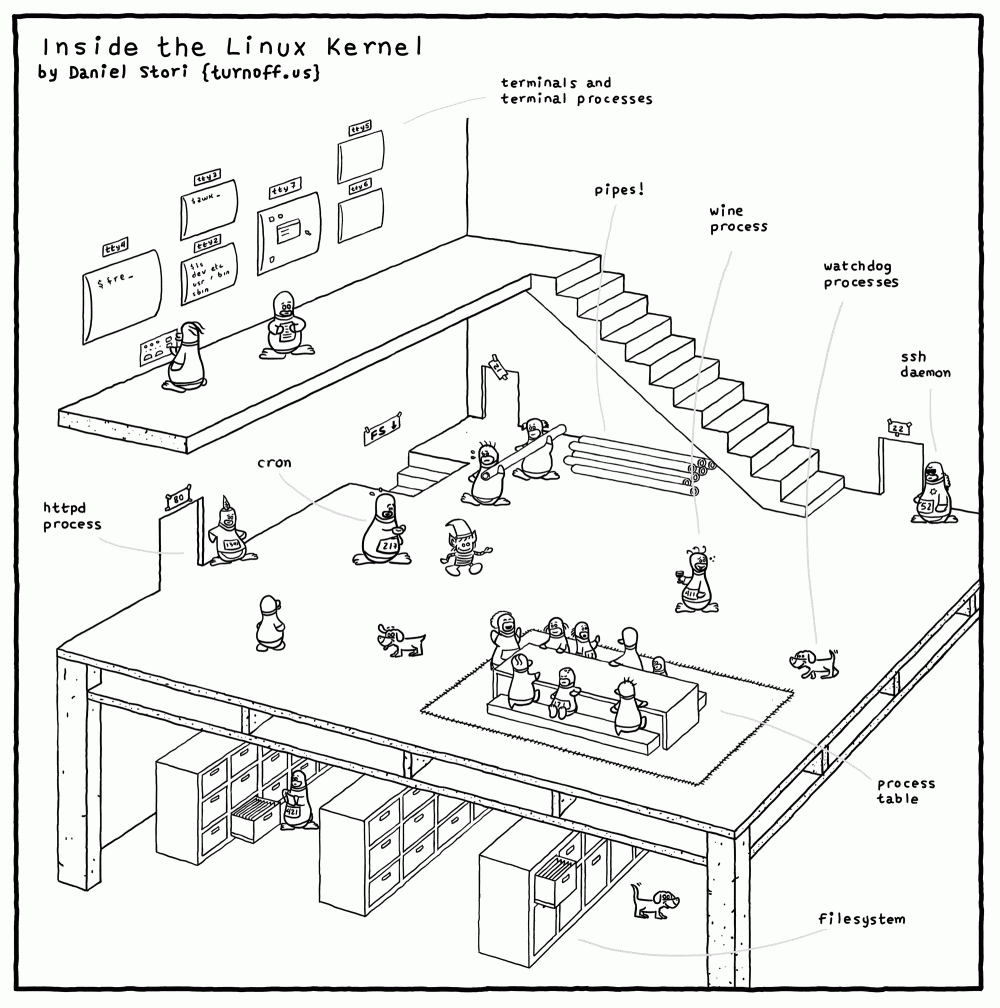
* 【2018-5-22】[基于HTML5超酷摄像头(HTML5 webcam)拍照功能实现代码](http://www.jb51.net/html5/67833.html),基于WebRTC技术
* 【2018-7-28】世界最大外文电子书搜索引擎[B-OK](http://b-ok.org/), [鸠摩电子书搜索引擎](https://www.jiumodiary.com/)
,【2018-8-7】[虫部落快搜](http://search.chongbuluo.com/)搜索大全
* 【2018-10-9】抓包工具:青花瓷[charles官网](https://www.charlesproxy.com/latest-release/download.do),[在线破解](https://www.zzzmode.com/mytools/charles/). [fidder](https://www.telerik.com/fiddler)
* 【2018-10-11】一图读懂开源license,
* 【2018-11-3】[IP地址详解](http://blog.51cto.com/6930123/2112403)
* 【2018-11-20】[图解浏览器工作原理](https://www.toutiao.com/a6625454427924857357/?tt_from=mobile_qq\&utm_campaign=client_share\×tamp=1542722419\&app=news_article\&utm_source=mobile_qq\&iid=50974775731\&utm_medium=toutiao_android\&group_id=6625454427924857357)
* \[2017-9-19]视频集合:[内存原理解析](http://www.365yg.com/group/6467022800149283342/),[CPU缓存原理解析](http://www.365yg.com/group/6467021466209616397/),[TCP,UDP协议原理对比](http://www.365yg.com/group/6467022804800766477/),[IPv4,IPv6原理解析](http://www.365yg.com/group/6467021492105249293/),[代理服务器原理解析](http://www.365yg.com/group/6467022795812373005/),[集线器-交换机-路由器区别](http://www.365yg.com/group/6467021483385291277/),[DNS域名解析](http://www.365yg.com/group/6467021479107101197/),[超线程原理解析](http://www.365yg.com/group/6467021487722201614/),[磁盘碎片原理解析](http://www.365yg.com/group/6467021470504583693/)
* 【2018-3-13】松果云科普:动画解释,[详解硬盘工作原理](https://www.365yg.com/a6524897664687931911),[详解显卡工作原理:GPU和CPU的区别](https://www.365yg.com/i6525769921438155272)
* 【2019-03-22】[HTTP协议详解](http://www.cnblogs.com/EricaMIN1987_IT/p/3837436.html),【2019-04-11】[细说API,重新认识RESTful](https://www.toutiao.com/a6646933417105555976/?tt_from=mobile_qq\&utm_campaign=client_share\×tamp=1554985458\&app=news_article\&utm_source=mobile_qq\&utm_medium=toutiao_android\&req_id=2019041120241801002302916124312B1\&group_id=6646933417105555976)
* 【2019-05-27】[电视直播链接汇总](http://bddn.cn/zb.htm)
* 【2019-05-28】[网站用户可视化组件](https://www.revolvermaps.com/?target=setup),代码如下:
***
***
### 实验评估
* 第一种:A/B-Test. [什么是ab-test?](https://www.zhihu.com/question/20045543/answer/59025552)
* A/B Test,也称为对比测试,是让两个版本的登陆页面的相互pk测试。看看哪个版本能更好地引导访问者达到你的预设目标,如注册或订阅。
* [工程实施:叫你如何对产品进行AB Test?](http://blog.csdn.net/weiguang_123/article/details/49203239),包含服务端、客户端如何实施ab-test,及各自的优缺点
* [ab-test有什么局限性?](https://www.zhihu.com/question/19631253)
* 首先,A/B测试只有在关键效绩指标(KPI, or Key Performance Indicator)单一,且这个单一明确的目标可以被电脑量化时,适用
* 其次,A/B测试相比起一些别的测试手段,如纸本原型(paper prototyping),需要的工作量大、时间长,对设计的要求也相对较高。
* 另外,A/B测试之所以进行,唯一原因是对结果的追求。但相对应的测试结果通常是短期、即刻的用户行为,比如购买、注册、点击等。
* 此外,A/B测试并不能提供用户行为的具体细节。A/B测试的结果也仅限于被测试的两个选项:如果12号字比16号字为你的网站带来多1%的用户浏览时间,那10号字呢?8号呢?A/B测试并不能帮助你作更多的、长远的决定。
* A/B测试还有别的缺点:需要的用户人数大,可能的影响因素多,可以测试的选项数有很大限制等等。
* [吆喝科技-ab-test最佳实践](http://www.appadhoc.com/blog/category/appadhoc/)
* 第二种:interleaving,参考美团分享的文章[沈国阳:美团推荐系统整体框架与关键工作](https://www.csdn.net/article/1970-01-01/2825455).
* abtest的好处是可以对多个策略给出定量评估,坏处是:①策略差异小时,评估结果波动大②需要较长时间反馈,导致迭代速度慢
* 改进:interleaving,所需流量小,灵敏度高(24h内),但只能给出定性结论。基本思想是将两个策略混合,对所有用户统计分析判断哪个好
* 【2018-6-22】优质资源,多图解释[Innovating Faster on Personalization Algorithms at Netflix Using Interleaving](https://medium.com/netflix-techblog/interleaving-in-online-experiments-at-netflix-a04ee392ec55)
* [灰度发布和A/B Test](http://www.jianshu.com/p/88f206f48278)
## 编程语言
[返回目录](#目录)
* [命令式编程和声明式编程的区别](http://www.vaikan.com/imperative-vs-declarative/)
* [go语言开发者必读的陷阱、技巧、错误](http://www.cnblogs.com/Eilen/p/6944345.html)
* 【2018-5-2】Python入门神图,参考:[Python脚本图解](https://blog.csdn.net/GarfieldEr007/article/details/50898988),[Python入门思维导图百度云盘下载](https://pan.baidu.com/s/1sl0o6tB)
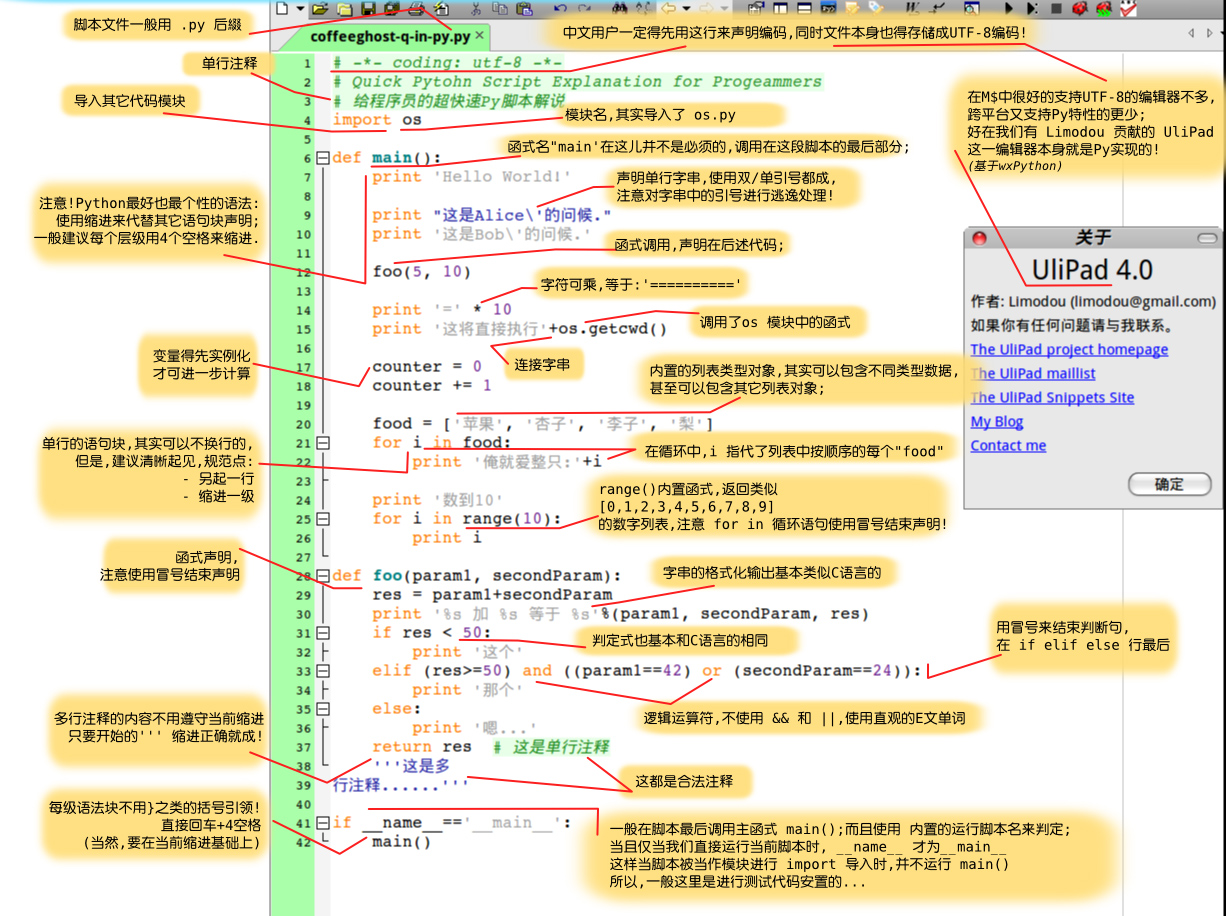
* python:[python小白笔记](http://www.cnblogs.com/xiaofeng1234/p/6052051.html),[python正则表达式](http://www.cnblogs.com/huxi/archive/2010/07/04/1771073.html),【2019-03-31】[正则表达式在线调试Regulex](https://jex.im/regulex/#!flags=\&re=%5E\(0-3\)\(88\)*%3F%24) 
* 【2018-5-4】[Python代码执行过程可视化](http://www.pythontutor.com/visualize.html#mode=display)
* 【2017-12-11】python面向对象:[初级篇](http://python.jobbole.com/82023/),[进阶篇](http://python.jobbole.com/83747/)
* 【2018-4-28】Dive into Python[中文版](https://woodpecker.org.cn/diveintopython/)
* 【2018-6-4】[图解深拷贝和浅拷贝](https://www.cnblogs.com/wilber2013/p/4645353.html)
* 【2018-5-30】request发明人的python教程:[The Hitchhiker’s Guide to Python!](http://docs.python-guide.org/en/latest/),[Python大神,requests库的作者放大招了](https://www.toutiao.com/a6533719066996113928/)
* 【2018-6-28】[python函数到底是传参还是传引用?](http://python.jobbole.com/87801/)
* 【2018-5-6】[Machine Learning Plus](https://www.machinelearningplus.com/blog/),包含numpy、pandas、scikit-learn各种工具包的代码实战示例,用python做科学计算-[Numpy快速数据处理](http://old.sebug.net/paper/books/scipydoc/numpy_intro.html)
* 
* [The Zen of Python(Python之禅)](http://blog.csdn.net/liang19890820/article/details/51734118)
* 
* Python 之禅, by Tim Peters
* 优美胜于丑陋(Python 以编写优美的代码为目标)
* 明了胜于晦涩(优美的代码应当是明了的,命名规范,风格相似)
* 简洁胜于复杂(优美的代码应当是简洁的,不要有复杂的内部实现)
* 复杂胜于凌乱(如果复杂不可避免,那代码间也不能有难懂的关系,要保持接口简洁)
* 扁平胜于嵌套(优美的代码应当是扁平的,不能有太多的嵌套)
* 间隔胜于紧凑(优美的代码有适当的间隔,不要奢望一行代码解决问题)
* 可读性很重要(优美的代码是可读的)
* 即便假借特例的实用性之名,也不可违背这些规则(这些规则至高无上)
* 不要包容所有错误,除非你确定需要这样做(精准地捕获异常,不写except:pass风格的代码)
* 当存在多种可能,不要尝试去猜测
* 而是尽量找一种,最好是唯一一种明显的解决方案(如果不确定,就用穷举法)
* 虽然这并不容易,因为你不是 Python 之父(这里的 Dutch 是指 Guido)
* 做也许好过不做,但不假思索就动手还不如不做(动手之前要细思量)
* 如果你无法向人描述你的方案,那肯定不是一个好方案;反之亦然(方案测评标准)
* 命名空间是一种绝妙的理念,我们应当多加利用(倡导与号召)
* 【2017-11-23】python编码规范,目前有google和pep8两种,pylint默认pep8,[Google python编码规范](https://zh-google-styleguide.readthedocs.io/en/latest/google-python-styleguide/python_style_rules/),[如何用pylint规范代码风格](https://www.ibm.com/developerworks/cn/linux/l-cn-pylint/)
* 安装方法:sudo pip install -U pep8/pylint
* 【2018-7-13】[python性能优化的20条建议](https://segmentfault.com/a/1190000000666603),【2019-1-11】[Python如何正确使用import?](https://blog.csdn.net/Greenovia/article/details/79399475),总结import的各种用法及区别,精华
* [给深度学习入门者的Python快速教程 - 基础篇](https://zhuanlan.zhihu.com/p/24162430),[numpy和Matplotlib篇](https://zhuanlan.zhihu.com/p/24309547).[Python超简洁教程,含图示,在线调试](https://jizhi.im/blog/post/pythonbasics)
* 老外的Matplotlib教程,[英文原文](http://www.labri.fr/perso/nrougier/teaching/matplotlib/)\_,[中文译文](https://liam0205.me/2014/09/11/matplotlib-tutorial-zh-cn/),[Matplotlib官方艺术馆](http://matplotlib.org/gallery.html)。【2018-6-26】matplotlib的高级接口[seaborn官方图例](https://seaborn.pydata.org/examples/index.html)
* [Pandas学习笔记](http://blog.csdn.net/u012675539/article/details/47113147),[十分钟搞定pandas](http://www.cnblogs.com/chaosimple/p/4153083.html),pandas cheetsheet, 
* pandas读取excel数据示例
\[2016-7-30]
* 【2018-5-2】6张python工具包总结图,见[python数据分析实用小抄](https://www.jianshu.com/p/7f4945b5d29c),[Top 28 Cheat Sheets for Machine Learning, Data Science, Probability, SQL & Big Data](https://www.analyticsvidhya.com/blog/2017/02/top-28-cheat-sheets-for-machine-learning-data-science-probability-sql-big-data/),[百度云地址](https://pan.baidu.com/s/1kUQxyUN#list/path=%2F)
* 【2018-11-18】[1000个python库大全](https://www.toutiao.com/a6609813223514309123/?tt_from=mobile_qq\&utm_campaign=client_share\×tamp=1542586981\&app=news_article\&utm_source=mobile_qq\&iid=50974775731\&utm_medium=toutiao_android\&group_id=6609813223514309123)
* 【2018-6-6】[python最强思维导图合集](https://mp.weixin.qq.com/s/9a7_gq6eBHKJ8Hb5EJsxFA),来自[数林觅风](https://woaielf.github.io/)的github
* 【2018-6-10】【精】[数据科学知识图谱](https://woaielf.github.io/2016/09/11/data-science/),数林觅风,精美的脑图笔记
* 【2019-04-10】Python存在的问题:[GitHub中文地址](https://github.com/leisurelicht/wtfpython-cn#),[GitHub英文地址](https://github.com/satwikkansal/wtfpython)
* 【2017-11-23】[史上最全设计模式导学目录](http://blog.csdn.net/lovelion/article/details/17517213)
* 【2017-12-14】[字符编码详解——彻底理解掌握编码知识,“乱码”不复存在](http://blog.51cto.com/polaris/377468),[字符字节和编码](http://www.regexlab.com/zh/encoding.htm)
* 【2017-12-16】编码总结
* 编码总结配图(原图链接已失效,保留条目说明)
* 
* 【2017-12-23】[\[译\]27 个Jupyter Notebook的小提示与技巧](http://liuchengxu.org/pelican-blog/jupyter-notebook-tips.html)
* 【2018-5-2】scikit-learn[cheet sheet](https://upload-images.jianshu.io/upload_images/2422746-7a1d1aad161f9224.png)
* 【2018-5-7】精华:[流畅的Python:阅读笔记](http://python.jobbole.com/88735/)
* 【2019-03-27】[996-ICU](https://996.icu/#/zh_CN),【2019-04-12】[程序猿找工作黑名单](http://coder.shengxinjing.cn/), [图领奖获得者名单](https://amturing.acm.org/byyear.cfm)
* 【2019-04-26】[Github Page自制个人简历](https://www.jianshu.com/p/9ac8aea88cdf)
* 【2019-06-02】[一段国产芯片和操作系统往事](https://www.huxiu.com/article/241195.html),[中国操作系统往事](https://baijiahao.baidu.com/s?id=1634102261483560138\&wfr=spider\&for=pc)
* 【2019-06-03】[有哪些业余挣钱的途径?](https://www.zhihu.com/question/27182640)
## 视频资源
[返回目录](#目录)
### 公开课
* 哈佛大学《公正》系列公开课:[哈佛英文主页](http://justiceharvard.org/justicecourse/),[网易中文翻译](http://v.163.com/special/sandel/episode06.html)
* 自律更自由:康德
* [一张图弄明白:从零维到十维空间](http://www.sohu.com/a/116444282_482877),[11分钟带你进入十次元的世界(video)](http://video.tudou.com/v/XMTc4ODE0ODAwMA==.html),[GuoKr's explornation](http://www.guokr.com/post/433527/)
* [懂了这些之后 才知道如何去赚钱](https://www.youtube.com/watch?v=MtKHKPCy0cI)(经济学原理)
* 【2017-8-25】[宇宙揭秘:电子双缝干涉实验,绝对颠覆你的三观甚至让你怀疑人生](http://www.365yg.com/group/6457791347830030861/)
* [几幅图让你真正了解什么是硕士学位、什么是博士学位](http://www.toutiao.com/a6463373238914253326/?tt_from=mobile_qq\&utm_campaign=client_share\&app=news_article_lite\&utm_source=mobile_qq\&iid=12181093832\&utm_medium=toutiao_android)
* [一部能让小孩喜欢汉字的动画片](http://music.163.com/#/video?id=912AF355DA533D2392052A27DFD28F26)。【2018-5-19】国产动画[小蝌蚪找妈妈](http://www.iqiyi.com/w_19rtv79nfd.html)
* 【2017-12-24】[一个故事告诉你比特币的原理及运作机制](http://blog.codinglabs.org/articles/bitcoin-mechanism-make-easy.html),相关视频条目保留但原始链接缺失。【2018-1-23】[如何简单易懂的介绍区块链](https://www.zhihu.com/question/37290469),【2018-2-19】[区块链讲解及Demo](https://anders.com/blockchain/),【2018-3-18】比特币在线Demo:[coinDemo](https://coindemo.io/),[blockchainDemo](https://blockchaindemo.io/)
* 5G技术:[一口气了解5G](https://mp.weixin.qq.com/s?timestamp=1558190773\&src=3\&ver=1\&signature=hDPA3e-yHD4ky4sQgXUxhbSMpRuppZFf-gqhAEIpOAXfkpIn5aWebJekYxMTd9KofQ3wO10*lvtWCzg*DhtUroKv5gVxBb-KWjZ01mUJL*jCSUHB4wjU12aiYpPlPNu4lDoWK5yR*2jvioYu41gDQi9JUgzKapecC*4zRwEIm4g=),【2019-05-25】[终于有人讲明白5G了,难怪美国破釜沉舟](https://www.toutiao.com/a6694434464761643534/?tt_from=android_share\&utm_campaign=client_share\×tamp=1558707725\&app=news_article_lite\&utm_medium=toutiao_android\&req_id=201905242222050100250801592743BB3\&group_id=6694434464761643534)
* 【2018-10-22】[银行与货币系统真相](https://v.qq.com/x/page/h0128ecsb8f.html),【2018-11-25】万维财经经济学视频[系列](https://www.365yg.com/c/user/51414569980/),覆盖经济规律、通货膨胀、货币等,通俗易懂,如:[经济机器是怎样运行的](http://www.365yg.com/i6617283549709992455/#mid=51415239994),【2019-03-07】2008年金融危机的电影[大空头](https://www.365yg.com/a6624281300087865859#mid=1556765139678210)
* 【2017-12-31】视频短片:[时间](https://www.yidianzixun.com/article/V_01LMOyvQ?title_sn/0\&s=9\&appid=xiaomi\&ver=4.5.5.0\&utk=a8pzx7na)(工薪族一家三口的作息时间差),[皮克斯2016创意动画《鹬》](https://www.yidianzixun.com/article/V_01DYkrTF?title_sn/0\&s=9\&appid=xiaomi\&ver=4.5.5.0\&utk=a8pzx7na),【2018-11-25】反映社会的短片:[Dinner for few](http://www.365yg.com/a6604023738310590980/#mid=1605851765491715),【2019-03-01】[承认吧,人生来就是孤独的](https://www.365yg.com/a6641087299998188035#mid=5543467706),【2019-04-14】[90分钟看完《知行合一王阳明》观传奇人生是怎样炼成的!](https://www.365yg.com/a6679033057569145357#mid=1626597192389645)
* 【2018-2-25】【电影】[暖](http://www.1905.com/vod/play/85391.shtml),白狗秋千架。【2018--3-17】美丽心灵(博弈论创始人,纳什)+ [万物理论](https://pan.baidu.com/s/1HdrJpd-OXp371A8m9PI_Eg)(霍金),【2018-12-16】印度拉马努金传记[知无涯者](https://www.iqiyi.com/v_19rra55zk8.html?vfm=2008_aldbd),Will Hunting [心灵捕手](https://www.bilibili.com/video/av22771407?from=search\&seid=2102098560566397389)【2018-11-25】马云励志演讲:[最伟大的成功](https://www.365yg.com/a6623610909505880584#mid=1561866780362754)
* 【2018-3-1】[杭州买房知识大全github](https://github.com/houshanren/hangzhou_house_knowledge)
* 【2018-9-25】[公积金介绍-视频](http://www.miaopai.com/show/s9rkLkUlHbJQ2pfmBz26oxRjLP8MQA4C8ueN~A__.htm)
* 【2018-10-9】[BBC纪录片盘点全球N种最不健康饮食方式](https://mp.weixin.qq.com/s?__biz=MzA3MDM3MDYwMg==\&mid=2653937310\&idx=2\&sn=250883f47966f52367f25e37b1ff5bd1\&chksm=84e6aadbb39123cdfb0d2057613045102c166b60fc3f5ce945c924ebbc36c06bf7c3b3385cae\&mpshare=1\&scene=23\&srcid=1007e1xXPnEgrSBctH82N6Xw%23rd)
* 【2018-10-13】[崔永元-我的抗战](http://tv.sohu.com/s2011/wodekangzhan/)
* 【2019-03-28】[996公司名单](https://github.com/996icu/996.ICU/issues/1647)
* 【2019-04-05】[扒手表演](https://www.365yg.com/a6674764723386319374#mid=1617281066216455)
## Comments